DEHUMIDIFICATION SET-UP ON Daikin One+ Smart Thermostat
For a system using the adapter, Daikin One+ Smart Thermostat allows
customers to have a dehumidication prole setting to achieve different
dehumidication performance due to different requirements.
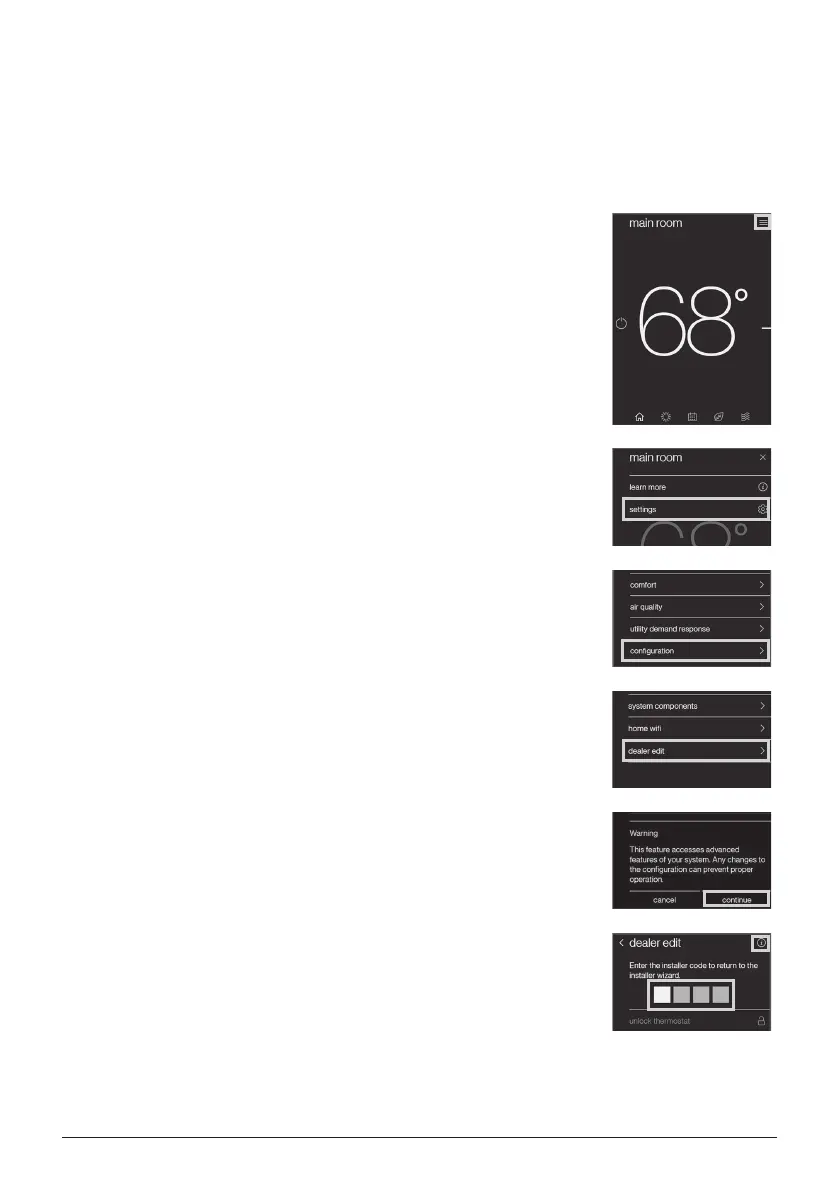
Navigating to dealer edit will allow you to access the dehumidication set-up.
1. On the “HOME” screen, select the icon in the
top right corner.
2. Select “settings”.
3. Select “conguration”.
4. Enter dealer edit mode by selecting “dealer edit”.
5. Select “continue”.
6. The installer code is need, and it can be found by
referring to the icon in top right corner.
13English
01-FITQ AOR_DTA119A71_IM_EN.indd 13 2020/10/22 13:41:24


 To Next Page