10
OPERATION
DRY · COOL · FAN Operation
The air conditioner operates with the operation mode of your
choice.
From the next time on, the air conditioner will operate with
the same operation mode.
■
To start operation
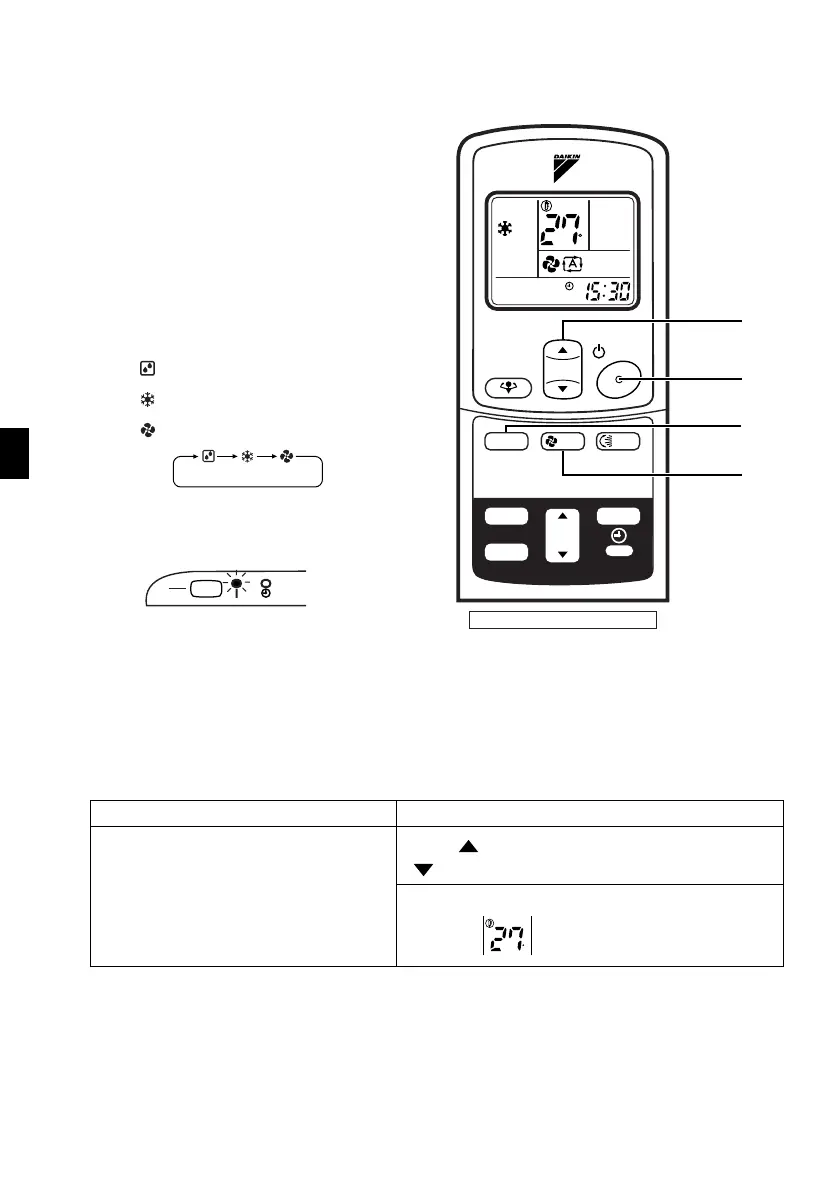
1. Press “MODE selector button”
and select a operation mode.
• Each pressing of the button advances the
mode setting in sequence.
:DRY
: COOL
:FAN
2. Press “ON/OFF button” .
• The OPERATION lamp lights up.
■
To stop operation
3. Press “ON/OFF button” again.
•
Then OPERATION lamp goes off.
■
To change the temperature setting
4. Press “TEMPERATURE adjustment button”
DRY or FAN mode COOL mode
The temperature setting is not variable.
Press “ ” to raise the temperature and press
“ ” to lower the temperature.
Set to the temperature you like.
C
TEMP
ON/OFF
MODE
ON
OFF
TIMER
FAN
SWING
CANCEL
POWERFUL
1
5
2, 3
4
See P6 for button names.
ON
OFF
C
01_EN_3P132108-4F.fm Page 10 Monday, June 27, 2005 5:38 PM



 To Next Page