6
■
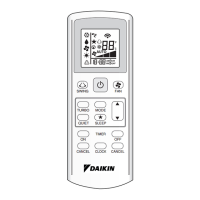
Remote Controller
1. Signal transmitter:
•
It sends signals to the indoor unit.
2. Display:
• It displays the current settings.
(In this illustration, each section is shown
with all its displays ON for the purpose of
explanation.)
3. POWERFUL button:
for POWERFUL operation. (page 13.)
4. TEMPERATURE adjustment button:
• It changes the temperature setting.
5. ON/OFF button:
•
Press this button once to start operation.
Press once again to stop it.
6. MODE selector button:
• It selects the operation mode.
(DRY/COOL/FAN) (page 10.)
7. FAN setting button:
• It selects the air flow rate setting.
8. SWING button: (page 12.)
9. ON TIMER button: (page 15.)
10. OFF TIMER button: (page 14.)
11. TIMER Setting button:
• It changes the time setting.
12. TIMER CANCEL button:
• It cancels the timer setting.
13. CLOCK button: (page 9.)
C
ON
AMPM
AMPM
TEMP
ON/OFF
MODE
ON
OFF
TIMER
FAN
SWING
CANCEL
POWERFUL
<
ARC423A18
>
1
2
3
6
9
11
10
13
12
8
7
5
4
01_EN_3P132108-4F.fm Page 6 Monday, June 27, 2005 5:38 PM



 To Next Page