5 | Before operation
User reference guide
19
CVXM-A, FVXM-A, CVXM-A9, FVXM-A9, FVXTM-A
Split system air conditioners
4P625990-1D – 2022.09
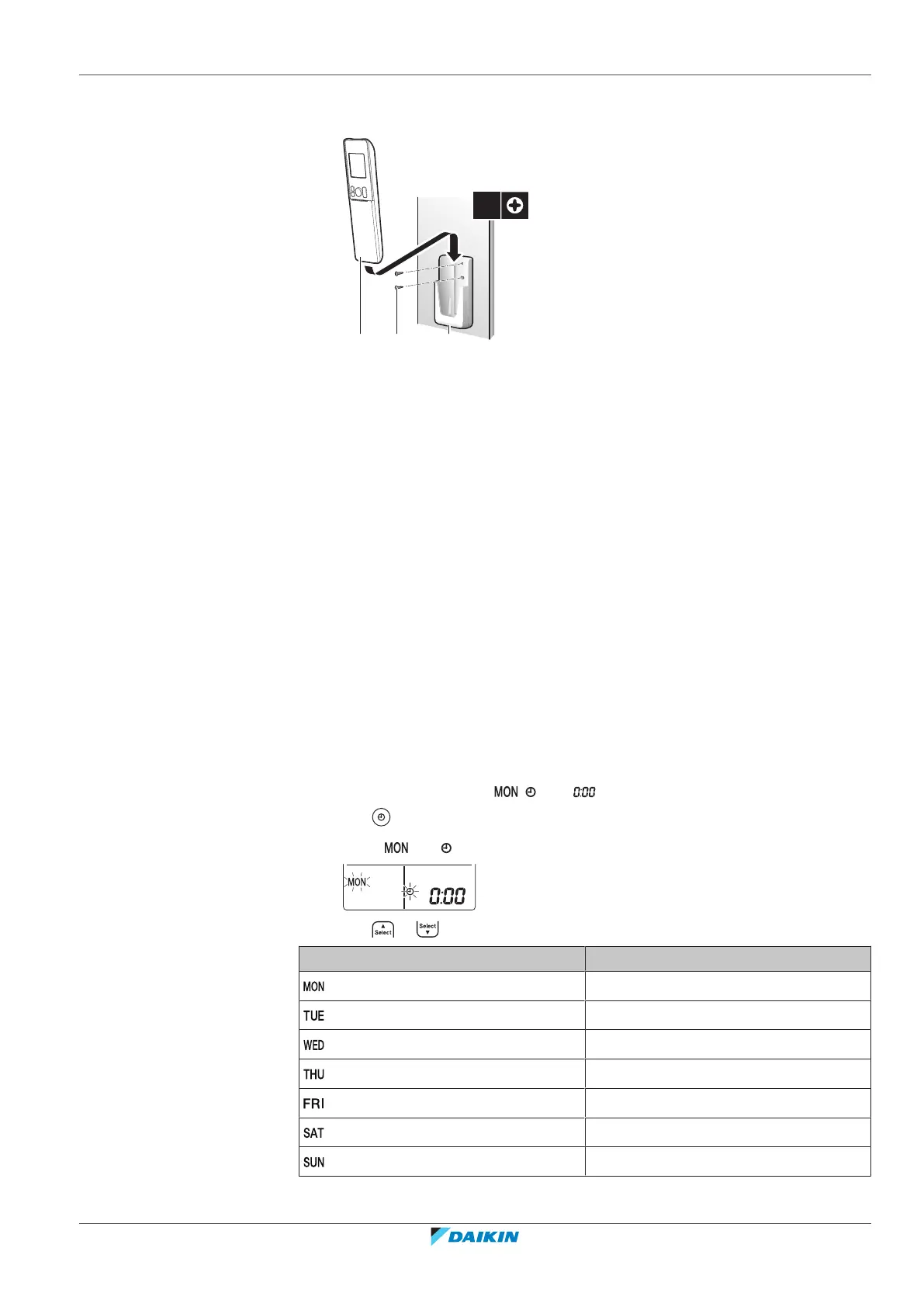
5.4 To mount the wireless remote control holder
a Wireless remote control
b Screws (field supply)
c Wireless remote control holder
1 Choose a place where the signal can reach the unit.
2 Fix the holder (accessory) to the wall or a similar location using 2 M3×20L
screws (field supply).
3 Insert the wireless remote control into the holder.
5.5 The clock setting
If the indoor unit's internal clock is NOT set to the correct time, the ON timer, OFF
timer and weekly timer will NOT operate correctly. The clock must be set again:
▪ After a circuit breaker has turned the unit OFF.
▪ After a power failure.
▪ After replacing batteries in the wireless remote control.
5.5.1 To set the clock
Note: If the time is NOT set, , , and blink.
1 Press .
Result: and blink
2 Press or to set the current day of the week.
Display Day of the week
Monday
Tuesday
Wednesday
Thursday
Friday
Saturday
Sunday






 To Next Page