15
Operation
WARNI NG
Do not turn off the unit by unplugging it from the power socket.
(Fire due to overheating or electric shock may result)
Operation
Operation
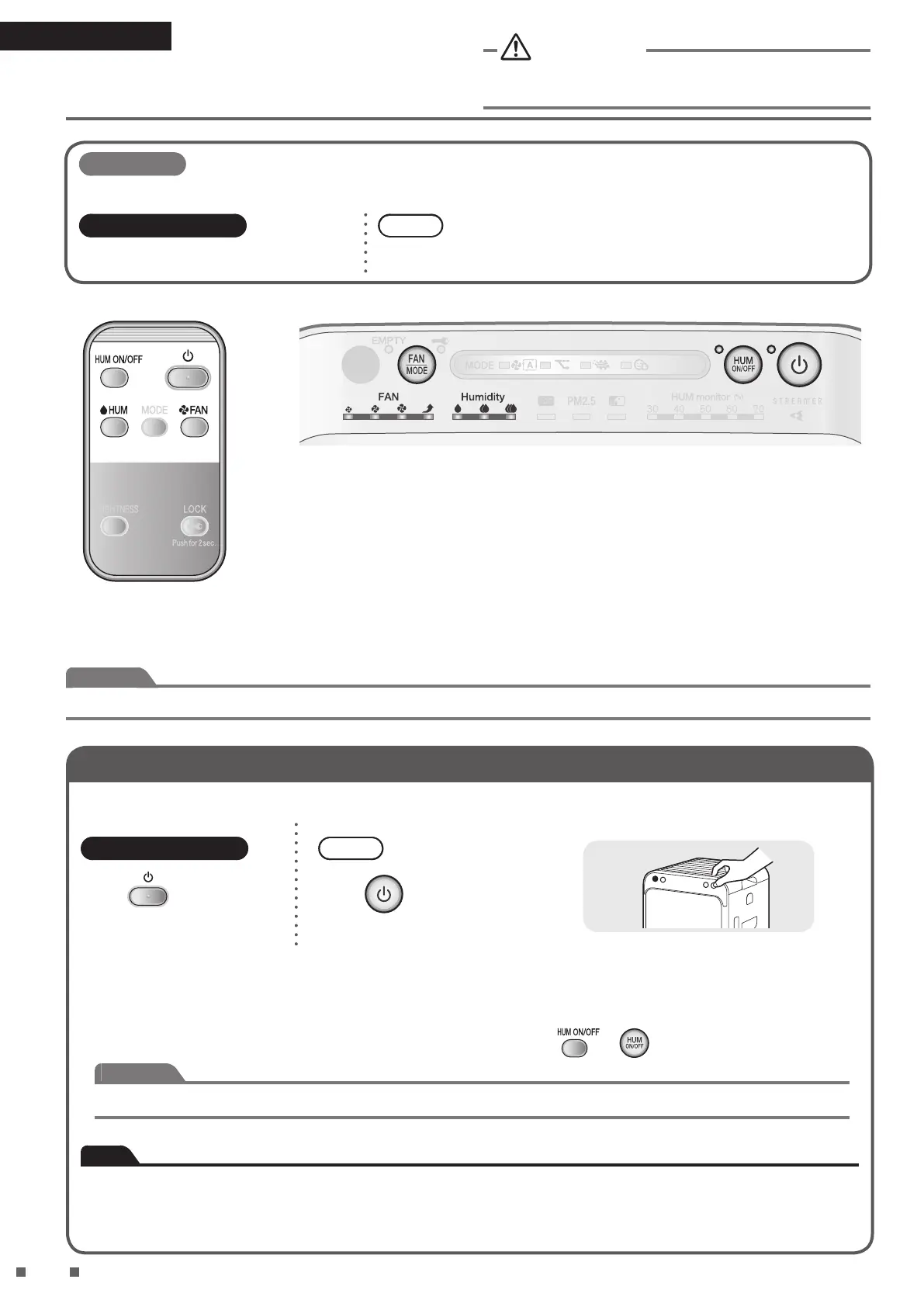
Detailed settings can be made using the remote controller.
Remote controller
Operation via remote controller.
Unit
Operation via operating/indicator panel on unit.
Attention
• Do not move the unit, or attach or remove parts to/from the unit while it is in operation. Water leakage, breakage or malfunction may result.
Using Air Purifying Operation (turning operation ON/OFF)
Puries the air in the room.
Remote controller
Press
.
Unit
Press
.
• Press again to turn OFF.
• ON/OFF lamp [green] lights up.
• If the Humidifying operation was running previously, the Humidifying operation will start automatically the next time the unit
is turned ON.
To use the Air purifying operation only, turn OFF the humidier by pressing
or .
Attention
When using the Air purifying operation only, discard any water in the water tank and humidifying tray.
Note
• At the time of purchase, the unit is set to Air purifying operation, AUTO FAN MODE with active plasma ion generation set to
ON.
• When the unit is unplugged or turned OFF, it will operate with the settings last used the next time it is turned ON.
• Operation settings cannot be changed for about 2 seconds immediately after the power supply plug is inserted.



 To Next Page