SiEN34-705 Operation Manual
Operation Manual 327
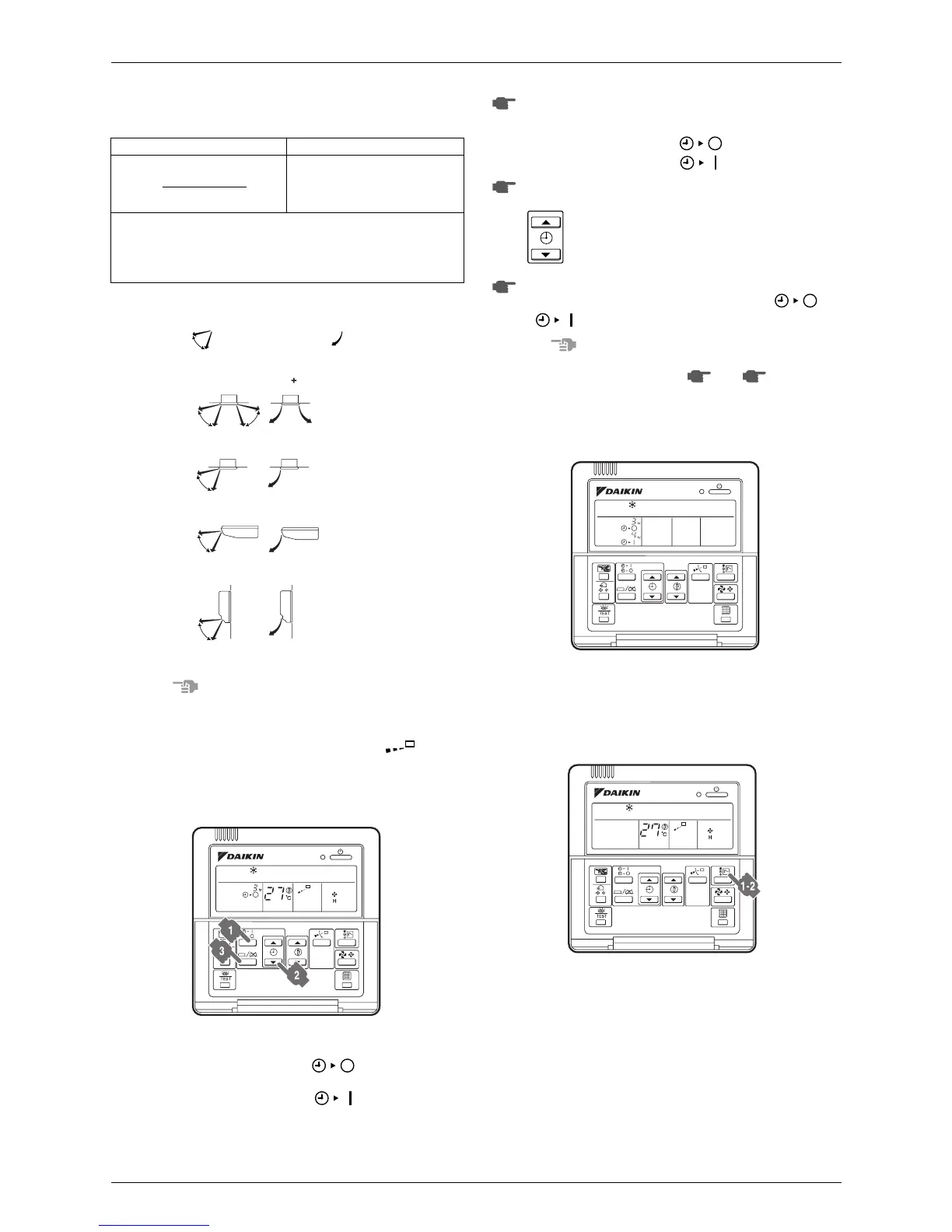
MOVEMENT OF THE AIR FLOW FLAP
For the following conditions, a micro computer controls the air flow
direction which may be different from the display.
The air flow direction can be adjusted in one of the following ways.
• The air flow flap itself adjusts its position.
• The air flow direction can be fixed by the user.
Automatic
“”
or desired position
“”.
(Refer to figure 13)
Note
• The movable limit of the flap is changeable. Contact your
Daikin dealer for details. (Only for FXC, FXF, FXH, FXK,
FXA)
• Avoid operating in the horizontal direction
“”
. It may
cause dew or dust to settle on the ceiling.
2-6-4 Programming Start and Stop of the System with
Timer
(Refer to figure 9)
• The timer is operated in the following two ways.
Programming the stop time “ ”. The system stops
operating after the set time has elapsed.
Programming the start time “ ”. The system starts
operating after the set time has elapsed.
• The timer can be programmed for a maximum of 72 hours.
• The start and the stop time can be simultaneously pro-
grammed.
Press the timer mode start/stop button several times and
select the mode on the display.
The display flashes.
• For setting the timer stop
“”
• For setting the timer start
“”
Press the programming time button and set the time for stop-
ping or starting the system.
Each time this button is pressed, the time advances
or goes backward by 1 hour.
Press the timer on/off button.
The timer setting procedure ends. The display
“”
or
“”
changes from flashing light to constant light.
Note
• When setting the timer off and on at the same time, repeat
the above procedure (from
“”
to
“”
) once again.
• After the timer is programmed, the display shows the
remaining time.
• Press the timer on/off button once again to cancel program-
ming. The display vanishes.
For example: (Refer to figure 11)
When the timer is programmed to stop the system after 3
hours and start the system after 4 hours, the system will stop
after 3 hours and start 1 hour later.
2-6-5 Setting the Master Remote Control
(Refer to figure 10)
COOLING HEATING
• When starting operation.
• When the room temperature is
higher than the set temperature.
• At defrost operation.
• When operating continuously at horizontal air flow direction.
• When continuous operation with downward air flow is performed at
the time of cooling with a ceiling-suspended or a wall-mounted
unit, the microcomputer may control the flow direction, and then
the remote control indication also will change.
Double-flow (FXC)
Ceiling Suspended (FXH)
Wall Mounted (FXA)
Multi-flow (FXF)
Corner (FXK)
figure 13
figure 9
1
2
3
1 3
figure 11
figure 10



 To Next Page