11
OPERATION
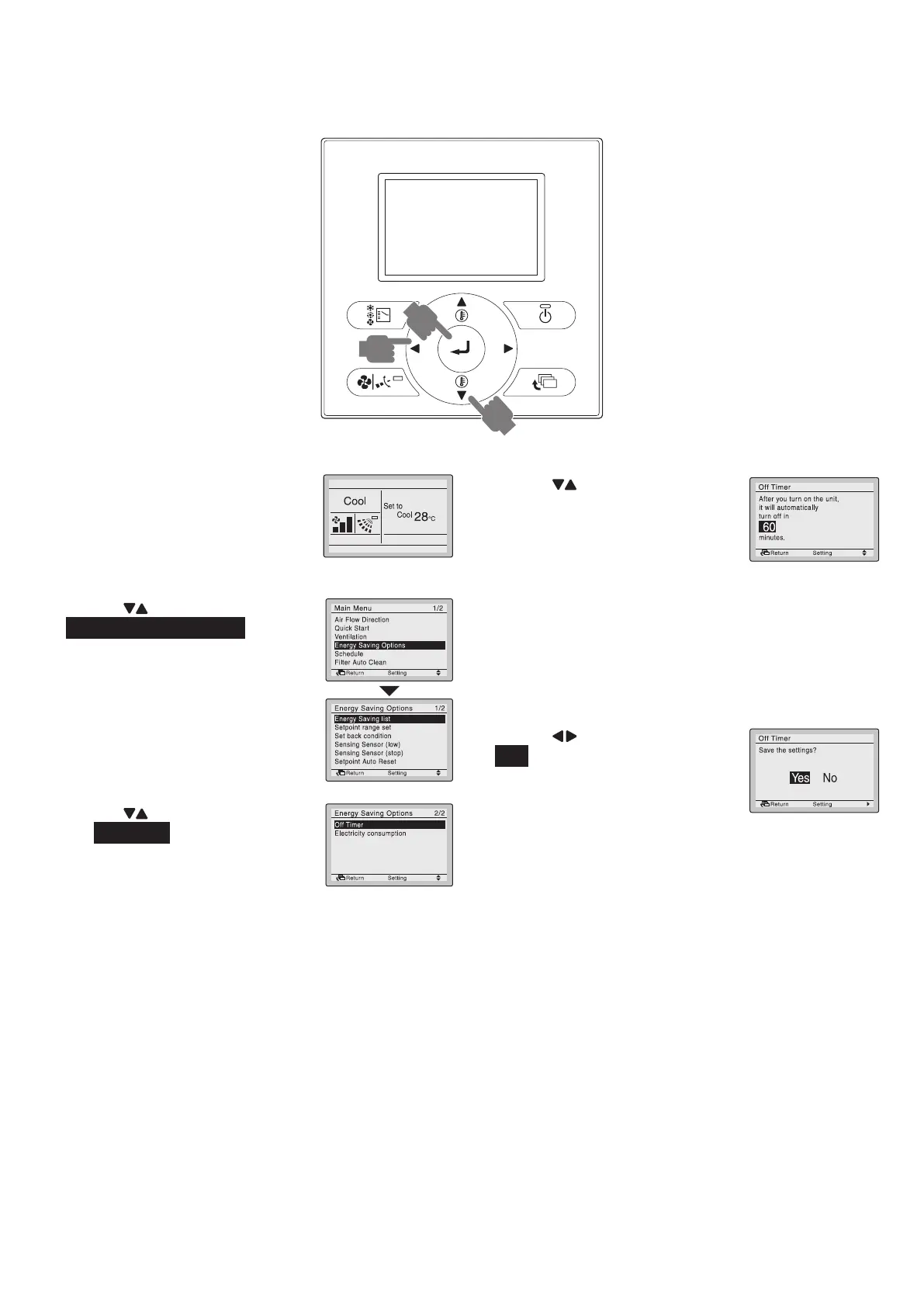
OFF TIMER Operation
BRC1E62
2,4,6
8
1,3,5,
7,9
1. PressMenu/Enterbutton.
Basic screen
2. Press “ ” buttons to select
EnergySavingOptions.
3. PressMenu/Enterbuttonto
displaytheEnergySaving
Options screen.
4. Press “ ” buttons to select
the OffTimer.
5. PressMenu/Enterbuttonto
displaytheOffTimerscreen.
6. Press “ ” buttons to set the
timefromoperationstartuntil
theunitautomaticallystops.
Selectionscanbemadein
incrementsof10minutesfrom
30to180minutes.
Holdingdownthebuttoncauses
thenumbertochange
continuously.
7. Selectthedesiredtimeandpress
Menu/Enterbutton.
Theconrmationscreenappear.
8. Press “ ” button to select
Yes .
9. PressMenu/Enterbuttonto
conrmtheOffTimersettings
and return to the Basic screen.
01_EN_3P344160-13U.indd 11 06-Oct-20 2:42:06 PM



 To Next Page