36
Functions
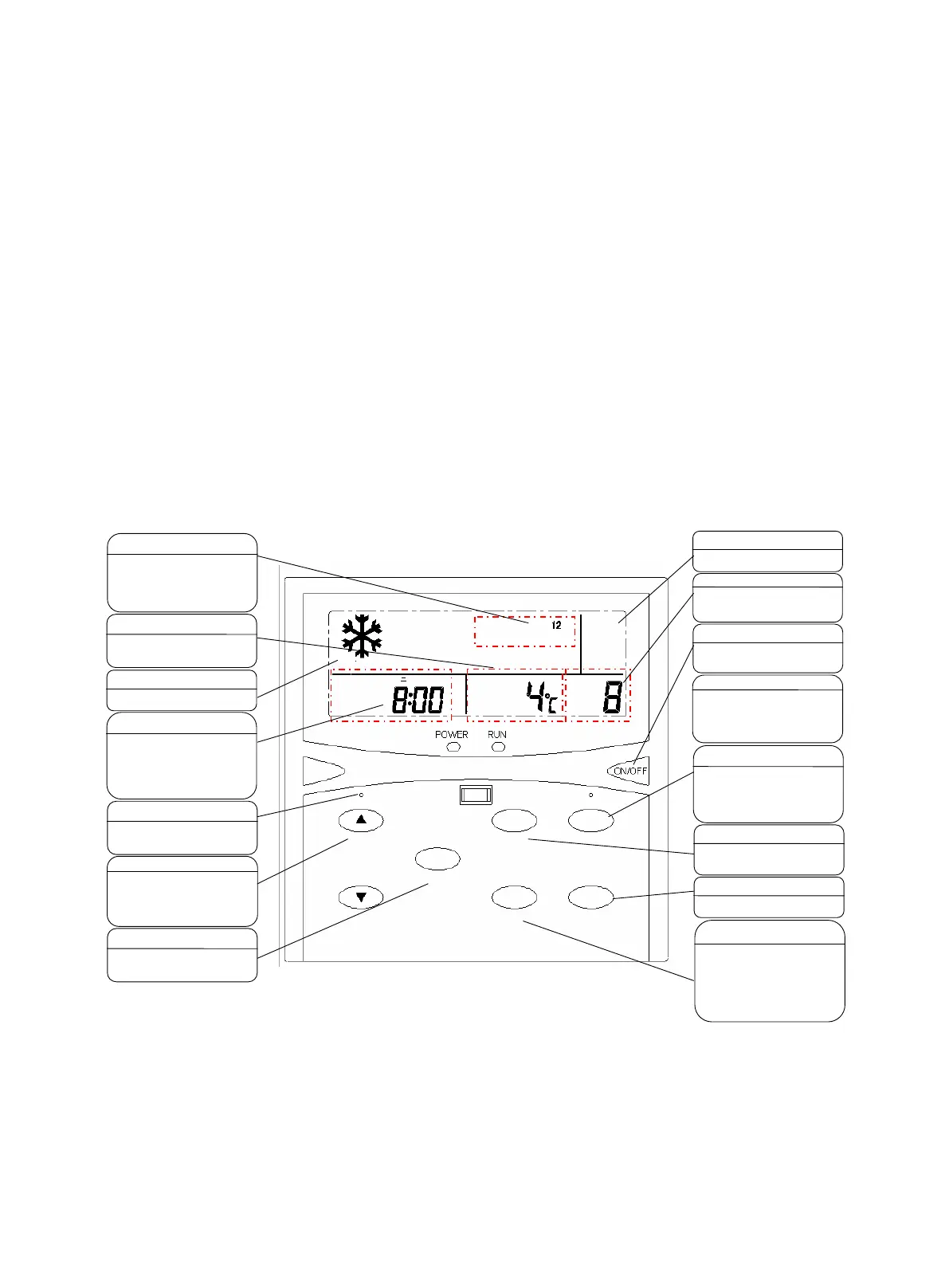
MC305 is a wall-mounted LCD controller which directly controls air conditioners through keys on its panel.
1) Features
Two operation modes: heating/cooling (Note: operation modes can only be switched when the unit is off)
For air cooling chiller, temperature setting range for inlet water: cooling 10ºC~25ºC, heating 25ºC~50ºC; For
water cooled chiller, temperature setting range for inlet water: cooling 9ºC~25ºC (-10ºC~10ºC for low water
temperature unit), heating 25ºC~50ºC.
2) Use specication
■ Temperature setting range for anti-freeze: 2ºC~5ºC.
■
A LED is used to indicate the status of the unit (ON/OFF).
■ Timed ON/OFF: a timing schedule can be set for a maximum of 7 days with up to 4 timed actions each day.
■ Real-time clock.
■ Error code display speeds up diagnosis.
■ Blue back light will shine 8 second if any key is pressed, it makes sure that we can browse or modify
parameters even in dark.
Unit Mode
Enter
Password Timer
Cooling
Compressor
ON
Cooling
Inlet Water
Temperature
Unit No.
Unit No. display
This area dis
plays the current unit No.
(the
corresponding unit code is
displayed according to the DIP
numbering principle).
ON/OFF
Press the “ON/OFF” key to turn on
(the RUN ind
icator is on) or turn off
(the RUN indicator is off) a unit.
ON/OFF display
This area disp
unit is ON or OFF.
“Week and Time setting” key
You can use a needle tool to push the
small button. The time and password
area will display the corresponding
week and time options. Then, press
the "▲” and “▼
and time.
“Mode setting” key
You can
switch betw
and heating mode. Note that the
mode can be switched only when the
unit is turned off.
“Timer” key
You can set different time for turning
on/off different units.
“Unit” key
Press the “Unit” key to switch the next
unit. Select different units and view
their status respectively.
“Password” key
Press the “ Password ”
display "Enter password" and "----“
the lower left box of the LCD, and
press the “▲” or “▼” k
change the value. After selection,
press the “Enter”
displayed in the display box
Mode display
This area displays the operating mode
at the moment.
Time and password display
In normal case, this area displays the
current clock. When you press the
“Password” key, it will display
adjusted password.
the “Week and Time setting
will display adjusted time
“Resetting” key
You can use a needle tool to push the
small button to power on and reset
“▲
▲▲
▲” and “▼
▼▼
▼” keys
1. Change the displaying content of
multi-
according to the sequence in the item
list.
2. Press the
temperature.
“Enter” key
It is used to set the clock, timing,
temperature, password, unit number,
Multi-function display area
This area can display the unit error
code, inlet water temperature and
outlet water temperature.
Display compressor status
This area displays the current
compressor status.
When 1 is displayed, compressor 1#
is operating. If nothing is displayed,
no compressor is operating




 To Next Page