37
Controller settings
The control system has the following functions:
1. Power on/off
Press the ON/OFF key to turn on or turn off a unit.
2. Parameter Viewing
The controller can be used to view the operation status and parameters of any unit connected to it.
■ Parameters can be view include operation status of the compressor, inlet/outlet water temperature,
timer setting, cooling antifreeze temperature setting, antifreeze temperature setting in winter, defrosting
temperature, and so on.
■ If slave units are connected, you can press the “Unit” key to view the set parameters and operating status
of the next unit. When the last slave unit is selected, you can press the “Unit” key to automatically switch
back to the master unit. Unit “FF” indicates the master unit, unit “00” indicates the rst slave unit, unit “01”
indicates the second slave unit, and so on.
3. Setting parameters (parameters can be set only when the unit is turned off)
1
Press the “Password” key to display “Enter password” and “----” in the lower left box of the LCD, press
the “▲” or “▼” key to select the highest digit of the password, press the “Enter” key to conrm this digit
and move the password leftward; press the “▲” or “▼” key to select the next digit, till all the four digits
are entered; press the “Enter” key to exit the password entry interface, and the display box displays time.
When the correct user password “0055” is selected (the user password can be used to change the inlet/
outlet water setting temperature of cooling and inlet/outlet water setting temperature of heating), you can
perform the following settings. The password entry status exits if there is no operation within 5s after the
password is entered.
2
You can choose the parameter to be set by pressing the “▲” or “▼” key and then press “Enter”. The
parameter name blinks. You can press the “▲” or “▼” key to set the parameter value, and then press “Enter”
to save the setting result.
3
You can repeat step
2
to set other parameters (note: password access will exit if no key is pressed within
60s; to set parameters again, you need to enter the password).
Note: Parameters can be set only when the unit is off.
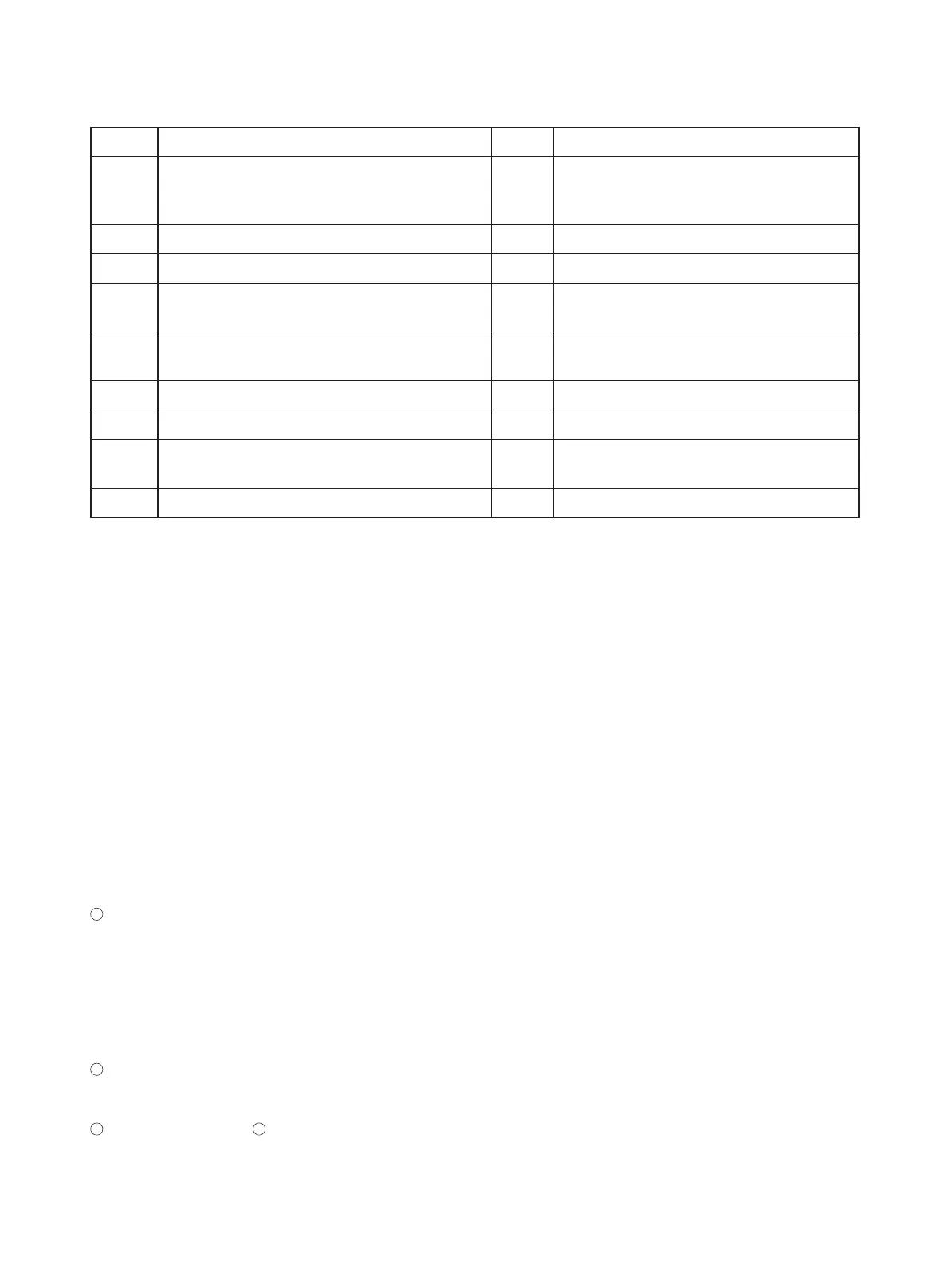
S/N Function S/N Function
1
Controlling the 2-way valve of the water
system (relevant accessories need to be
purchase separately);
10 Protection for Compressors in Operation
2 Anti-freeze protection 11 Averaging Workload among Compressors
3 2-way Valve Interlock Control 12 Failure alarm, viewing and output
4 Week Setting 13
Memorizing parameters in the case of a
power failure
5 Status display 14
Setting and resetting the operating
parameters of the unit
6 Auto-startup at power on 15 Electric heater
7 Status display 16 Setting the clock of the system
8
Memorizing the clock settings in the case of a
power failure
17
Displaying the indoor and inlet water
temperatures
9 Timing 18




 To Next Page