Air conditioner control
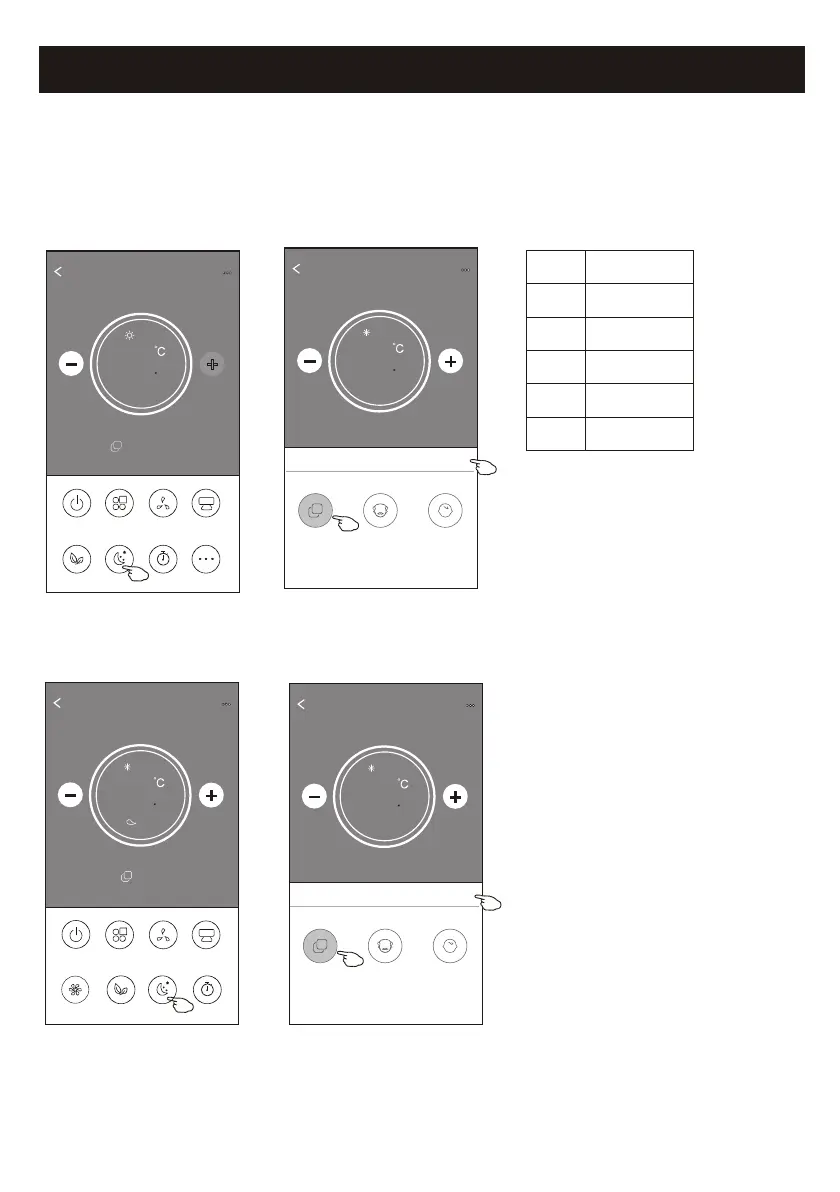
1. Tap the Sleep button.
2. Choose your desired sleep mode and tap it.
3. Tap the X button to back to the main control screen.
4. The selected sleep mode indicator will appear on the screen.
ON/OFF
Fan Speed
Precision
Air Flow
More
Eco Sleep
Mode
Timer
Sample1
25
Heat
0
20
ON/OFF
Sample1
23
Cool
0
Fan Speed
Swing Flow
Eco Sleep
Mode
Timer
Turbo
Note:
The Main control screen may appear slightly different ,depending on the air conditioner model.
Example as below:
Mode
Sleep enabled
Cool
Fan
Dry
Heat
Auto
Yes
Yes
Note:
Sleep is disabled on Turbo/Sleep mode too
for some air conditioner model..
Sleep
Low
Sleep is disabled on Fan/ Dry/Auto mode .
Back
Sample1
25
Cool
0
Sleep
X
Standard
Child
The aged
Back
Sample1
25
Cool
0
Sleep
X
Child
The aged
Standard
Control form2-Sleep function



 To Next Page