Air conditioner control
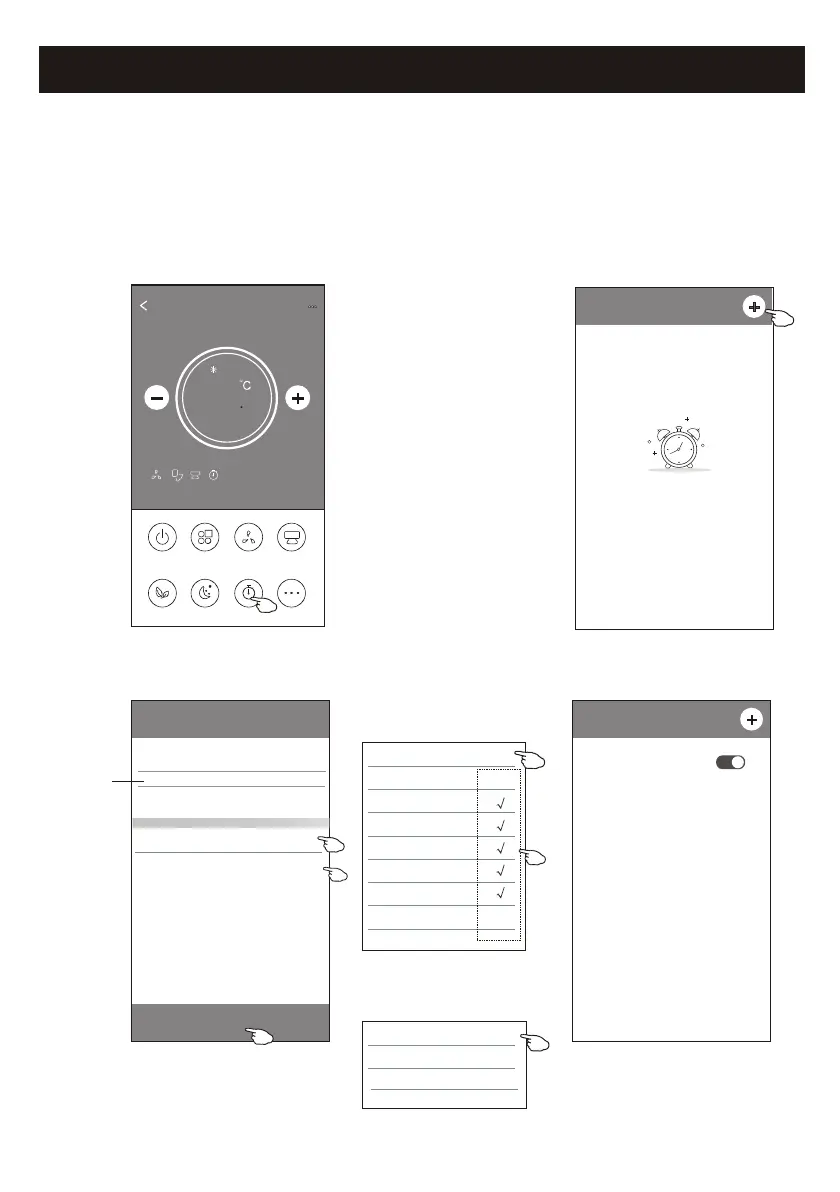
1. Tap the Timer button.
2. Tap + in the upper right corner of the Timer main screen.
3. Choose the Time/Repeat/Switch OFF then tap Save.
4. The timer(off) will appear on the Timer main screen.
ON/OFF
Fan Speed
Precision
Air Flow
More
Eco Sleep
Mode
Timer
Sample1
25
Cool
0
< Timer
No Timer
< Timer
19 27
20 28
22 30
23 31
Save
21 : 29
Repeat Monday.... >
Switch OFF>
Once
Monday
Tuesday
Wednesday
Thursday
Friday
Saturday
Sunday
Cancel Repeat Confirm
21
Slide up or down
to select time
Tap repeat > then tap your desired
repeat days or Once, then tap
Confirm your selection.
< Timer
21:29
OFF, Weekday
ON
Cancel Switch Confirm
OFF
Tap Switch > then slide the
screen to choose ON
and Confirm.
Control form2-Timer(on) setting



 To Next Page