EasyManua.ls Logo

Daiwa TANACOM 500 - User Manual

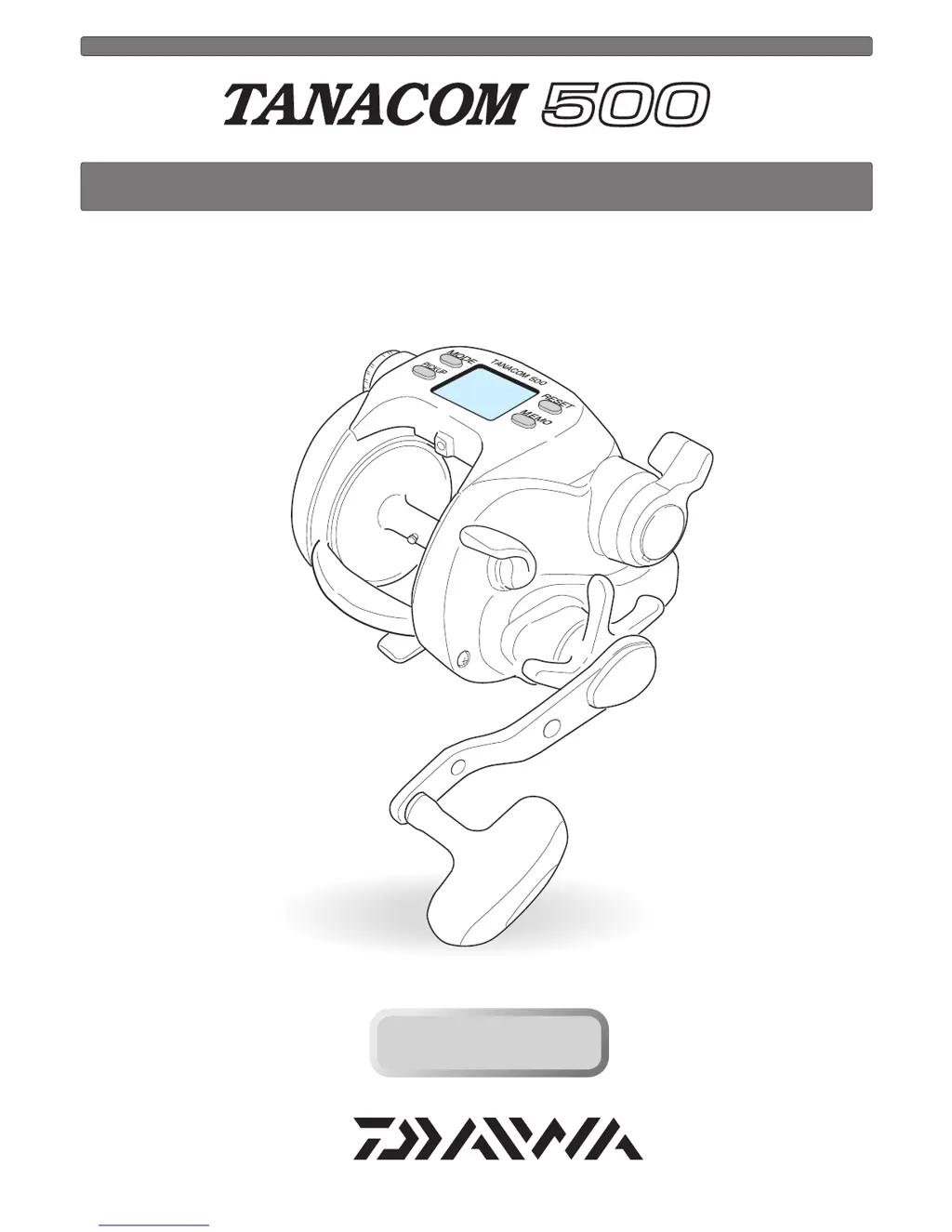
Daiwa TANACOM 500
37 pages
Print Icon
To Next Page IconTo Next Page
Loading...
Thank you for purchasing a TANACOM 500. To take full advantage of the
reels many useful functions, please read this manual carefully before using. Retain
this manual for future reference.
OPERATING MANUAL
Reference
Reference

Questions and Answers

  • J
    jfoleyAug 13, 2025
    Why does my Daiwa Fishing Equipment motor not respond to the power lever?
    • N
      newtonmichaelAug 13, 2025
      If the Daiwa Fishing Equipment motor doesn't respond to the power lever, it could be due to several reasons. First, if the counter displays 0.0 m, this is a normal function to prevent over winding; press the RESET BUTTON to continue. Second, ensure the lever is pulled to the OFF position before moving it forward to start winding. Finally, an unstable power source can cause this issue; try using another power source, such as electric reel specific batteries.
  • R
    robert86Aug 17, 2025
    What to do if the auto stop function does not work on my Daiwa Fishing Equipment?
    • C
      Craig MartinezAug 17, 2025
      If the auto stop function on your Daiwa Fishing Equipment isn't working, consider these potential causes: * Ensure you've pressed the RESET BUTTON at the surface to reset the depth to zero with the rig at the surface. * Adjust the settings of the auto stop function to account for sinker weight or boat rocking. * Reset the depth counter at the surface if the line has elongated.
  • P
    Paula RodriguezAug 20, 2025
    Why does the counter display not appear on my Daiwa TANACOM 500?
    • J
      jason42Aug 20, 2025
      If the counter display on your Daiwa Fishing Equipment does not appear, it could be due to a few reasons. The battery charge might be low, so try recharging it. Alternatively, the cord could be worn or corroded, in which case you should replace it. Finally, check for incorrect battery connections and ensure they are correctly connected.
  • S
    Sabrina MillerAug 25, 2025
    How to fix counter errors on Daiwa TANACOM 500?
    • M
      Maria RichardsonAug 25, 2025
      If you're experiencing counter errors with your Daiwa Fishing Equipment, it could be because the line length has increased due to stretching. To resolve this: * Reset the counter. * Revise the display. * Re-enter the line data.
  • R
    Rachel GoodAug 28, 2025
    What to do if the jigging function does not respond on my Daiwa TANACOM 500 Fishing Equipment?
    • D
      Dean PopeAug 28, 2025
      If the jigging function on your Daiwa Fishing Equipment isn't responding, first check if the power lever is at OFF; if so, push the lever forward. Also, ensure that pickup mode is not selected; use the MODE BUTTON to select the jigging mode.
  • D
    Douglas MoyerSep 1, 2025
    Why does my Daiwa Fishing Equipment reel jig on its own?
    • M
      Morgan TownsendSep 1, 2025
      If your Daiwa Fishing Equipment reel jigs on its own, it's likely due to low power voltage. Replace the battery with a recharged one.
  • M
    Makayla LongSep 5, 2025
    What to do if the pickup does not respond on my Daiwa Fishing Equipment?
    • K
      Kathleen MaldonadoSep 5, 2025
      If the pickup function on your Daiwa Fishing Equipment is not responding, the speed setting might be at zero. Press the MODE BUTTON to select a winding speed setting.
  • R
    robertharperSep 9, 2025
    Why does the inverse counter not appear on my Daiwa TANACOM 500 Fishing Equipment?
    • D
      Dean SmithSep 9, 2025
      It is normal. If the inverse counter does not appear on your Daiwa Fishing Equipment, press MEMO BUTTON.

Summary

Caution

Precautions

Important safety warnings and handling advice for the reel.

Counter display readability

Factors affecting the visibility and readability of the reel's digital display.

Prevent line entanglement

Instructions to prevent the line from being wound onto the spool incorrectly.

Power source

Connecting the reel to power

Step-by-step guide on how to connect the reel to a power source.

Understanding the power source

Information on voltage requirements and power source stability.

Battery status indication

How the reel indicates the voltage level of the connected battery.

Using the Reel

Reel handling and care

Basic guidelines for operating and maintaining the reel during use.

Counter display conditions

Situations that may affect the clarity of the reel's counter display.

Maintenance

Reel maintenance overview

General advice on washing and maintaining the reel after use.

Reel cleaning procedure

Detailed steps for washing and rinsing the reel to remove salt and grit.

Reel Maintenance

Power cord handling and care

Guidelines for safely handling and maintaining the reel's power cord.

Other maintenance considerations

Additional points regarding reel maintenance, including disassembly and cord replacement.

Buttons and Display Identification

MODE BUTTON operation

Function and usage of the MODE button for settings and scrolling.

RESET BUTTON function

How to use the RESET button for zeroing counters and resetting functions.

MEMO BUTTON purpose

The function of the MEMO button for memorizing data and resetting timers.

PICKUP BUTTON control

How the PICKUP button controls winding and initiates jigging.

Mode display overview

What the mode display shows regarding active functions and settings.

Depth counter display

The display showing the current depth from the surface.

Inverse counter display

The display showing depth from the bottom or winding speed.

Drift;Jigging display indicator

Indication on the display when the jigging function is active.

Chumming timer display

Information shown by the chumming timer, including power and time.

Reel Components and Accessories

Free spool adjustment mechanism

Adjusting brake tension on the spool to prevent backlash.

Power lever operation

How to use the power lever for adjusting winding power and speed.

Waterproof drag system

Adjusting the star drag to prevent line breakage under heavy pull.

Clutch engagement and disengagement

How to engage and disengage the reel's clutch for winding or free-spooling.

Levelwind mechanism function

How the levelwind distributes line evenly on the spool.

Included reel accessories

List of items included with the reel, such as power cord and reel bag.

Line Data Input - Designated

Line Data Input - Known Length

Line Data Input - With Backing Line

Functional Setting Operations

Mode Setting Display

How to set various reel functions using the mode setting display.

Functional Setting Operations

Before Fishing Setup

Steps to perform before fishing, including surface depth setting.

Functional Setting Operations

Auto Stop Function

Setting and using the auto stop feature for automatic line winding.

Functional Setting Operations

Line Feeding Function

How to use the line feeding function with motor assistance for line payout.

Functional Setting Operations

Pickup Speed Setting

Adjusting the speed at which the reel retrieves line.

Functional Setting Operations

Inverse Counter Function

Utilizing the inverse counter for depth tracking from the bottom.

Functional Setting Operations

Drift Mode Operation

How to activate and use the Drift mode and its associated alarms.

Functional Setting Operations

Jigging Function Setup

Setting up the jigging function, including patterns and length.

Functional Setting Operations

Chumming Timer Setup

Setting the chumming timer for automatic winding and timing fishing actions.

Functional Setting Operations

Display Recalibration

How to recalibrate the reel's counter for accurate depth readings.

Useful Functions and Alarms

Audible Alarm Types

Explanation of various audible alarms indicating reel status and events.

Display Backlighting

Information on the reel's display light for low-light conditions.

Breaker System Indicator

What the breaker display signifies regarding circuit protection.

Reel Specifications and Display

Technical Specification List

Detailed technical data including gear ratio, drag, and line capacity.

Counter Display Range

The operating ranges for the upper and lower counters and temperature.

Parts Identification List

Troubleshooting Guide

Company Information and Warranty

Daiwa Global Contact Information

Contact details for various Daiwa offices worldwide.

Product Limited Warranty Terms

Details on the warranty period and conditions for the reel.

Warranty in Spanish

Limited warranty terms presented in Spanish.

Daiwa TANACOM 500 Specifications

General IconGeneral
ModelTANACOM 500
CategoryElectric Reel
Max Drag22 lb
Power12V
Power Source12V DC

Related product manuals