EasyManua.ls Logo

Danby DDR4007EE - Warnings and Important Notices; For Your Safety; Electrical Service Information; Grounding Instructions

Danby DDR4007EE
25 pages
Print Icon
To Next Page IconTo Next Page
To Previous Page IconTo Previous Page
Loading...
ADR3006==.qxp
2006.02.17
13:41
Page
22
Operating
Instructions;
AIR
FILTER:
Dehumidifying
is
a
means
of
removing
moisture
from
the
air,
A
dehumidifier
will
help
to
protect
your
home
and
valued
possessions
from
damage
(swelling)
caused
by
moisture
in
the
air.
Essentiaiiy
a
dehumidifier
removes
moisture
from
the
air,
as
moist
air
passes
over
a
dehumidifying
(evaporator)
coil.
Moisture
is
condensed
on
the
evaporator
coil,
drained
and
collected
inside
an
internal
(removable)
water
tank
located
at
the
front
of
the
unit,
The
exhausted
air
being
returned
into
the
room
environment
is
elevated
several
degrees
causing
the
surrounding
air
temperature
to
increase
(slightly).
This
process
also
contributes
to
lov;ering
the
relative
humidity
of
the
surrounding
air.
Dehumidifying
Mode
Instructions:
When
the
unit
is
first
connected
to
the
electrical
outlet,
the
(green)
power
light
starts
to
flash
and
continues
to
flash
until
the
“on./off”
button
is
pressed.
When
the
“on/off”
button
is
activated,
(pressed)
the
flashing
(power)
light
turns
to
a
steady
stats
"on”
condition
and
the
dehumidifier
automatically
defaults
to:
Display;
Current
Ambient
Room
Humidity
(RH%)
Humidity
Setting;
60%
RH
Fan
Speed;
=
Low
IMPORTANT
NOTE:
Depending
on
humidity
conditions
of
the
surrounding
environment,
the
dehumidifier
may
not
start
automatically
under
the
default
setting,
(this
is
an
indication
the
humidity
ievei
of
the
surrounding
environment
is
lower
than
the
“default
setting
of
60%
RH)
Therefore,
it
may
be
necessary
to
scroll
through
each
of
the
different
dehumidifier
settings
35%
-
80%
until
the
"humidistat”
(sensor)
recognizes
conditions
that
will
allow
the
unit
to
operate.
DEHUMIDIFYING
MODE
SELECTION:
1.
To
turn
the
unit
on
press
the
ON/OFF
button.
2.
Press
the
humidity
‘VP"
or
"DOWN"
button
to
select
a
desired
RH
operating
value.
(35%
-
80%)
-OR-
2a.
Press
the
CONT.
button.
When
CONTINUOUS
mode
is
selected,
the
humidistat
(control)
v^ili
be
by-passed
and
the
compressor
wili
operate
non-stop
regardless
of
humidity
conditions.
Your
dehumidifier
features
a
removable
Air
Filter.
This
filler
is
located
at
the
front
of
the
unit
(behind
the
air
intake
griil)
directly
above
the
water
tank
compartment,
The
air
filter
plays
an
important
role
in
helping
to
reduce
(minimize)
dust/dirt
particles
from
the
surrounding
environment.
A
blocked/ciogged
air
filter
reduces
air
intake,
impacting
negatively
on
operating
efficiency.
To
maintain
maximum
operating
efficiency:
The
filter
must
be
checked
and
cleaned
regularly,
(every
2
weeks)
More
frequent
cleaning
may
be
required
depending
upon
indoor
air
quality.
IMPORTANT:
Never
operate
the
unit
without
the
air
filter
in
placG-
A!R
FILTER
REMOVAL;
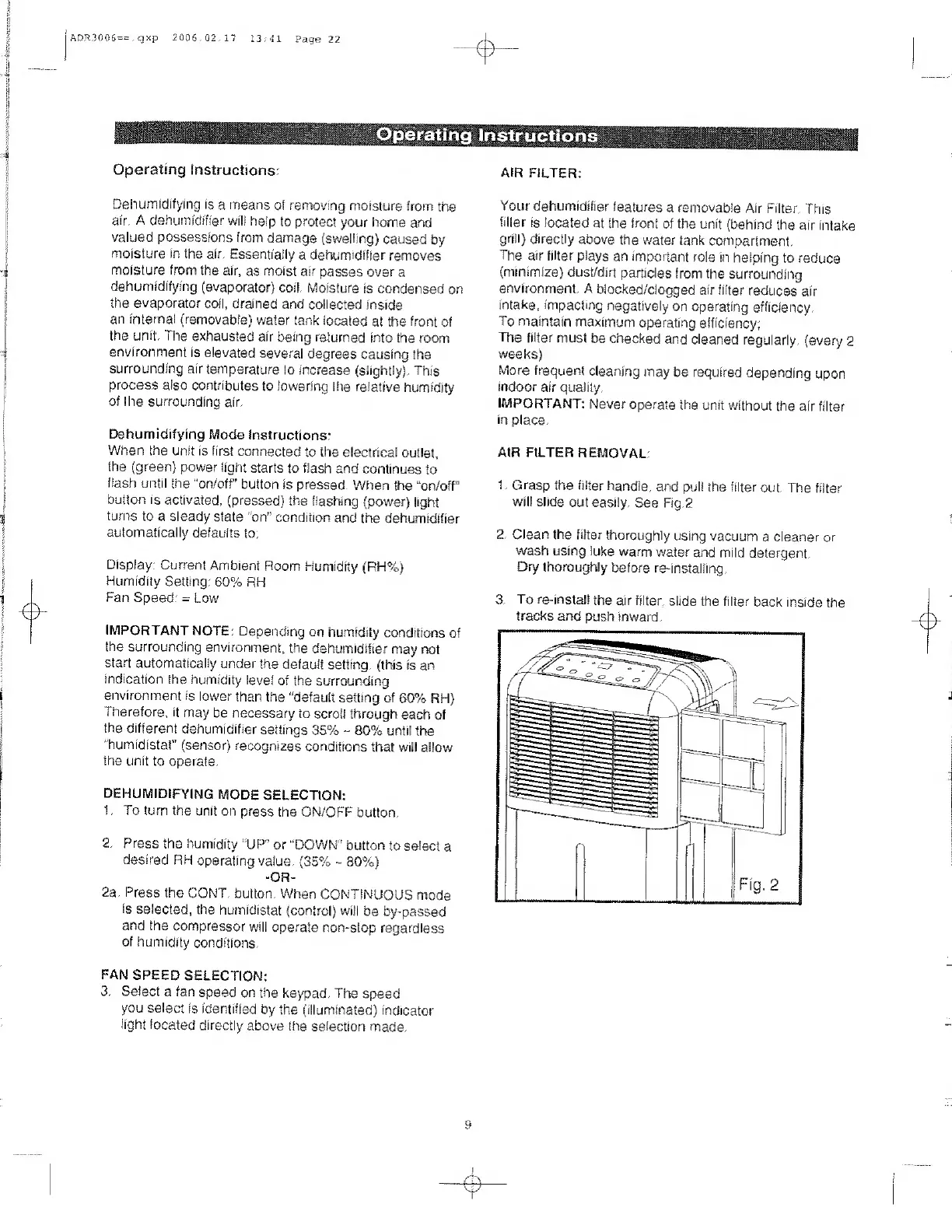
1.
Grasp
the
filter
handle,
and
puli
the
filter
out.
The
filter
will
slide
out
easily.
See
Fig.2
2.
Clean
the
filter
thoroughly
using
vacuum
a
cleaner
or
wash
using
luke
warm
water
and
mild
detergent.
Dry
thoroughly
before
re-installing,
3.
To
re-install
the
air
filter,
slide
the
filter
back
inside
the
tracks
and
push
inward.
FAN
SPEED
SELECTION:
3,
S
elect
a
fan
speed
on
the
keypad.
The
speed
you
select
is
identified
by
the
(illuminated)
indicator
light
located
directly
above
the
selection
made.

Related product manuals