Operating Instructions
READ AND FOLLOW ALL OPERATING INSTRUCTIONS
To get the best performance from your dishwasher, read all operating instructions before using it for the first time.
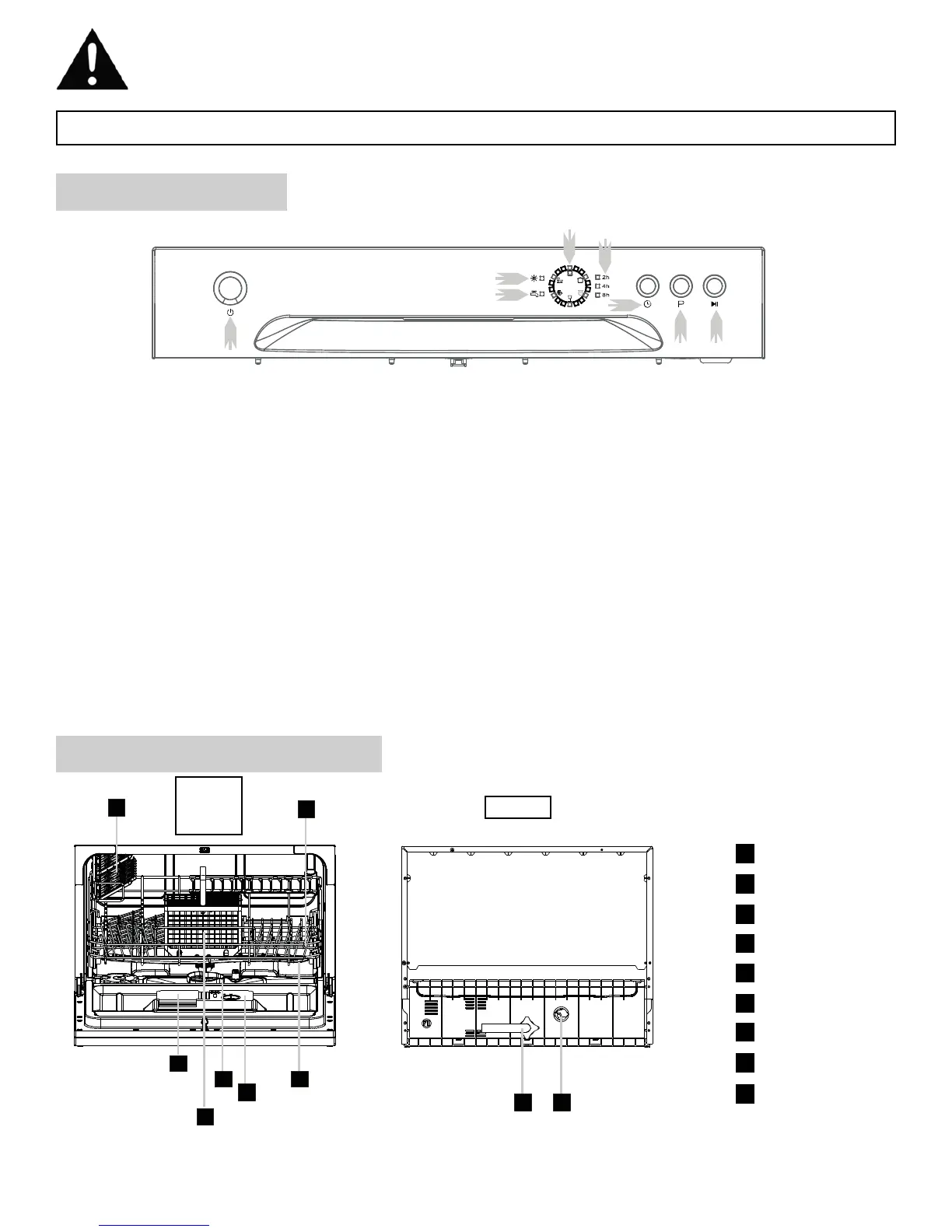
CONTROL PANEL
4
1) Power Button: To turn on/off the power supply.
2) Rinse Aid Warning Light : To be on when the rinse aid
dispenser needs to be refilled.
3) Water Faucet Light: Illuminated when the water faucet
has not been turned on.
4) Program indicator light: Displays which washing
program has been selected.
5) Delay time: Indicates the delay time of either 2, 4, 6 or 8
hours. For 6 hours, the 2 hour and 4 hour lights will illumi-
nate at the same time.
6) Delay Button: Press this button to set a delayed start
time.
7) Washing Program Selector: Press this button to select
wash cycles.
8) Start/Reset Button: Press this button to start or pause
the dishwasher.
DISHWASHER FEATURES
1
Detergent Dispenser
2
Cutlery Basket
3
Filter assembly
4
Rinse Aid Dispenser
5
Spray Arms
6
Cup Shelf
7
Basket
8
Drain pipe connector
9
Inlet pipe connector
FRONT
DOOR
OPEN
REAR


 To Next Page