4.1.4. How to get the Communication Up and Running
Connect the LON cable to the frequency converter. Don't forget to connect the screen as well. Never connect the screen directly to earth. Activate the
termination resistance if the AKD is the last controller on the LON cable.
When the LON cable is connected t o the gateway or System Manager, and the ADAP-KOOL address has been given in par. 11-90 (is only shown when
the LON option is mounted in the frequency converter), press the Service Pin on the LON card. The address and Service Pin are also part of the Application
Wizard.
Gateway/ AKM
After activating the Service Pin, wait a couple of minutes until the gateway has downloaded the needed information on the frequency converter. Com-
munication to the Gateway or System Manager is now up and running. Now perform an "Upload configuration" in the AKM.
SystemManager/ ServiceTool
Communication through ServiceTool can be done in two ways. Either 1. or 2.:
1. Activate Service Pin and use the Refresh function in Service Tool
2. Only set the address in the AKD and perform the Scan function in Service Tool.
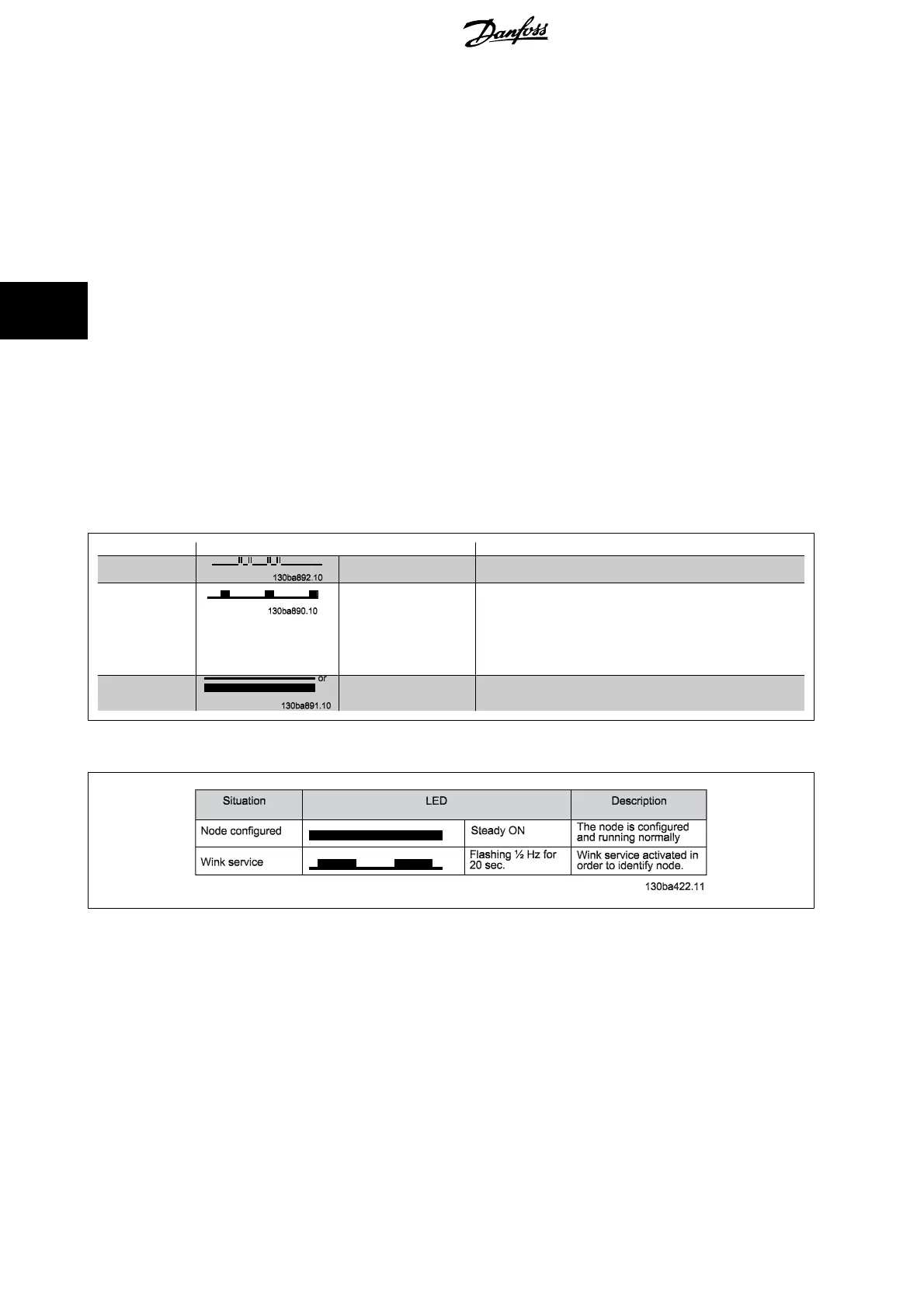
4.1.5. LED Behaviour
MS: Service LED (red)
Situation LED Description
Normal operation Four short pulses, then
continuously OFF
The node is running normally
Warning Short regularly repeted
flash, about each sec.
One of the following problems has occured:
a. The default illegal address 0 must be changed to correct address
in par. 11-90. (Remember to press Service Pin afterwards)
b. The ADAP-KOOL files have been erased from the AKD102 drive.
You must download new firmware to the drive.
c. There is an internal fault - generating watchdog resets. The option
needs replacing.
Faulty hardware Steady ON or OFF The LonWorks option needs replacing
NS: Status LED ( green)
4. How to I nstall ADAP-KOOL
®
AKD-LonWorks
8
MG.11.P1.02
4





 To Next Page