EasyManua.ls Logo

Danfoss Z-Wave RS - Page 4

Danfoss Z-Wave RS
7 pages
Print Icon
To Next Page IconTo Next Page
To Previous Page IconTo Previous Page
Loading...
lnstallation
& UserGdde
Z{eßs
T
I
i
I
Hlation
& User Guide
Z-Wave RS
GTJI
OxoO
/
0x0l
/
oo2
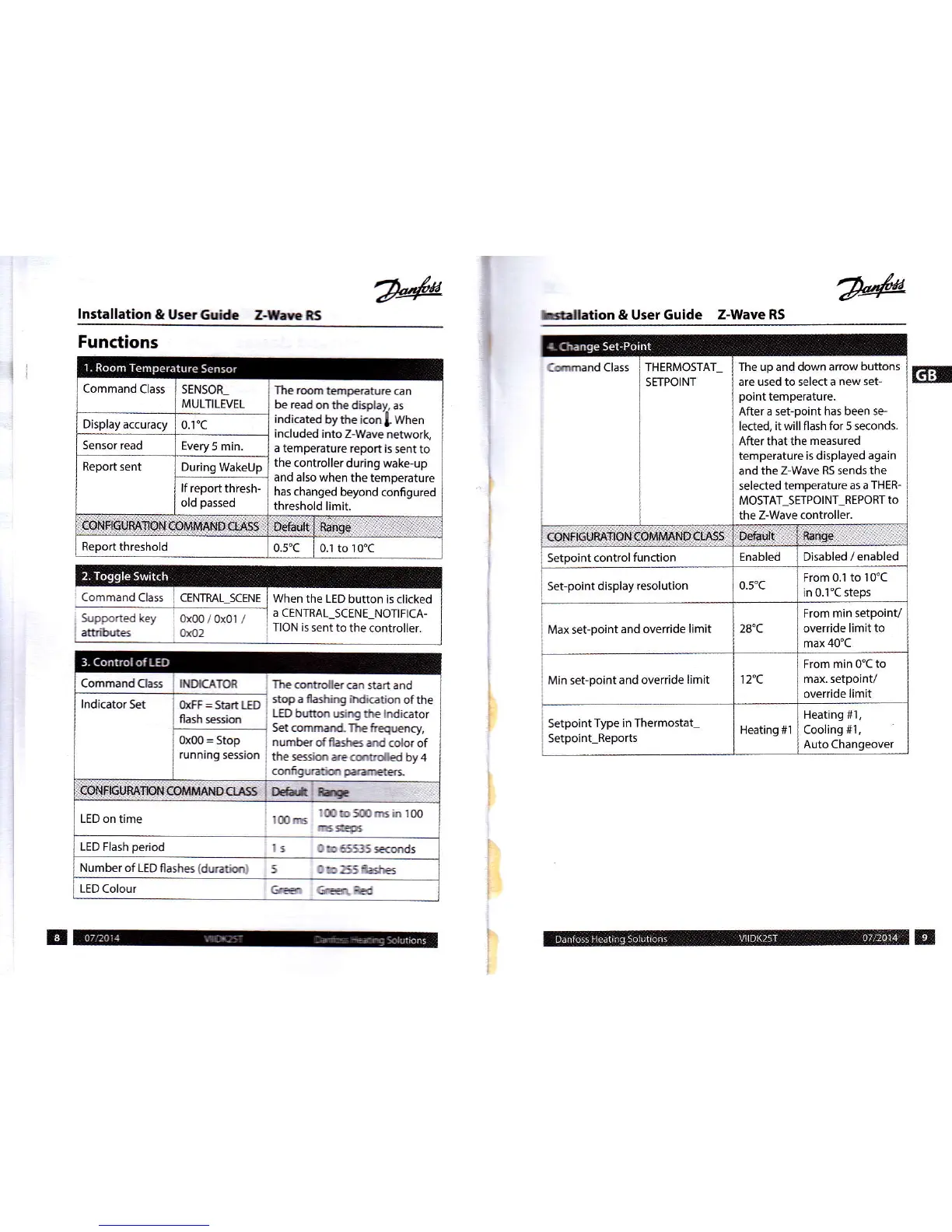
When the LED
button is clicked
a CENTRAL_SCENE
NOTIFICA-
TION is
sentto the.ontroller-
Functions
SENSOR_
|
The rom
tmpenture
can
MULTILEVEL
I
bereadmthedisptay,as
lfu
indicted
bythe i@l when
included
into Z-Wave
network,
a temperature
report is
sentto
the
controller
during wake-up
and also
when the temperature
has
changed beyond
configured
threshold limit.
Cmmand CIass THERMOSTAI
SETPOINT
The up and down arrow
buttons
are used to select a new
set-
point
temperature.
After a set-point
has been 5e-
leded,
itwill flash for 5 seconds.
Afterthat the
measured
temperature is displayed
again
and
the Z-Wave RS sends
the
selected temperature
as a THER-
MOSTAT_SErPOlNT_REPORT
to
the Z-Wave controller.
rIiNFtGußÄT{§N1:o[rMn üft:16§: ür&ult,
naasä
Setpoint control
function
Enabled Disabled / enabled
Set-point
display resolution
o-5"c
From 0.1
to I 0'C
in 0.1"C steps
Max set-point
and ovetride
limit 28"C
From min setpoinV
override limit to
max
40'C
Min set-point
and override
limit r 2"c
From min 0'C
to
max. setpoint/
override limit
;
Setpoint
Type in Thermostat-
:
Setpoint
Reports
Heating #1
Heating #1,
Cooling
#t,
Auto Chanqeover
IND€ATOR
. The
cmtrolls cn start
and
OoEF
=
St"^ tED
'top_a
ffölting iMi@tion
of the
flash 6rkh
.
LED hntm
6irE tlE
lndiGtor
Set command- The
teqmcy,
0xO0=Stop
i
numbscfllastEdrdcolorof
running
session
i
tie sjm
re @to{ed
by 4
i
cmfgwtim prrnAer:
lndicator s€t
LEDontime
lmc
lmbsoocinloo
6s5
LED Flash
period
I 5
C!D65535
ffids
NumberoflEDflashs(dmtirl
5 Ob255ßa.*E
LEDColour
frE
c@f,Ed

Related product manuals