EasyManua.ls Logo

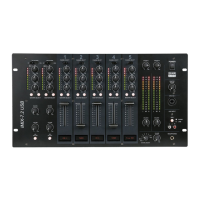
DAPAudio IMIX-7.2 USB - User Manual

DAPAudio IMIX-7.2 USB
16 pages
Print Icon
To Next Page IconTo Next Page
Loading...
IMIX 7.2 USB
Highlite International B.V. Vestastraat 2 6468 EX Kerkrade the Netherlands
Ordercode: D2353
MANUAL
ENGLISH
Question and Answer IconNeed help?

Do you have a question about the DAPAudio IMIX-7.2 USB and is the answer not in the manual?

Summary

General Safety and Handling

Safety Instructions

Guidelines for safe operation, installation, and maintenance.

Operating Determinations and Precautions

Operating Determinations

Guidelines for proper system operation and usage conditions.

Connections and Product Description

Connection with the Mains

How to connect the device to the power supply.

Front Panel Overview

Front Panel Controls

Detailed description of the mixer's front panel controls and connections.

Rear Panel and Installation

Rear Panel Connections

Detailed description of the mixer's rear panel connections and controls.

Installation Guide

Instructions for installing and connecting the IMIX-7.2 USB.

Microphone Channel Functions

Master and Output Controls

Troubleshooting and Specifications

Troubleshooting Guide

Step-by-step guide to solving common problems with the mixer.

Product Specifications

Technical specifications, dimensions, and power requirements.

Summary

General Safety and Handling

Safety Instructions

Guidelines for safe operation, installation, and maintenance.

Operating Determinations and Precautions

Operating Determinations

Guidelines for proper system operation and usage conditions.

Connections and Product Description

Connection with the Mains

How to connect the device to the power supply.

Front Panel Overview

Front Panel Controls

Detailed description of the mixer's front panel controls and connections.

Rear Panel and Installation

Rear Panel Connections

Detailed description of the mixer's rear panel connections and controls.

Installation Guide

Instructions for installing and connecting the IMIX-7.2 USB.

Microphone Channel Functions

Master and Output Controls

Troubleshooting and Specifications

Troubleshooting Guide

Step-by-step guide to solving common problems with the mixer.

Product Specifications

Technical specifications, dimensions, and power requirements.

DAPAudio IMIX-7.2 USB Specifications

General IconGeneral
Channels7
USB InterfaceYes
EQ3-band on each channel
Phantom PowerYes (+48V)
Power SupplyAC 230V, 50Hz

Related product manuals