24 Vantec series User's Manual
Vantec Series | Amplifier
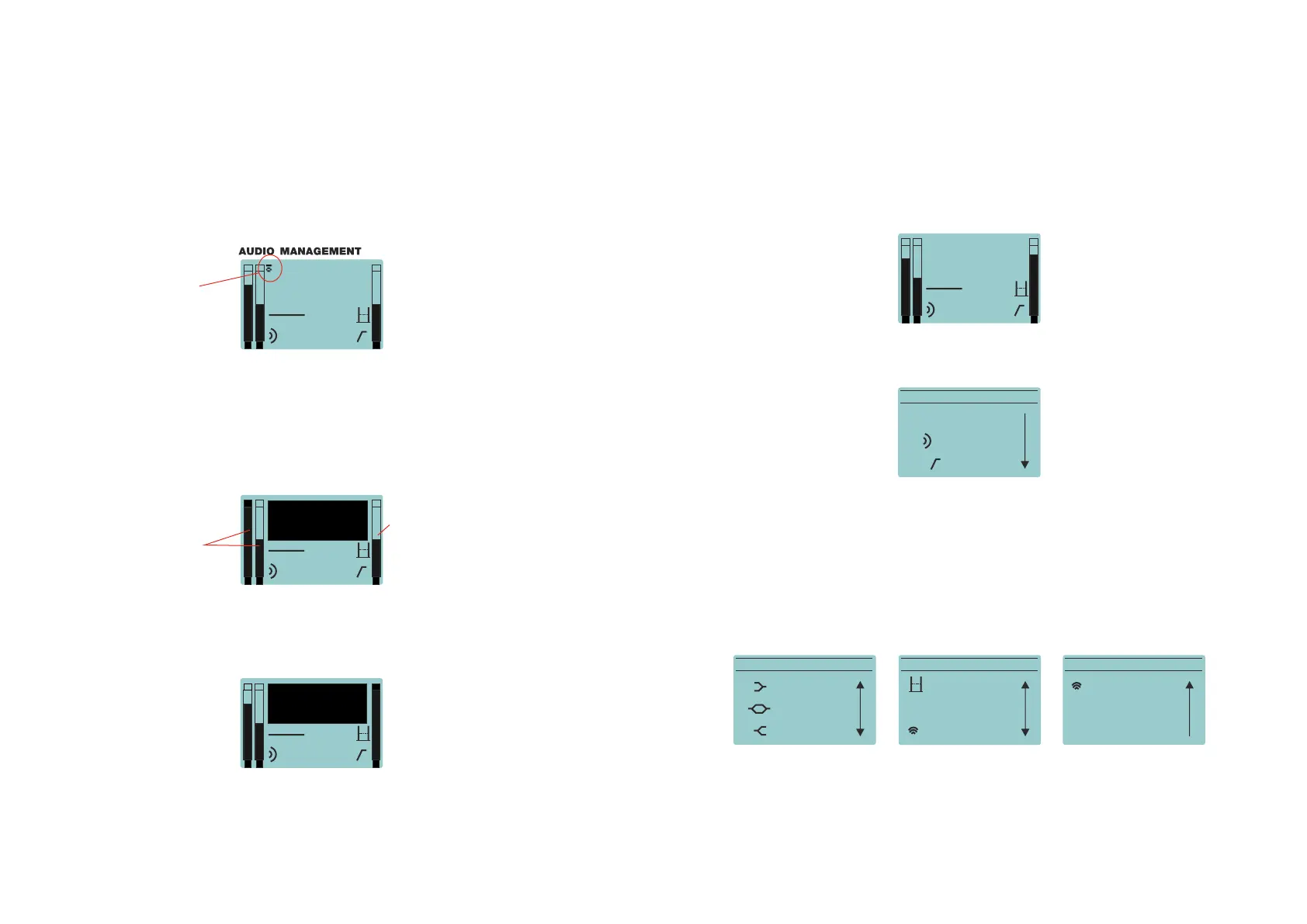
ADJUSTING THE LEVELS:
By default the state of the screen is the following:
Once the input source (s) have been connected to the amplifier´s cabinet, the user has to
adjust the levels.
For the two input channels (1 and 2), two independent gain controls are available. Be careful
when setting the input volume and do not exceed the maximum level shown on the meters:
(input clip shown on channel one)
After having set the input volume values under the maximum level, user has to adjust ouput
volume with the master control. The level is shown in the right meter of the screen. As with
the inputs be careful not exceeding the limit: (LIMIT shown)
After these two volume adjustments the screen will show something like this (when having
the input sources ON):
MAIN MENU:
As stated previously by pushing the encoder the user can access to the following options
in the MENU:
Note: to enter and select and option always push the encoder. For going back in the menu,
the user has to select Back on the screen and press the encoder or just pushing the encoder.
After 30 seconds without using the unit it will go back to the main screen automatically.
By scrolling down the encoder more options appear:
It is highly recommendable working
with output volume below 0dB.
If maximum level is required user
should increase the output level
(higher than 0dB)
This icon shows when
Wireless Audio is activa-
ted, from Firmware v2.1
Exceeding the limits
may cause speaker
failure!!
peak
meters
RMS
meter
12
live off
0,0m
O
+ 0 dB
1
C
2
live off
0,0m
O
INPUT
CLIP
1
L
2
live off
0,0m
O
LIMIT
12
live off
0,0m
O
- 4 dB
MAIN MENU
BACK
PRESET: Live
HPF: Off
MAIN MENUM AIN MENU
LOW: 0 dB
WIRELESS AUDIO
EXPANDER: off
HIGH: 0 dB
MID: 0 dB
Delay: 0,0m
MAIN MENU
WIRELESS AUDIO
OPTIONS
BACK
Exceeding the limits
may cause speaker
failure!!


 To Next Page