27 Vantec series User's Manual
Vantec Series | Amplifier
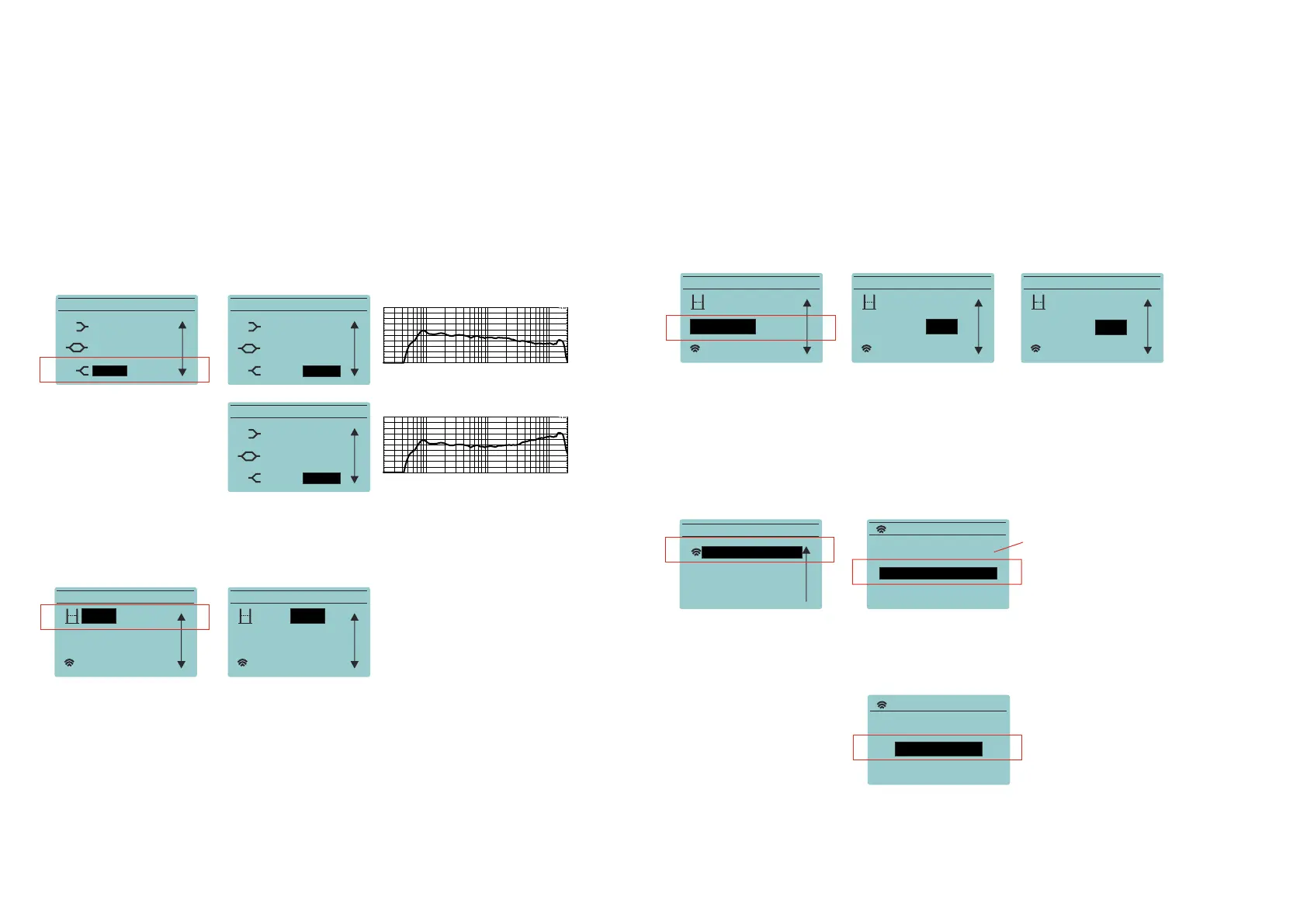
HIGH:
Boosting the energy in the high end is possible by the use of this parameter, Besides the user
can remove energy. The scale goes from -10dB to +6dB. As with the previous options use the
encoder to move in the main menu till the HIGH sub menu. Then press again and you will
enter the dB selector:
DELAY:
The user can set up a delay in the cabinets by using the delay Sub-menu; from 0 to 9.9m in
0.1m steps. Delay units can be selected between meters or feet:
EXPANDER:
When the cabinet has to be used in very silent environments the expander acts as a noise
gate but with a more progressive behavior. By default this option is not engaged.
WIRELESS AUDIO:
This functionality allows the user to connect a device such as a tablet or smart phone to send
audio to the speakers (up to 2) without using cables. Go to the Wireless Audio Menu and
push the encoder to enter.
When creating a new link, the user has to select if just one cabinet is going to be connected
to the audio source (select SINGLE L+R), or a pair of cabinets are going to be linked (stereo).
MAIN MENU
LOW: 0 dB
HIGH: 0 dB
MID: 0 dB
MAIN MENU
MAIN MENU
LOW: 0 dB
LOW: 0 dB
HIGH: -10 dB
HIGH: +6 dB
10k5k2k1k500200100502020 20kHz
120,0
dBSPL
110,0
100,0
90,0
80,0
70,0
DAS Audio SA LogChirp - Frequency Response 20-05-2015 12,09,27
CH A dBSPL 1/3 Octave 192kHz 32K Rectangular Start 0,00ms Stop 170,66ms FreqLO 5,86Hz Length 170,66ms
File: spl 1m -20 dBu ganancias a 0 dB low -10 dB.mls
10k5k2k1k500200100502020 20kHz
120,0
dBSPL
110,0
100,0
90,0
80,0
70,0
DAS Audio SA LogChirp - Frequency Response 20-05-2015 12,09,27
CH A dBSPL 1/3 Octave 192kHz 32K Rectangular Start 0,00ms Stop 170,66ms FreqLO 5,86Hz Length 170,66ms
File: spl 1m -20 dBu ganancias a 0 dB low -10 dB.mls
MID: 0 dB
MID: 0 dB
MAIN MENU
WIRELESS AUDIO
EXPANDER: off
Delay: 0,0m
MAIN MENU
WIRELESS AUDIO
EXPANDER: off
Delay: 9,9m
MAIN MENU
WIRELESS AUDIO
Delay: 0,0m
EXPANDER: off
MAIN MENU
WIRELESS AUDIO
Delay: 0,0m
EXPANDER: off>
MAIN MENU
WIRELESS AUDIO
Delay: 0,0m
EXPANDER: <on
MAIN MENU
OPTIONS
BACK
WIRELESS AUDIO
WIRELESS AUDIO
STATUS: not linked
CREATE A NEW LINK
BACK
this line indicates the actual status
of the wireless audio link
CREATE NEW LINK
Select Mode:
SINGLE: L+R >


 To Next Page