28 Vantec series User's Manual
Vantec Series | Verstärker
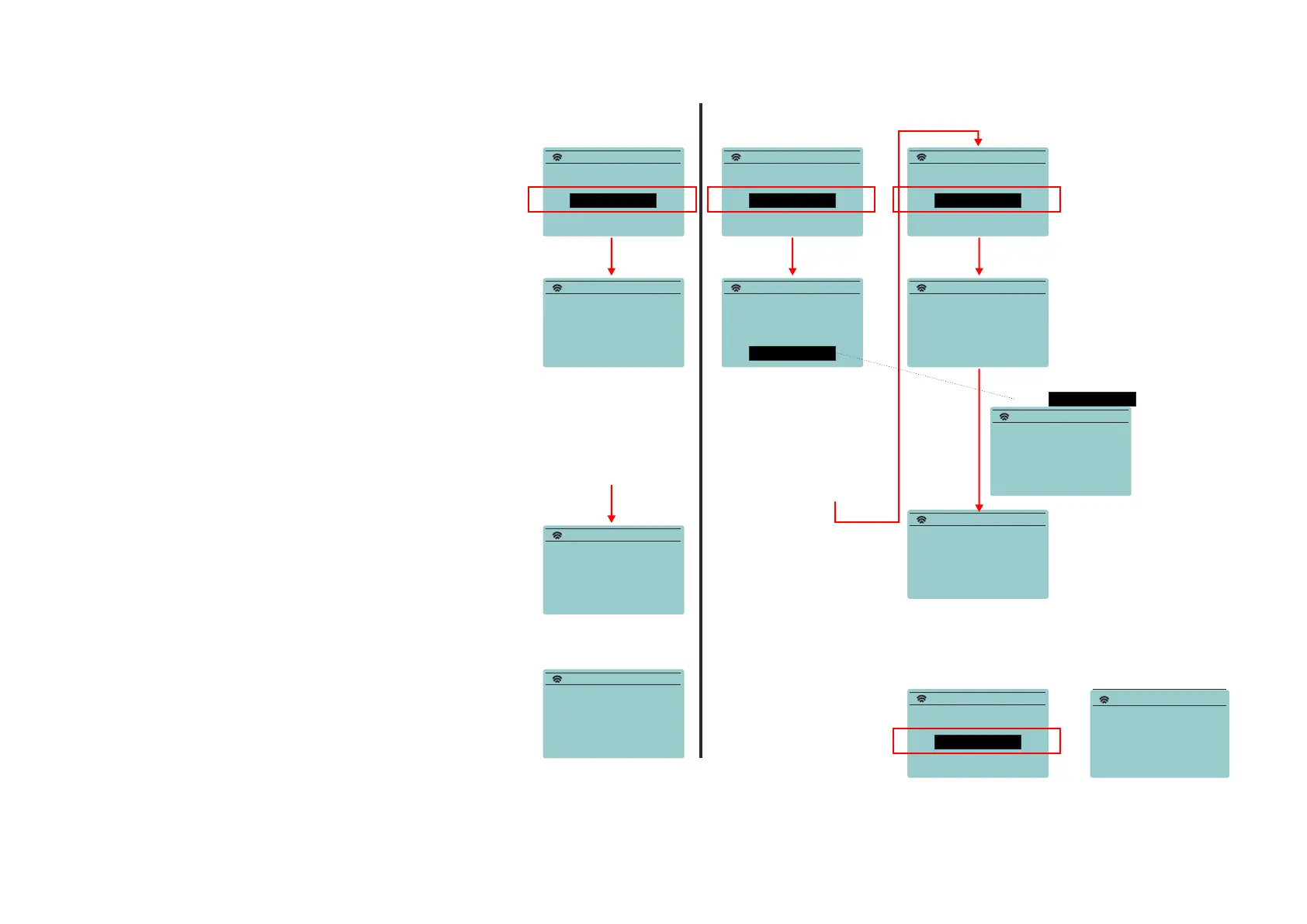
If a pair of cabinets is going to be used, one will be the Master
unit connected to your tablet and other the Slave will receive
audio from the Master. Master will reproduce Left audio
channel and Slave Right channel.
Note:
When doing a master-slave connection ONLY one possible
slave cabinet should be connected (power). Switch off all
the rest of the units.
Note:
Always be sure that the distance between devices does
not exceed 20meters.
Check as well that there is direct visual contact between
the units. This means that objects, as walls may cause
interruption in the transmission.
When establishing the link between Master & Slave
cabinets, switch off all the other devices.
It can take up to 1 minute to create the link.
CREATE NEW LINK
CREATE NEW LINK
WIRELESS AUDIO
WIRELESS AUDIO
CREATE NEW LINK
CREATE NEW LINK
CREATE NEW LINK
CREATE NEW LINK
CREATE NEW LINK
CREATE NEW LINK
CREATE NEW LINK
Select Mode:
Connect from your
LINKED: das audio iPAD
device to:
CREATE NEW LINK
connected to:
VANTEC-12A -025A53
BACK
DAS iPad
Select Mode:
Select Mode:
Configure SLAVE unitW aiting MASTER
Searching for
in SLAVE: R mode connection
LINK DONE!!
Slave Units
Select Mode:
SINGLE: L+R > < MASTER: L >
< MASTER: L >
CONTINUE
CONTINUE
---- Wait a minute ----
---- Wait a minute ----
< SLAVE: R >
Modo SINGL EM odo Master & Slave
press
3
4
4.1
5
6
3
EM
CREATE NEW LINK
Connect from your
device to:
VANTEC-12A -025A53
7
Enable the Wireless Audio option
in your smart phone or tablet
and select the Vantec cabinet.
Once this is done a message
indicating the name of the con-
nected device will appear in the
status link.
When selecting Master L mode,
next step is configuring the
Slave cabinet.
Go to the other cabinet and con-
figure it in Slave R mode:
When establishing the link a
“beep” sound will be reproduced
by the speaker system.
After having created the link
between the Master and the
Slave Cabinets, configure Master
with the tablet, smart phone etc
creating the new link:
1 1
2 2
"master"
cabinet
"master"
cabinet
"master"
cabinet
"master"
cabinet
"master"
cabinet
"master" and
"slave" cabinet
"slave"
cabinet


 To Next Page