
 To Next Page
P
Paul HernandezJul 28, 2025
How to turn on and off Dash Gingerbread Waffle Maker?
- KKimberly JonesJul 28, 2025
To turn on the Dash Mini Waffle Maker, simply plug in the power cord. When you're finished cooking, turn it off by unplugging it.

How to turn on and off Dash Gingerbread Waffle Maker?
To turn on the Dash Mini Waffle Maker, simply plug in the power cord. When you're finished cooking, turn it off by unplugging it.
How do I know when my Dash Gingerbread is ready?
You'll know your Dash Mini Waffle Maker is heated and ready to use when the Indicator Light shuts off. This indicates that the appliance has reached the optimal temperature for cooking.
Why does the light on my Dash Gingerbread keep turning off?
It's normal for the light on the Dash Mini Waffle Maker to turn on and off. During cooking, the heating element automatically cycles on and off to regulate the temperature, preventing the Cooking Surface from overheating or becoming too cold. The Indicator Light mirrors this process, turning on and off accordingly.
What to do if food sticks to my Dash Waffle Maker?
If food starts sticking to your Dash Mini Waffle Maker after a few uses, it's likely due to a build-up of burnt food residue on the Cooking Surface. To resolve this, allow the appliance to cool completely. Then, pour a little cooking oil onto the surface and let it sit for 5–10 minutes. Scrub the surface with a sponge or soft-bristled brush to dislodge the food. Wipe down the Cooking Surface with a damp, soapy cloth, then rinse the cloth and wipe again. For stubborn residue, pour on cooking oil and let sit for a few hours before scrubbing and wiping clean.
Why does the cover of my Dash Gingerbread Waffle Maker get so hot?
Yes, it is completely normal for the cover of your Dash Mini Waffle Maker to get very hot during use. Always lift and lower the Cover by the Cover Handle. To prevent injury, do not lift the Cover so that your arm is over the Cooking Surface, as it is hot and may cause injury. Lift from the side.
Basic safety precautions to follow when using electrical appliances, including reading instructions and proper handling.
Instructions on safe operation, including avoiding hot surfaces, water proximity, and using correct utensils.
Guidance on polarized plugs, extension cords, and avoiding electrical hazards with the appliance.
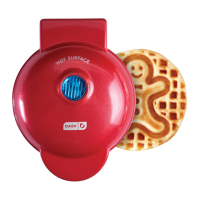
Identification of key parts of the Mini Waffle Maker, including cover, handle, indicator light, and cooking surfaces.
Instructions for initial cleaning and preparing the waffle maker before first use.
Step-by-step guide on operating the waffle maker, including heating, spraying, adding batter, and cooking.
Guidance on safely removing cooked waffles and cooling the appliance after use.
Instructions for cleaning the waffle maker after each use, including unplugging and wiping.
Methods for removing stubborn food residue from the cooking surfaces using oil and gentle scrubbing.
Explanation of normal indicator light cycling and troubleshooting no heat/light issues.
Guidance on addressing food sticking issues, likely due to residue buildup.
Information on normal cover heat and safe operation practices.
Ingredients and directions for making classic round waffles.
Ingredients and directions for making savory zucchini and parmesan waffles.
Ingredients and directions for making gingerbread-flavored waffles.
Ingredients and directions for making snickerdoodle-flavored waffles with garnish.
Ingredients and directions for making chocolate waffles shaped like tacos.
List of various recipe ideas with ingredients and estimated cooking times.
Information on how to contact customer support for assistance.
Details of the one-year limited warranty, terms, and claim process.
Key technical details of the waffle maker, including voltage and power rating.
 General
| Brand | Dash |
|---|---|
| Model | Gingerbread |
| Category | Waffle Maker |
| Language | English |