
 To Next Page
A
Amy RyanJul 29, 2025
How to turn Dash Waffle Maker on and off?
- Jjames42Jul 29, 2025
To turn on your Dash Waffle Maker, simply plug in the power cord. When you’re finished cooking, turn it off by unplugging it.

How to turn Dash Waffle Maker on and off?
To turn on your Dash Waffle Maker, simply plug in the power cord. When you’re finished cooking, turn it off by unplugging it.
How to know when Dash Multi Mini Waffle Maker is ready?
When your Dash Waffle Maker reaches the optimal temperature, the Indicator Light will shut off, signaling that you’re ready to start cooking.
Why does the light on my Dash Multi Mini Waffle Maker keep turning off?
It is normal for the light on your Dash Waffle Maker to shut off intermittently. During the cooking process, the heating element automatically turns on and off to regulate the temperature, ensuring that the Cooking Surface doesn't overheat or get too cold. When this happens, the Indicator Light turns on and off.
Essential safety rules for operating the waffle maker, covering general usage and handling.
Specific electrical safety, cord handling, and user capability requirements for safe operation.
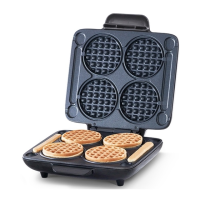
Identifies and labels the key parts of the Multi Mini Waffle Maker for user reference and understanding.
Instructions for preparing the waffle maker before its first use, including removal of packaging and cleaning.
Explains how to safely open, close, and handle the hot waffle maker during operation.
Describes the function of the red and green indicator lights indicating heating status.
Provides step-by-step guidance on adding batter, cooking, and safely removing waffles.
Instructions on how to safely finish cooking, unplug, and cool the appliance before storage.
Details the proper methods for cleaning the waffle maker's surfaces and components after use.
Specific steps for removing stubborn burnt food residue from the cooking surfaces effectively.
Explains why the indicator light might cycle on and off during the cooking process.
How to know when the waffle maker has reached the optimal cooking temperature.
Clarifies how to turn the appliance on and off, as there is no dedicated power button.
Information on normal cover heat and methods for dealing with food sticking to surfaces.
Steps for resolving problems when the indicator light is off or the appliance is not heating.
Provides ingredients and step-by-step instructions for making classic mini waffles.
Ingredients and instructions for preparing savory omelette-style chaffles.
Ingredients and instructions for making healthy paleo-friendly mini waffles.
Ingredients and instructions for baking banana bread flavored mini waffles.
Ingredients and instructions for making rich brownie-flavored mini waffles.
A list of various recipe ideas with necessary ingredients and approximate cooking times.
An empty section provided for users to record personal notes, observations, or reminders.
Provides phone numbers and email addresses for customer support and warranty-related inquiries.
Outlines the terms, conditions, and coverage of the product's one-year limited warranty.
Lists key technical details including model number, voltage, power rating, and stock number.
 General
| Brand | Dash |
|---|---|
| Model | Multi Mini Waffle Maker |
| Category | Waffle Maker |
| Language | English |