3
Paperlike Pro
4
Paperlike Pro
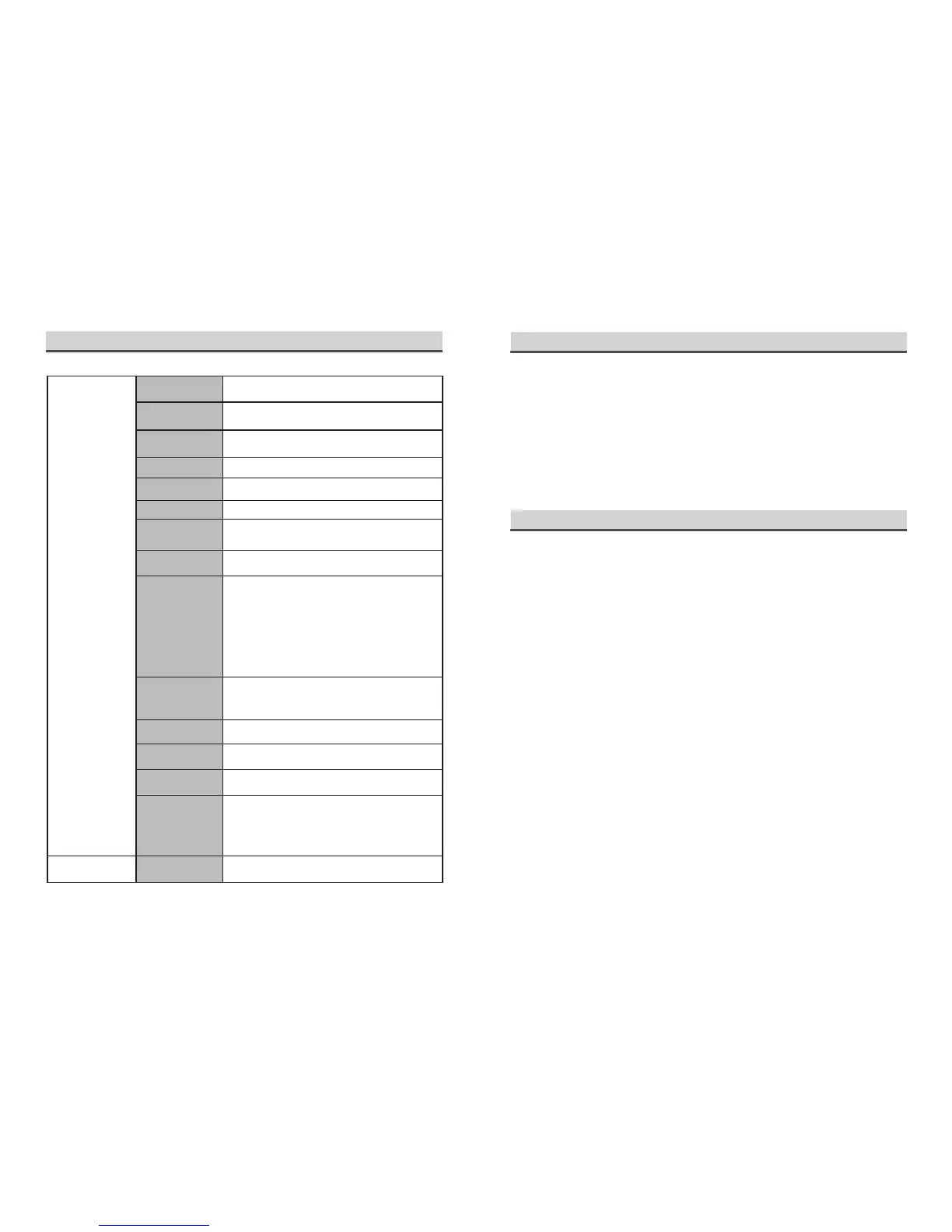
Specication
Screen
Max 13.3-inch E Ink screen (Carta)
Video
transmission
HDMI
Power supply
USB (5V-1A)
Aspect Ratio
4 : 3
Display
Reects ambient light (no backlight)
Resolution
1600×1200
Perform
resolution
800×600 to 1600×1200
Best working
temperature
15
℃
~35
℃
Display mode
-A5 model : Increases image details (DASUNG
technology)
-Floyd algonthm :Combines high quality image
and high speed
-A2 model : Filters out image details
-16 model : High detail visibility
-A61 model : Better detail visibility than 16 model
E Ink ghost
shadow removal
Smart Quick Blink (DASUNG technology)
Shell material
Plastic
VESA standard
hole
75mm×75mm
External interface
(small lamp)
USB-A
Operating system
compatibility
Windows 7
Windows 8/ Windows 10
Mac OS 10.11-10.14
Linux Ubuntu-16.04-Desktop-amd64
Software
Free upgrade
Paperlike Pro
Learn how to use
Advice and caution
Paperlike Pro is not the born perfect product. You need to nd a suitable using method
for it. Because Windows and MAC OS usually take conventional monitor as the default
one, they have all kinds of render effects such as rich color and animation, which is
inappropriate for Paperlike Pro’s black-and-white display. Any inappropriate setting may
cause ghost shadow and unclear font. Therefore, before using Paperlike Pro, it is advised
to follow the recommended setting, which requires unnecessary render eects to be o
and font to be adjusted appropriately.
■
Video display and gameplay shall be prohibited. Paperlike Pro is for daily oce and
learning needs. Excessive refresh will reduce Paperlike Pro’s working lifetime. Any caused
problems due to abusive refresh usage are outside the scope of free warranty.
■
For VESA standard hole, make sure to use the VESA screws only provided by
DASUNG. Improper screws may penetrate back cover and cause screen damage.
■
Please use Paperlike Pro between 15 degrees Celsius and 35 degrees Celsius.
Otherwise may cause a signicant decrease in performance.
■
Please do not use Paperlike Pro in too humid or dusty environment, which reduces the
working lifetime of Paperlike Pro.
■
Please pay attention to the protection of Paperlike Pro and handle it with care. Please
do not use nger or other sharp objects to press or scratch screen. Man-made damage is
outside the scope of free warranty.
■
Though Paperlike Pro’s display eect is as comfortable as paper, staring at the display
excessively can also cause asthenopia. Please pay attention to rest.
■
Paperlike Pro, as the world’s unique E Ink monitor, is our technological achievement
and protected by our patents. It is forbidden to copy or use for other commercial purpose.
Any offender will be held liable for the violation under the relevant laws or acts in the
relevant jurisdiction.


 To Next Page
 Loading...