System Connections
QUICK REFERENCE GUIDE
11
SYSTEM CONNECTIONS
The BC9620 and BC9630 (BC9600 + CM9630 connection module) provide a
multi-interface connector (BC9630) / USB cable (BC9620) for connections to a
host and a power supply connector for an external power supply.
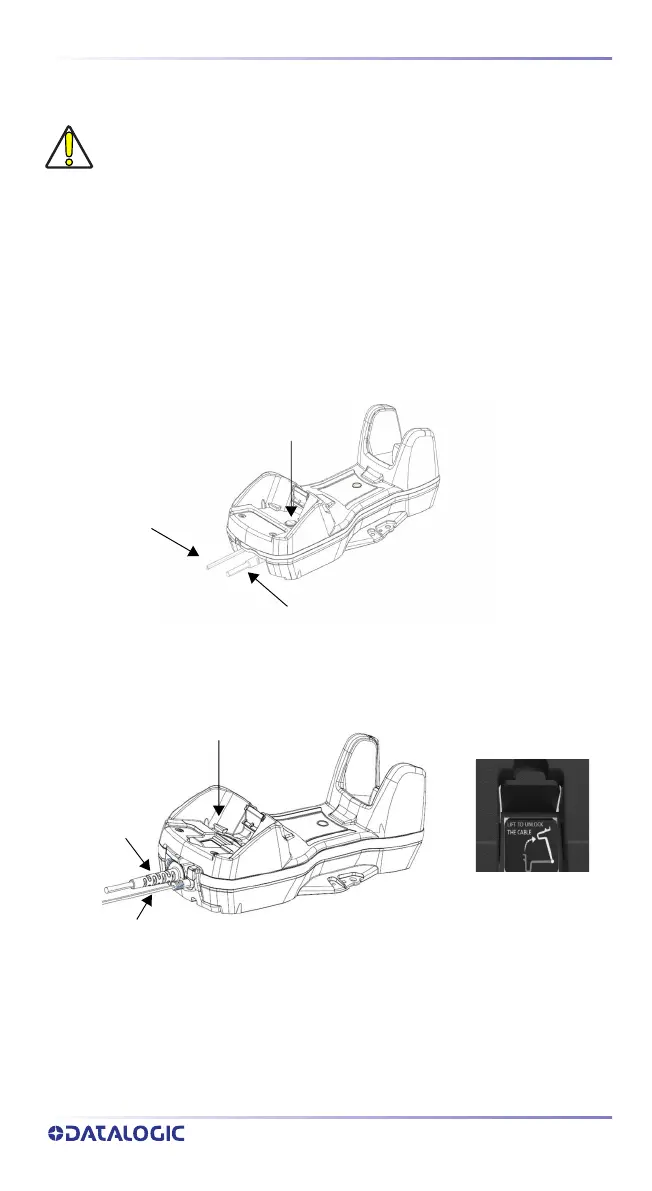
To unlock the USB cable of BC9620, push the button shown in the picture and
extract the cable.
To unlock the multi-interface cable of BC9630, first lift the lever and then
extract the cable, as indicated by the label next to the lever.
Figure 2 - BC9620 connection module
Figure 3 - BC9630 connection module
CAUTION: Connections should always be made with power off.
USB cable only
Power adapter cable
Unlock Button
Multi-interface
cable
Power adapter cable
Unlock Label
Unlock Label



 To Next Page