Before you can connect your DataRemote CDS-9010 device to the Internet and use it, you must
have access to high-speed Internet. A high-speed Internet connection can be accessed through
DSL, LTE wireless network, cable modem, Wi-Fi access point, and/or a leased line.
Make sure you are connecting your new DataRemote CDS-9010 device near a power source and
away from extreme heat / humid sources.
As this device uses LTE, please make sure that wherever you are installing the device, there is good
cell reception. The device should also be installed in a location which is easily accessible.
WHAT DO YOU NEED TO KNOW
BEFORE INSTALLING YOUR DEVICE
IMPORTANT:Please refrain from putting furniture or other obstacles in front of the device
as it might influence the signal, thus degrading the quality of service.
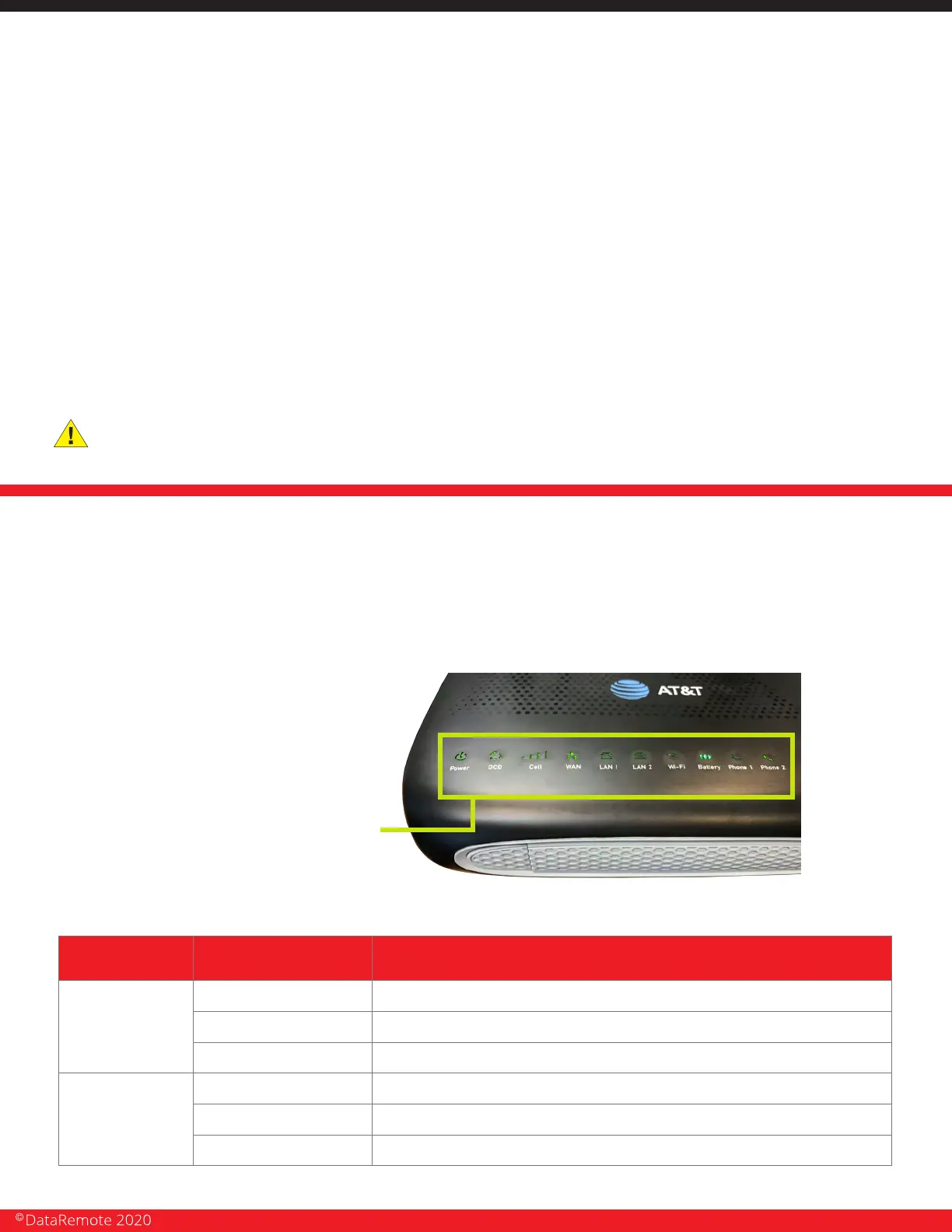
LED LIGHTS INDICATORS
NOTE: Before you use your device, please get acquainted with the LED indicators and
connectors first.
TOP PANEL
LED STATUS
LED STATUS EXPLANATION
POWER
BATTERY
Solid (GREEN)
Flashing (GREEN)
OFF
Solid (GREEN)
Solid (BLUE)
The router is powered on (External Power) and running normally.
The router is powered on (Internal Power - BAT) and running normally.
The router is powered off.
Battery charged
Battery charging
Solid (RED) Battery discharging
Page 5
Revision No. 004 April 2020


 To Next Page