STEP 6
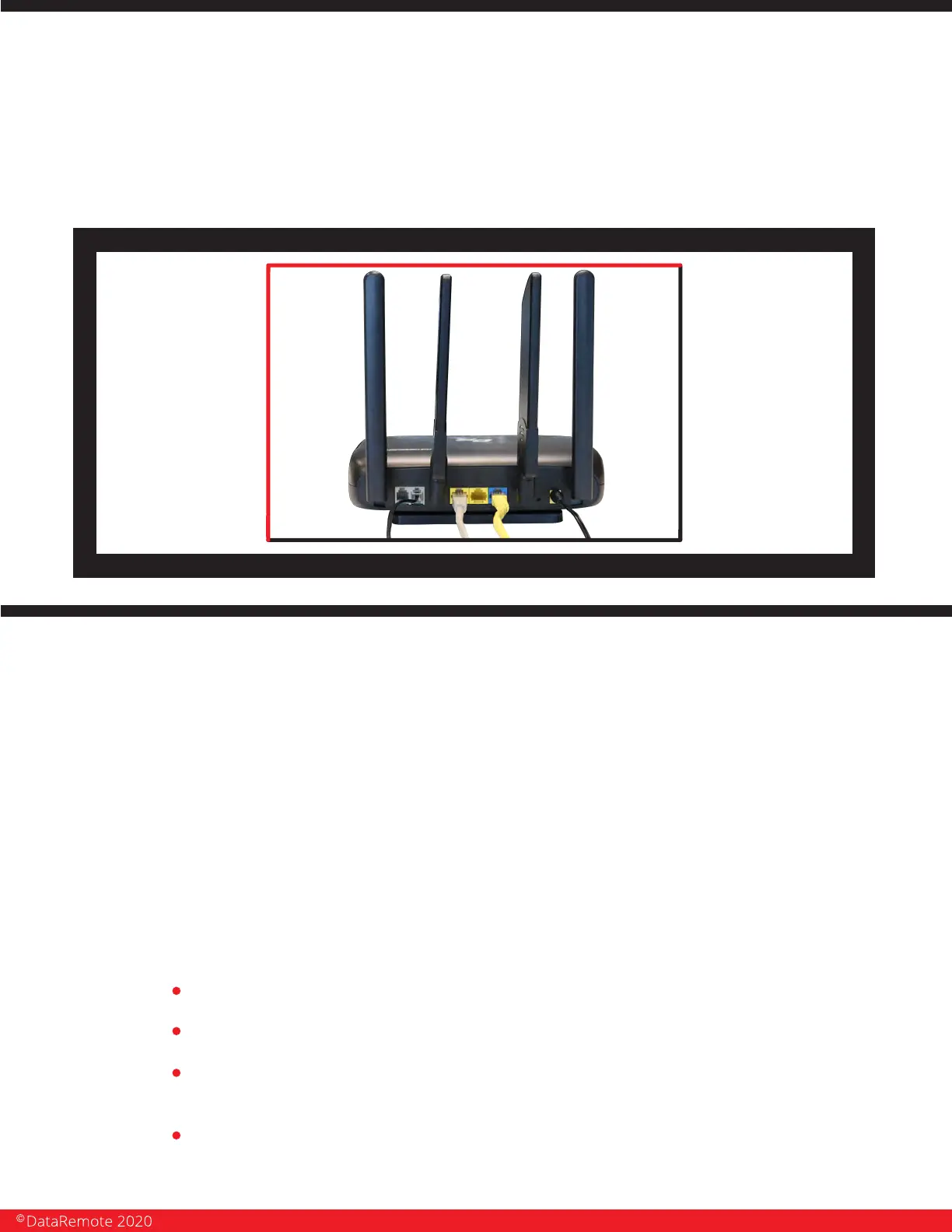
Check the Power, WAN, LAN and LEDs lights to make sure you are connected
properly. IMPORTANT: Make sure antennas don’t touch each other.
Your device should look like this when connected to a phone line, WAN and one
LAN/Computer device.
SERVICE TECHNICIAN
INSTALLATION
Overview of the DataRemote CDS-9010 device.
The DataRemote CDS-9010 device is part of DataRemote's POTS (Plain Old Telephone
Service) IN A BOX product line. It is a cellular appliance with battery backup that uses the LTE
Cellular Data Network to provide high levels of reliable cellular connectivity to directly replace
wire-line POTS lines, including the capability for transmission of voice, FAX, alarm, analog data,
ring-down and emergency lines with full access to E-911.
SCOPE OF WORK.
The scope of work to be completed on-site can be summarized to consist of the following:
Locate existing devices (ie: Fire Panel(s), Call Boxes, Fax, Voice lines).
Using a cable toner, locate demarc/SNI for existing POTS lines currently serving devices.
Unpack, assemble then test DataRemote CDS-9010 device in "Standalone" Mode with
power cable connected.
Mount DataRemote CDS-9010 device and test FXS 1-2 (if applicable) phone jacks by calling
in/out using a telephone test set or simple line telephone and cell phone prior connecting
any device/appliance.
Page 12
Revision No. 004 April 2020


 To Next Page