EasyManua.ls Logo

DataRemote CDS-9010 - User Manual

DataRemote CDS-9010
28 pages
Print Icon
To Next Page IconTo Next Page
Loading...
USER MANUAL
CDS-9010
WHAT
CAN YOUR
NEW DEVICE DO?
Virtually every application
that requires a copper hard-line
can now be replaced with one device!
Dual Band Wi-Fi Router
LTE VoIP
Revision No. 004 April 2020

Other manuals for DataRemote CDS-9010

Question and Answer IconNeed help?

Do you have a question about the DataRemote CDS-9010 and is the answer not in the manual?

Summary

Introduction to Product and Installation

DataRemote Solution Overview

Explains how DataRemote replaces traditional landlines with LTE/VoIP services.

Hardware Installation Introduction

Introduces the hardware installation process for the CDS-9010 device.

Product Package Contents

Itemized Components List

Lists all the physical items included in the product box.

Pre-Installation Guidance

Internet Access Requirements

Specifies the need for high-speed internet connectivity for setup.

Device Placement and Signal Considerations

Advises on optimal device placement for signal quality and accessibility.

LED Status Indicator Meanings

Explains the different states and meanings of the device's LED lights.

Device Hardware Details

Rear Panel Connectivity

Identifies and describes the ports and connectors on the back of the device.

Basic Installation Steps

Initial Device Setup

Provides step-by-step instructions for the fundamental setup of the device.

Step 1: SIM and Power Installation

SIM Card Insertion Procedure

Detailed instructions on how to properly insert the SIM card.

Battery and Power Adapter Connection

Guidance on installing the internal battery and connecting the power adapter.

Step 2 & 3: Network Connectivity

WAN and LAN Port Configuration

Instructions for connecting to the Wide Area Network (WAN) and Local Area Network (LAN).

Step 4: Phone Line Connection

FXS Port Usage and Warnings

Details on connecting phone lines to FXS ports, including critical warnings.

Step 5: Antenna Installation

LTE Antenna Connection Guidelines

Instructions for attaching LTE antennas and avoiding signal degradation.

Service Technician Installation Process

Technician Scope of Work

Defines the tasks and responsibilities for a certified installation technician.

Device Assembly and Pre-Testing

Covers assembling the device and performing initial functional tests.

Installation Support Resources

Required Materials and Tools

Lists the necessary components and tools for technicians.

Pre-Installation Task Checklist

On-Site Arrival and Initial Testing

Details initial on-site procedures and equipment checks before installation.

Phase 1: Device Assembly and Voice Line Test

Antenna and Battery Attachment

Steps for attaching LTE antennas and installing the internal battery.

Voice Line Test Procedure

How to conduct voice line tests using LEDs and making test calls.

Phase 2: POTS Line Identification

Locating Fire Panel POTS Connections

Guidance on finding and identifying POTS lines connected to fire alarm panels.

Phase 3: Cut-over to DataRemote Device

Redirecting Fire Alarm Lines

Instructions for switching fire alarm panel lines to the CDS-9010.

Phase 4: Fire Alarm Communication Testing

Testing Alarm Communication Lines

Procedures for testing both primary and secondary fire alarm communication paths.

Phase 5: Fax Line Testing

Fax Testing Procedures

Steps for conducting outbound and inbound fax tests, including baud rate details.

Phase 6: Analog Data Line Testing

Analog Data Call Verification

How to test analog data connectivity by making data calls.

Post-Installation and Project Completion

Final Tasks and Deliverables

Lists final installation tasks, required deliverables, and contact information.

Legal and Regulatory Information

FCC Statement and Warnings

Covers FCC regulations, radiation exposure, and California Proposition 65.

E911 Service Disclaimer

Provides critical information and limitations regarding 911/E911 service availability.

Product Certifications

Certified Device Specifications

Details specifications, frequency bands, and certifications for the device.

Summary

Introduction to Product and Installation

DataRemote Solution Overview

Explains how DataRemote replaces traditional landlines with LTE/VoIP services.

Hardware Installation Introduction

Introduces the hardware installation process for the CDS-9010 device.

Product Package Contents

Itemized Components List

Lists all the physical items included in the product box.

Pre-Installation Guidance

Internet Access Requirements

Specifies the need for high-speed internet connectivity for setup.

Device Placement and Signal Considerations

Advises on optimal device placement for signal quality and accessibility.

LED Status Indicator Meanings

Explains the different states and meanings of the device's LED lights.

Device Hardware Details

Rear Panel Connectivity

Identifies and describes the ports and connectors on the back of the device.

Basic Installation Steps

Initial Device Setup

Provides step-by-step instructions for the fundamental setup of the device.

Step 1: SIM and Power Installation

SIM Card Insertion Procedure

Detailed instructions on how to properly insert the SIM card.

Battery and Power Adapter Connection

Guidance on installing the internal battery and connecting the power adapter.

Step 2 & 3: Network Connectivity

WAN and LAN Port Configuration

Instructions for connecting to the Wide Area Network (WAN) and Local Area Network (LAN).

Step 4: Phone Line Connection

FXS Port Usage and Warnings

Details on connecting phone lines to FXS ports, including critical warnings.

Step 5: Antenna Installation

LTE Antenna Connection Guidelines

Instructions for attaching LTE antennas and avoiding signal degradation.

Service Technician Installation Process

Technician Scope of Work

Defines the tasks and responsibilities for a certified installation technician.

Device Assembly and Pre-Testing

Covers assembling the device and performing initial functional tests.

Installation Support Resources

Required Materials and Tools

Lists the necessary components and tools for technicians.

Pre-Installation Task Checklist

On-Site Arrival and Initial Testing

Details initial on-site procedures and equipment checks before installation.

Phase 1: Device Assembly and Voice Line Test

Antenna and Battery Attachment

Steps for attaching LTE antennas and installing the internal battery.

Voice Line Test Procedure

How to conduct voice line tests using LEDs and making test calls.

Phase 2: POTS Line Identification

Locating Fire Panel POTS Connections

Guidance on finding and identifying POTS lines connected to fire alarm panels.

Phase 3: Cut-over to DataRemote Device

Redirecting Fire Alarm Lines

Instructions for switching fire alarm panel lines to the CDS-9010.

Phase 4: Fire Alarm Communication Testing

Testing Alarm Communication Lines

Procedures for testing both primary and secondary fire alarm communication paths.

Phase 5: Fax Line Testing

Fax Testing Procedures

Steps for conducting outbound and inbound fax tests, including baud rate details.

Phase 6: Analog Data Line Testing

Analog Data Call Verification

How to test analog data connectivity by making data calls.

Post-Installation and Project Completion

Final Tasks and Deliverables

Lists final installation tasks, required deliverables, and contact information.

Legal and Regulatory Information

FCC Statement and Warnings

Covers FCC regulations, radiation exposure, and California Proposition 65.

E911 Service Disclaimer

Provides critical information and limitations regarding 911/E911 service availability.

Product Certifications

Certified Device Specifications

Details specifications, frequency bands, and certifications for the device.

Overview

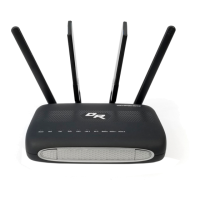
The DataRemote CDS-9010 is an LTE VoIP Dual Band Wi-Fi Router, designed as a stand-alone device to replace traditional landlines by converting existing legacy lines to next-generation service via VoIP and the LTE cellular network. This device is part of DataRemote's "POTS IN A BOX" product line, offering enterprise-grade solutions for various applications that typically require copper hard-lines, including voice, fax lines, burglar and fire alarms, elevators, ATMs, emergency call boxes, and point of sale systems. It facilitates clear and reliable voice quality over the Internet and is fully compatible with Session Initiation Protocol (SIP) industry standards, allowing integration with other SIP devices and software.

Function Description:

The CDS-9010 acts as a central device manager, connecting various legacy systems to modern LTE and VoIP networks. It supports a wide range of inputs and outputs:

  • Phone Lines (FXS Ports): Two RJ-11 FXS ports (Phone 1 and Phone 2) are available for connecting analog phones or equipment requiring a phone line, such as fire panels, call boxes, fax machines, and voice lines. These ports supply voltage and are designed to connect to FXO analog phones or other FXO devices, not directly to active RJ-11 wall lines with voltage.
  • Ethernet Ports: Two LAN ports (LAN 1 and LAN 2) are provided for local networked devices, allowing connection to equipment or computers for Internet access. A WAN port connects to a modem, switch, or router for Internet access.
  • Cellular Connectivity: The device utilizes LTE cellular data network for high levels of reliable cellular connectivity, serving as a primary or backup communication channel. It includes two SMA-M connectors for LTE antennas.
  • Wi-Fi: The device supports Wi-Fi connectivity, functioning as a Wi-Fi access point.
  • Battery Backup: An internal battery provides backup power, ensuring continued operation during power outages. An internal case for an extra battery is also included.

The device is capable of detecting and supporting various alarm protocols (Contact-ID, SIA, Pulse, etc.) when set in auto alarm mode. It can handle both inbound and outbound calls for voice and fax, and supports analog data lines for modem communication.

Important Technical Specifications:

  • Model: CDS-9010
  • Type: LTE VoIP Dual Band Wi-Fi Router
  • Power Input: 100-240V-50/60Hz via AC Power Adapter. It also features a DC 9-16V input.
  • Cellular Bands (AT&T Certified):
    • 4G: II/IV/V
    • LTE: 2/4/5/12/13/14/66/71
  • LTE Category: CAT 4
  • Antennas: Two LTE antennas (SMA-M connectors) and integrated Wi-Fi antennas.
  • Ports:
    • 2 x RJ-11 FXS phone line outlets (Phone 1, Phone 2)
    • 1 x WAN (Internet) connector outlet
    • 2 x RJ-45 Ethernet outlets (LAN 1, LAN 2)
    • 1 x DC Power cord connector outlet
  • SIM Card: Requires a SIM card (SIM 1 slot located in the right battery port).
  • Battery: Internal battery for backup power.
  • Dimensions: Not explicitly stated, but implied to be a desktop router form factor.
  • Operating Environment: Designed to be installed near a power source and away from extreme heat/humid sources, with good cell reception.
  • Certifications: AT&T Certified Devices, PTCRB Certified Devices, California Energy Commission Certified Devices, UL Certified (UL 2054, CAN/CSA-C22.2 No. 60950-1-07, UL 60950-1).
  • FCC Compliance: Complies with Part 15 of FCC Rules, Class B digital device limits, and FCC RF radiation exposure limits (minimum distance 20cm between radiator and body).

Usage Features:

  • LED Indicators: The top panel features several LED lights to indicate device status:
    • POWER: Solid Green (router powered on, external power), Flashing Green (router powered on, internal battery power), OFF (router off).
    • BATTERY: Solid Green (battery charged), Solid Blue (battery charging), Solid Red (battery discharging).
    • CELL DCD: Solid Green (LTE WAN IP assigned), OFF (disconnected).
    • WAN ETH: Solid Green (WAN ETH IP assigned), OFF (disconnected).
    • LAN 1/2: Solid Green (cable connected to LAN port).
    • Wi-Fi: Solid Green (Wi-Fi radio on), OFF (Wi-Fi radio off).
    • PHONE 1/2: Solid Green (registered), Flashing Green (on calling/pick up phone), OFF (not registered).
    • CELL (Signal Strength): Strong (all bars solid green), Three bars (RSSI < -80 dBm to -89 dBm), Two bars (RSSI < -90 to 100 dBm), One bar (RSSI 101-120 dBm), OFF (RSSI 120 dBm and below).
  • Reset Button: Located on the back panel for device reset.
  • Easy Installation: Step-by-step instructions are provided for basic installation, including SIM card insertion, battery installation, power connection, and connecting WAN, LAN, and phone lines.
  • Versatile Connectivity: Supports a wide array of devices and applications, making it a comprehensive landline replacement solution.
  • E911 Services: Provides enhanced E911/911 calling services, though users are advised to be aware of limitations compared to traditional 911 services and to have alternative means of accessing emergency services.

Maintenance Features:

  • Troubleshooting Guide: A separate troubleshooting guide is available for addressing LED indicator variations and other issues. Installation support is available via phone.
  • Battery Replacement: The battery should only be replaced with a DataRemote manufactured or approved battery to prevent fire, explosion, and voiding warranties. Proper disposal of used batteries is required.
  • Firmware/Software Updates: Not explicitly detailed in the provided manual, but typical for such devices.
  • Advanced Programming Information: Available on the Support.Dataremote.com website, which serves as the main support desk for submitting Tier 3 trouble tickets and accessing documentation for advanced programming. Users need to set up an account to access these resources.
  • Installation Checklist: A detailed checklist is provided for service technicians to ensure proper migration and installation, including pre-installation tasks, testing voice lines, fire alarm communication, fax lines, and analog data lines. Deliverables include signed work orders, checklists, and required photos of the installation.
  • Safety Warnings: Important warnings are provided regarding foreign voltage on RJ-11 ports, antenna placement (not touching each other), and proper handling of the device during installation and testing.
  • FCC Compliance: The device is designed to comply with FCC regulations, and users are advised on measures to correct potential interference.

DataRemote CDS-9010 Specifications

General IconGeneral
BrandDataRemote
ModelCDS-9010
CategoryNetwork Router
LanguageEnglish

Related product manuals