WHAT IS ON THE
BACK OF YOUR DEVICE
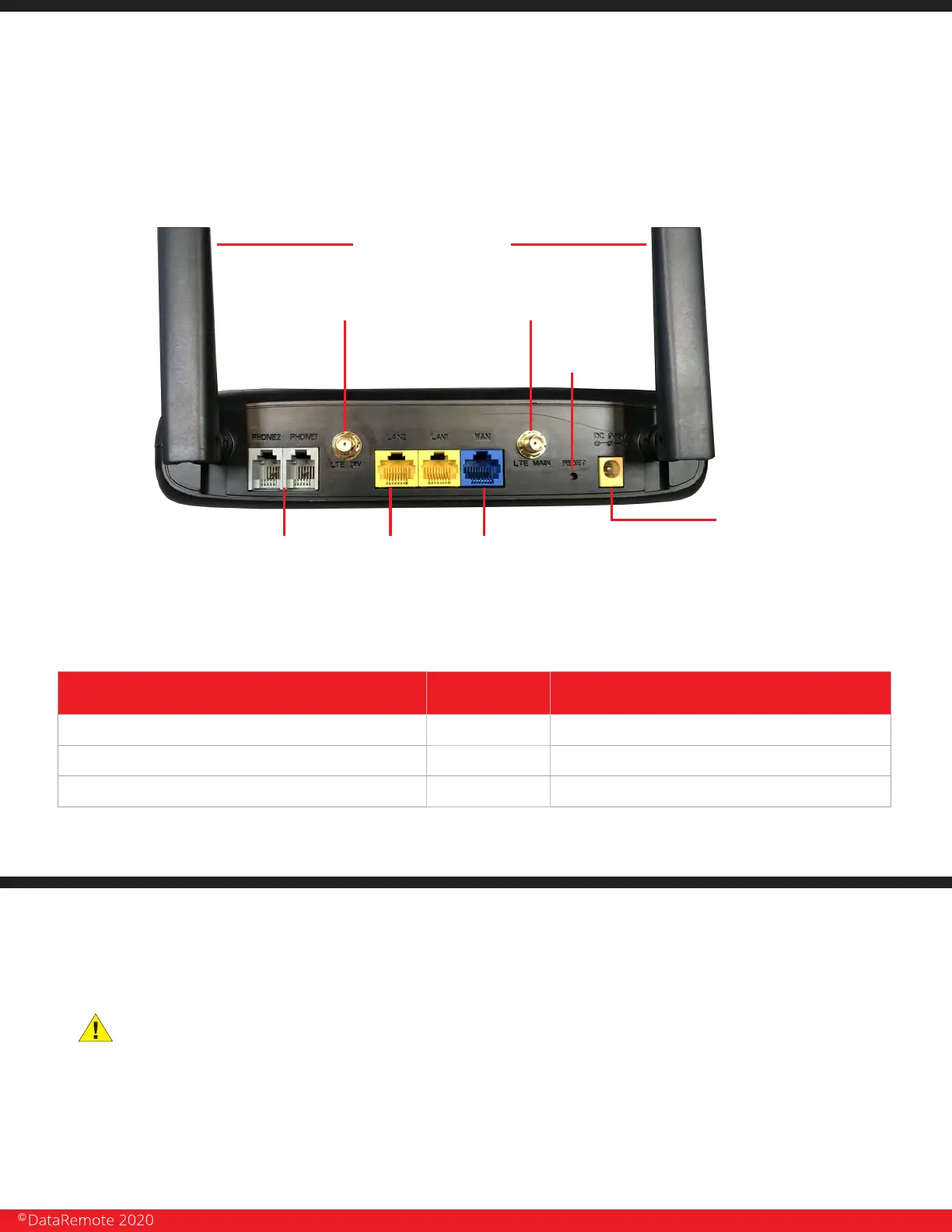
REAR PANEL INTERFACE DESCRIPTION
AC Power cord connector outlet
DC
Wide Area Network (Internet) connector outlet
Two (2) Ethernet outlets
WAN
LAN1/2
Connector for a power adapter.
Connector for accessing the Internet.
Connectors for local networked devices.
BASIC INSTALLATION
IMPORTANT! Before starting to configure the router, please
connect your device as shown in these "step by step" directions. If
you have any questions regarding installation, please contact the
Support number provided on your device’s Box.
Two (2) FXS phone
line outlets
WAN
Wide Area Network
Connector Outlet
Cellular Antennas Connectors
Two (2)
(Connecting
locally)
Ethernet
Outlets
Power Cord
Connector
Outlet
WiFi Antennas
Reset
Button
Page 7
Revision No. 004 April 2020


 To Next Page