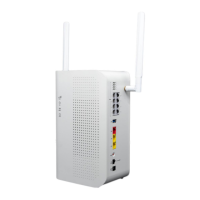
The DataRemote CDS-9010 device will be set in auto alarm mode, meaning it will detect what type
of supported protocol the panel communicates in (Contact-ID, SIA, Pulse...Etc)
NOTE: DO NOT PLUG IN A BUTT SET TO THE CDS-9010 DEVICE AND MAKE A TEST CALL ON ANY OF
THE ALARM LINES AS THIS WILL DEACTIVATE THE AUTO DETECT MODE.
THE FIRST CALL WILL FAIL, IF CALLS CONTINUE TO FAIL CONTACT INSTALLATION SUPPORT.
NOTE: IF YOU WISH TO KNOW IF THE DATAREMOTE CDS-9010 DEVICE'S ALARM LINES HAVE BEEN
SET TO “AUTO” PLEASE CONTACT DATAREMOTE PM.
From the Cut-over steps above, the Fire Panel may have already communicated its trouble
condition and restoration to the alarm vendor, but we want to test it once again.
1. Determine if the Fire Panel has a current trouble condition (Controller display a message or LED
Indicators) and note or take a picture if so then go back to the DataRemote CDS-9010 device.
2. Invoke Fire Alarm Panel into a trouble condition: Remove phone cord from alarm line 1-2
(respectively) jacks of the DataRemote CDS-9010 device unit and leave disconnected for at least 3
minutes. If time permits, walk back to Fire Alarm Panel to wait for it to go into trouble condition as
may be indicated in controller display and/or via certain LED indicators being lit on motherboard.
NOTE: IF THIS PHONE LINE DISCONNECT METHOD DOESN'T INVOKE A TROUBLE CONDITION IN
FIRE PANEL TO BE REPORTED FROM THE PANEL, PLEASE CONTACT INSTALL SUPPORT TEAM AS
YOU MAY HAVE TO TEMPORARILY DISCONNECT BACKUP BATTERIES OR POWER-CYCLE THE PANEL
TO FORCE AN EVENT REQUIRED TO BE COMMUNICATED TO MONITORING VENDOR.
3. Test the Fire Alarm Panel Trouble Resolution Process.
IMPORTANT: DO STEPS IN THIS ORDER ONLY, DO NOT CHANGE THE ORDER.
Secondary Line Testing:
- ONLY plug phone cord back into secondary 2 alarm line of the DataRemote CDS-9010 device.
Wait for the phone 2 green LED on the DataRemote CDS-9010 device to start flashing. Once the
flashing phone 2 LED goes back to solid green, the system has attempted the call to report the
trouble event to the alarm vendor.
Primary Line Testing:
- Once the secondary test call is successful, leave Phone 2 port's cord plugged in, and now plug
remaining phone cord into the primary alarm line 1 port of the DataRemote CDS-9010 device.
- Wait for the Phone 1 green LED on the DataRemote CDS-9010 device to start flashing green. Once
the flashing phone 1 LED goes back to solid green, the system has attempted the call to report the
trouble event to the alarm vendor.
4. Fire Panel confirmation:
Page 20
Revision No. 004 April 2020


 To Next Page