EN Dateq BCS70 Manual BCS72(GE) dual stereo input module 10
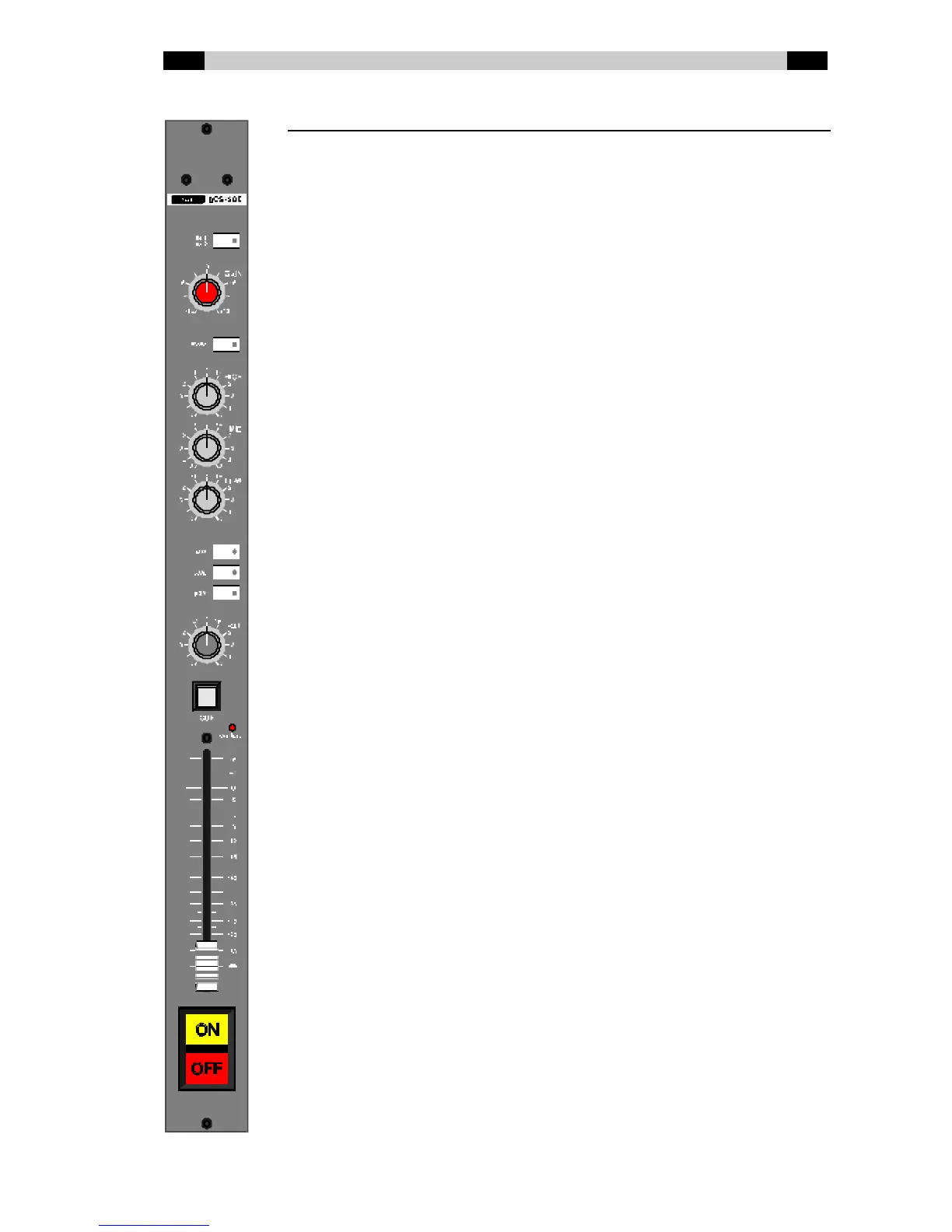
BCS72(GE) dual stereo input module
BCS72 Stereo module w ithout gain or tone control
BCS72E Stereo module w ithout gain, w ith tone control
BCS72G Stereo module w ith gain, w ithout tone control
BCS72GE Stereo module w ith gain and tone control
Line 1 / Line 2 Input selection. Sw itch pushed in (LED is lit up) is
Line 2.
Gain Volume presetting (only on the BCS72G and
BCS72GE). Limited adjustment range: ± 12dB.
Mono Makes the stereo input signal mono. Sw itch pushed
in (LED lit up) is active.
Hig h High tone control (only on the BCS72E and
BCS72GE). Shelving: ± 12db @ 12 kHz.
Mid Mid-tone control (only on the BCS72E and
BCS72GE). Bell curve: ± 16dB @ 1.3 kHz.
Low Low tone control (only on the BCS72E and
BCS72GE). Shelving: ± 16dB @ 60 Hz.
AUX / AUD / PGM Bus routing sw itches. Sw itch pushed in (LED lit up)
indicates that the signal is being routed from the
module to the bus concerned. AUX can be set to PRE
or POST fader w ith jumpers.
BAL Balance control. This is used to set the balance
betw een the left and right channels.
CUE Monitoring. This button lights up green if the CUE
function on this module is active. The button lights up
red if an (external) mute is active.
Ove rload This LED lights up if the signal level anyw here in the
module is too high and if distortion can or does occur
(the limit is at 6 dB under clip level).
Fade r 100 mm long volume control. Depending on the
jumper settings on the module, the volume is
dependent on the AUX bus (POST) or independent
(PRE) of the position of this fader.
ON / OFF Sw itches w ith w hich the channel can be turned on
and off (if button start is configured) and/or the
connected equipment can be started / stopped. The
lamps in the sw itches can light up dependent on the
channel status (internal tally) or can be controlled by
connected equipment (external tally).



 To Next Page