EasyManua.ls Logo

Datsun 1000 - Page 65

Datsun 1000
224 pages
Print Icon
To Next Page IconTo Next Page
To Previous Page IconTo Previous Page
Loading...
Mannal
fransmission
9
1
o
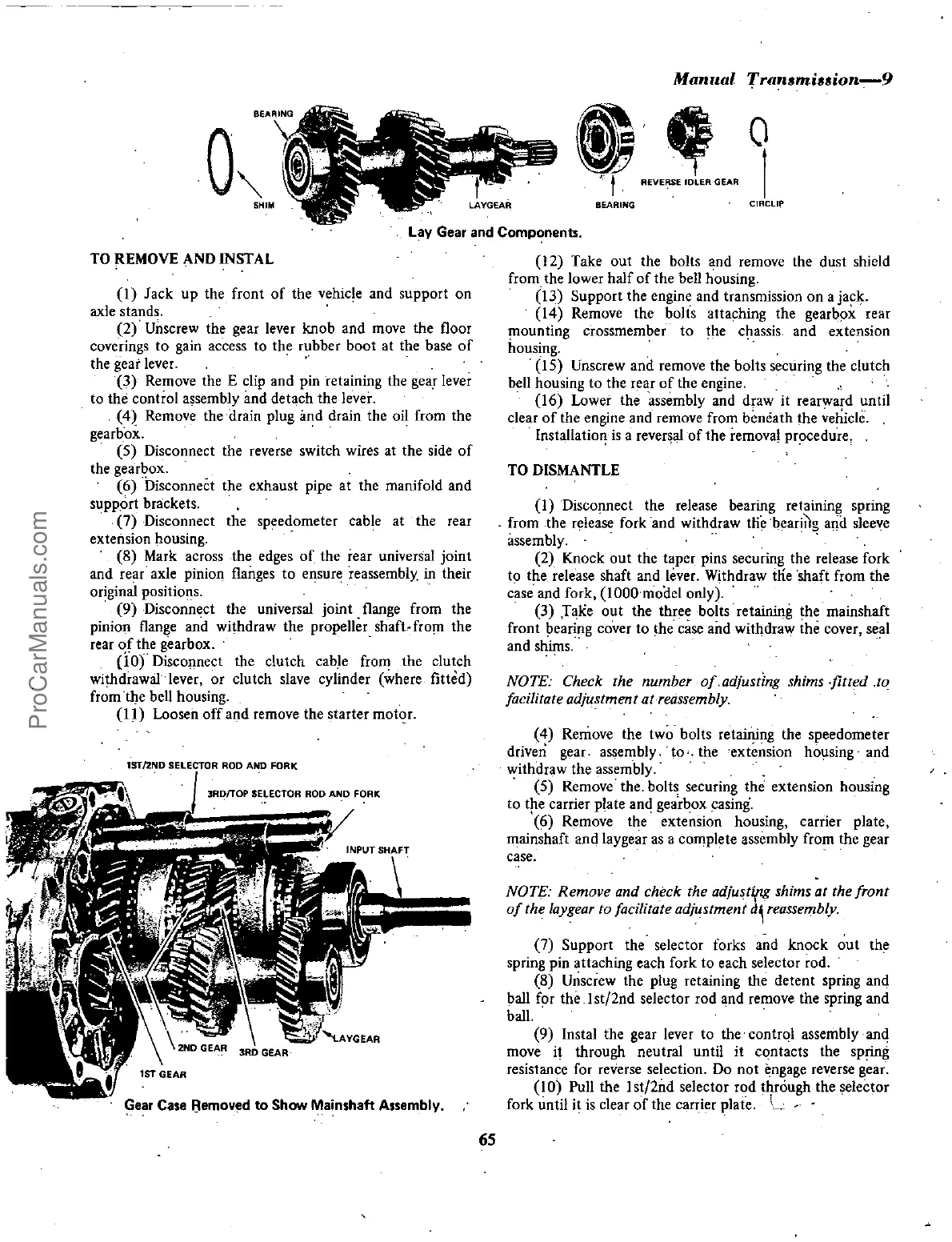
SHIM
REVERSE
IDLER
GEAR
LAYGEAR
BEARING
C1RCLlP
L
y
Gear
and
Components
12
Take
out
the
bolts
and
remove
the
dust
shield
from
the
lower
half
of
the
bell
housing
13
Support
the
engine
and
transmission
on
a
jack
14
Remove
the
bolts
attaching
the
gearb
x
rear
mounting
crossmember
to
the
c
assis
and
extension
housing
15
Unscrew
and
remove
the
bolts
securing
the
clutch
bell
housing
to
the
rear
of
the
engine
I6
Lower
the
assembly
and
draw
it
rearward
until
clear
of
the
engine
and
remove
from
beneath
the
vehicle
Installatio
is
a
reversal
of
the
removal
procedure
TO
REMOVE
AND
INSTAL
I
Jack
up
the
front
of
the
vehicle
and
support
on
axle
stands
2
Unscrew
the
gear
lever
knob
and
move
the
floor
coverings
to
gain
access
to
the
rubber
boot
at
the
base
of
the
gear
lever
3
Remove
the
E
clip
and
pin
retaining
the
gea
lever
to
the
control
assembly
and
detach
the
lever
4
Remove
the
drain
plug
ilOd
drain
the
oil
from
the
gearbox
5
Disconnect
the
reverse
switch
wires
at the
side
of
the
gearbox
6
Disconnect
the
exhaust
pipe
at
the
manifold
and
support
brackets
7
Disconnect
the
speedometer
cable
at
the
rear
extension
housing
8
Mark
across
the
edges
of
the
rear
universal
joint
and
re
r
axle
pinion
flanges
to
e
sur
reassembly
in
their
original
positio
s
9
Disconnect
the
universal
joint
flange
from
the
pinion
flange
and
withdraw
the
propeller
shaft
from
the
rear
of
the
gearbox
10
Disconnect
the
clutch
cable
from
the
clutch
withdrawal
lever
or
clutch
slave
cylinder
where
fitted
from
the
bell
housing
11
Loosen
off
and
remove
the
starter
motqr
lST
2ND
SELECTOR
ROD AND
FORK
RD
TOP
SELECTOR
ROO
AND
FORK
Gear
Case
Removed
to
Show
Mainshaft
Assembly
TO
DISMANTLE
I
Disconnect
the
release
bearing
retaining
spring
from
the
r
lease
fork
and
withdraw
tHe
eari
tg
a
d
sleeve
assembly
2
Knock
out
the
taper
pins
securing
the
release
fork
to
the
release
shaft
and
lever
Withdraw
die
shaft
from
the
case
and
fork
IOOOmoael
only
3
TaKe
out
the
three
bolts
retaining
the
mainshaft
front
earing
cover
to
he
case
and
withdraw
the
cover
seal
and
shims
NOTE
Check
rhe
number
of
adjusring
shims
fitted
to
facilitate
adjustment
at
reassembly
4
Remove
the
two
bolts
retaining
the
speedometer
driven
gear
as
embly
to
the
extension
ho
sing
and
withdraw
the
assemhly
5
Remove
the
bolts
securing
the
extension
housing
to
the
carrier
plate
and
gearbox
casing
6
Remove
the
extensi
n
housing
carrier
plate
mainshaft
and
laygear
as
a
complete
assembly
from
the
gear
case
NOTE
Remove
and
check
the
adjusti
1g
shims
ar
the
fronr
of
the
laygear
to
facilitate
adjustment
d
reassembly
7
Support
the
selector
forks
and
knock
out
the
spring
pin
attaching
each
fork
to
each
selector
rod
8
Unscrew the
plug
retaining
the
detent
spring
and
ball
for
the
I
st
2nd
selector
rod
and
remove
the
spring
and
ball
9
Instal
the
gear
lever
to
the
control
assembly
and
move it
through
neutral
until
it
contacts
the
spring
resistance
for
reverse
selection
Do
not
ngage
reverse
gear
10
Poll
the
I
st
2nd
selector
rod
t
ugh
the
selector
fork
until
it
is
clear
of
the
carrier
plate
6S
ProCarManuals.com

Related product manuals