8
ROTARY LASER LEVEL
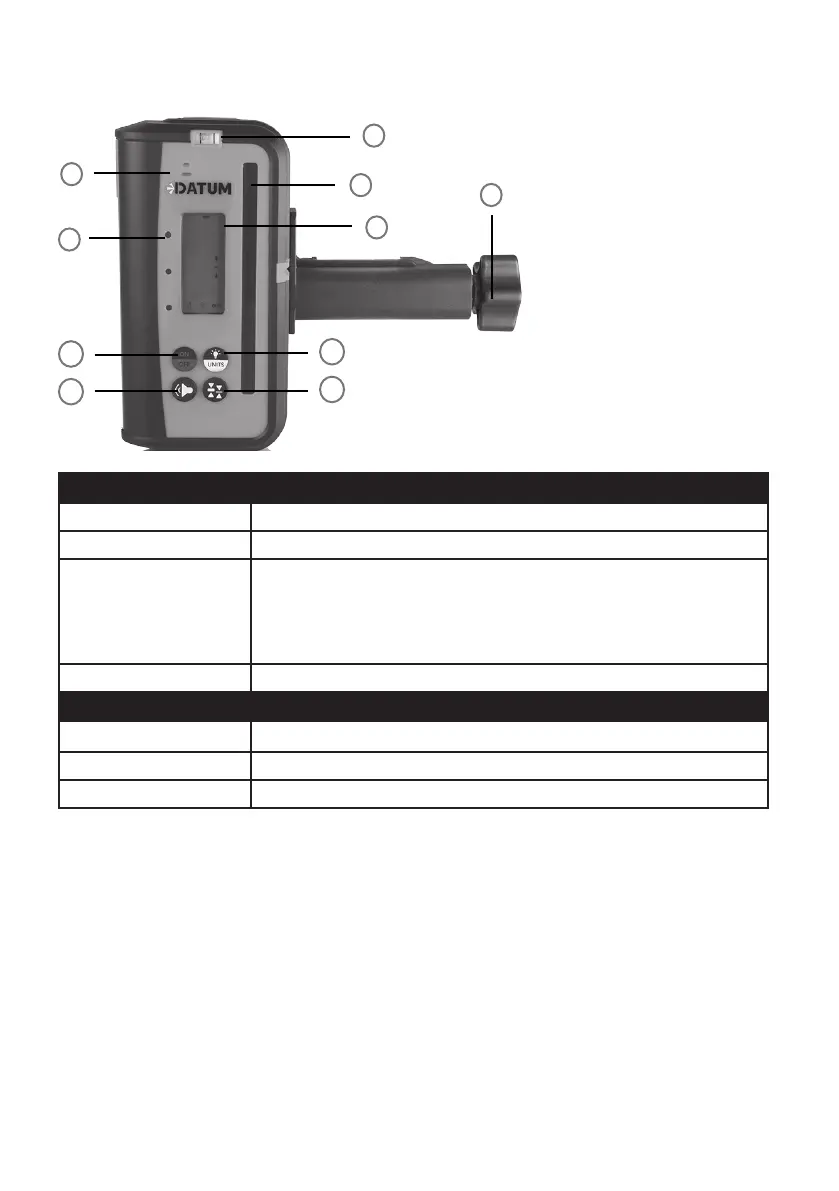
DETECTOR CONTROL DESCRIPTION
BUTTON DIRECTION OF USE
I - On/O Detector On/O button.
J - Volume Control O-Medium-High
K - Units Selection/Screen
Backlight
Unit Selection - Press the button to switch dierent unit for readings:
cm, mm, in and ft.
Screen Backlight - Press and hold this button for 3 seconds to activate the
backlight for extra visibility.
L - Accuracy Setting Change detection accuracy.
LED INDICATOR DESCRIPTION
ORANGE Indicates the laser beam is above the leveled line
GREEN Indicates the laser beam is on grade with the levelled line
RED Indicates the laser beam is under the levelled line
3
4
1
5
2
I
1. Speaker
2. LED indicator lights
3. Bubble level
4. Laser sensor panel
5. LCD screen
6. Sta mounting
bracket
6
J
K
L


 To Next Page