12
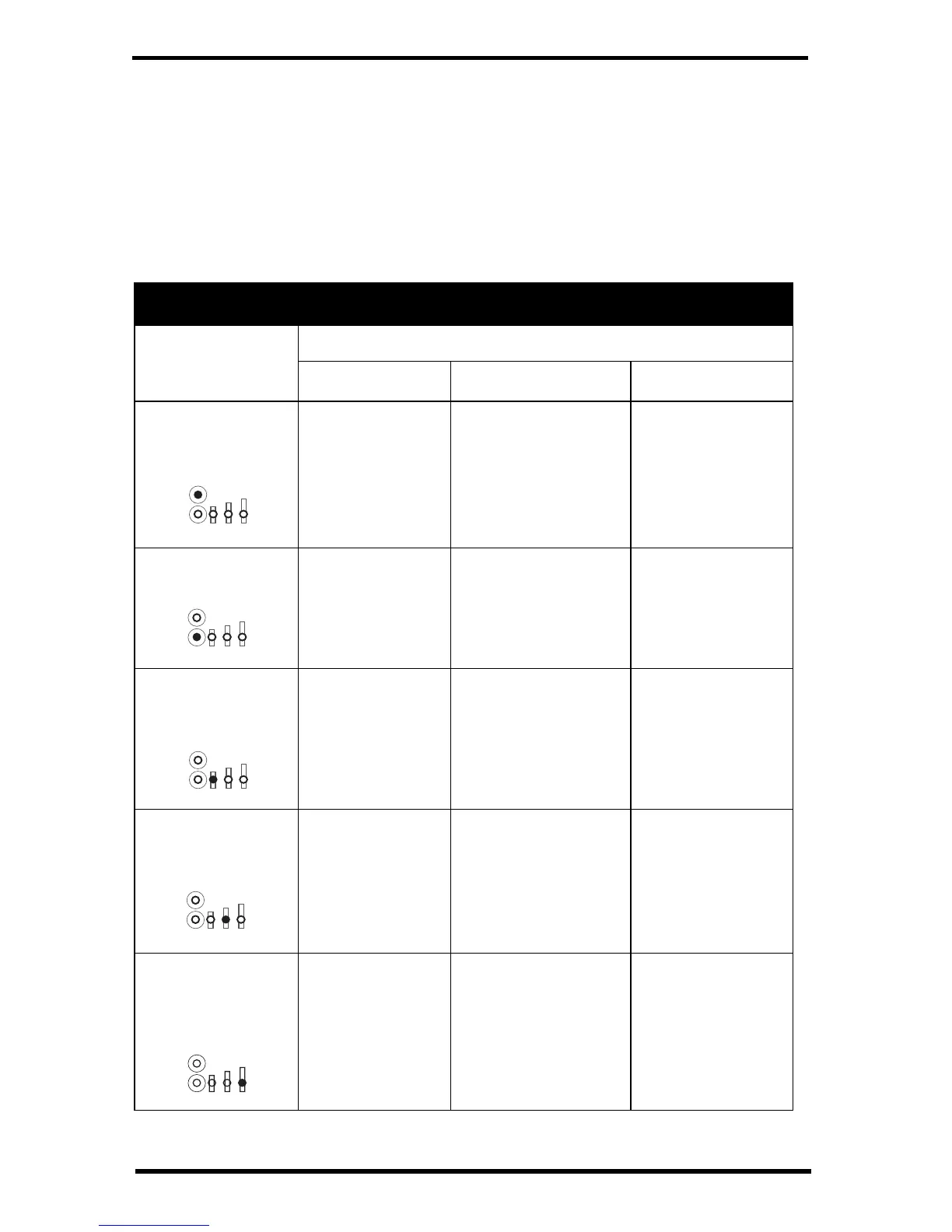
What do the LED lights indicate?
If there is an error in getting a signal, the status LEDs will flash to indicate the
type of error.
Refer to the table below to ascertain what the LEDs mean so that you can report
the problem to Technical Support.
Vantage Connect: Normal and Error LEDs
Vantage Connect Status LEDs
LED Position
and What it
Indicates
Color Indicates
Green Yellow Red
Upper LED:
Weather Station
Status
Receiving
weather station
packets, normal
function.
Searching for
weather station
signal.
No weather station
signal. Contact
Tech Support.
Cell Status 1:
Modem Activation Modem activated. Modem is activating. Modem not
activated. Contact
Tech Support.
Cell Status 2:
Cellular Signal
Strength
Strong signal. Low signal.
Vantage Connect will
function in this
location, but move if
possible.
No signal.
Vantage Connect
will not function in
this location.
Cell Status 3:
Network
Registration
Registered. Searching for tower. Registration failed.
Contact Tech
Support.
Cell Status 4:
Communication
with
WeatherLink.com
Good. Waiting for
connection.
Communication
error. Contact Tech
Support.


 To Next Page