Setup Mode
12
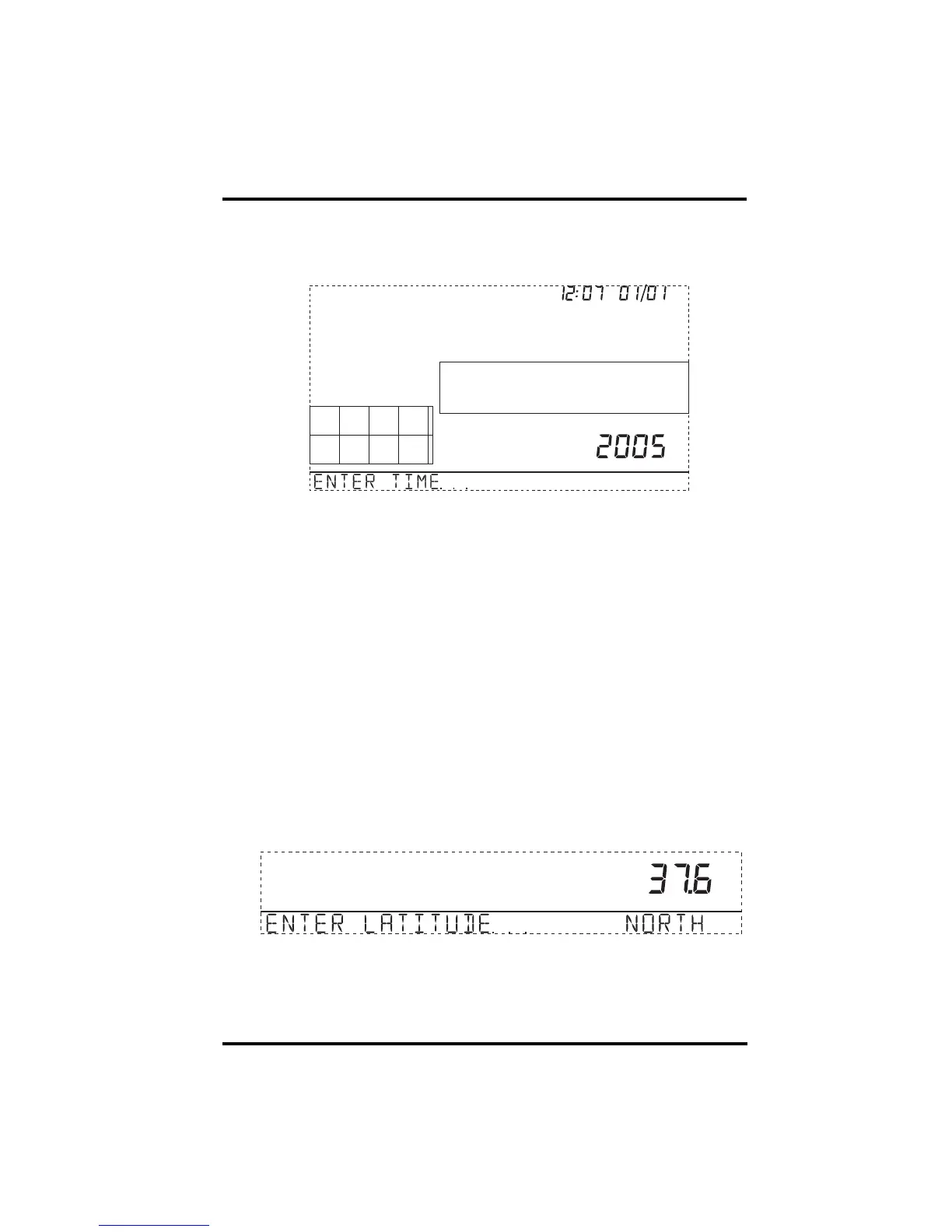
Screen 4: Time & Date
The very first time you power-up the console, the time and date are set to
12:00AM January 1
st
, 2004. Be sure to enter the correct date and local time.
Screen 4: Time & Date
To change the time and date:
1. Press the right and left arrows to select the hour, minute, month, day or year.
The selected time or date setting blinks on and off.
2. To change a setting, press the up and down arrows to adjust the value up or
down.
To choose a 12-hour or 24-hour clock, first select either the hour or minute
setting, then press 2ND and immediately press UNITS. This toggles the
clock setting between the two clock types.
To choose between a MM/DD or DD.MM display for the date, first select
either the day or month setting, then press 2ND and immediately press
UNITS. This switches the console from one date display to the other.
3. Press DONE to move to the next screen.
Screen 5: Latitude
The console uses latitude along with longitude to determine your location,
allowing it to adjust the forecast and calculate the times for sunset and sunrise.
Screen 5: Latitude
• Latitude measures distance north or south of the equator.
• Latitude is used with longitude to identify your position on earth.
am






 To Next Page