Console Diagnostic Screens
37
• A degree (°) sign displays in field 1 of the Reception Diagnostic screen to
differentiate which screen is currently being displayed.
Statistical Diagnostic Screen
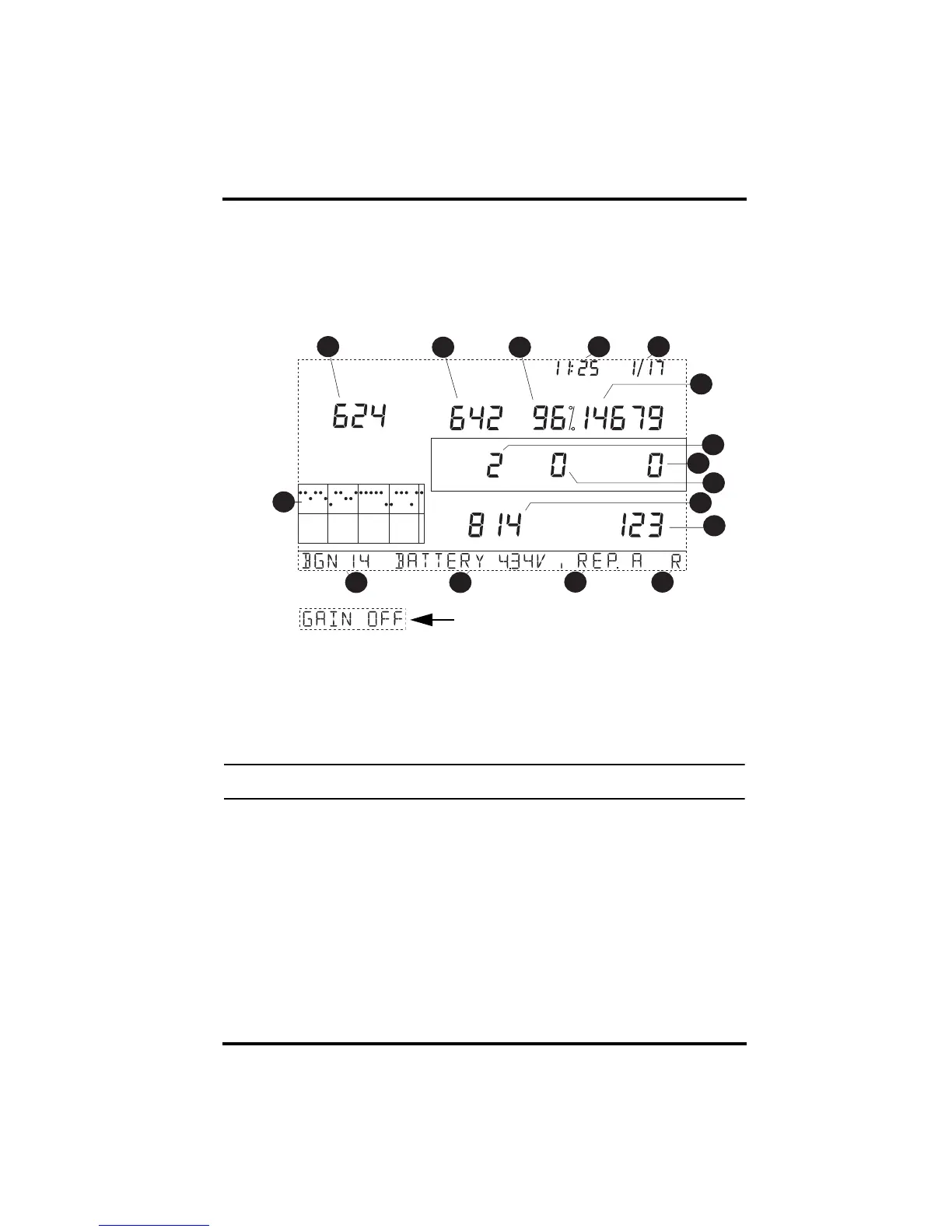
The Statistical Diagnostic displays information about how data is being
received from the weather station to the console. The information that is dis-
played in this screen includes:
Statistical Diagnostics Screen
1. Time of day. When WIND is pressed, the number of times the reed switch
was seen closed is displayed. The reed switch closes once each rotation.
Use WIND to toggle between these two values.
2. Date. When WIND is pressed, the number of times the reed switch was
seen open is displayed. Use WIND to toggle between these two values.
Note: The time of day and date displays can be toggled in both statistical and reception diagnostic
screens.
3. Number of packets containing errors that were received.
4. Number of missed data packets.
5. Percentage of packets received without errors.
6. Total number of packets received.
7. Number of times the console resynchronized with the transmitter.
8. Maximum number of packets missed in a row without resynchronization.
9. Current number of consecutive misses. The counter increments when the
console is synchronized but the packet is missed. The console will attempt
to resynchronize after 20 consecutive misses.
10. Longest streak of consecutive packets received.
9HUWLFDO6FDOH
67$7,2112
DP
/DVW GD\V
GD\
(YHU\
Alternate View of Banner
















 To Next Page