9.2 Message
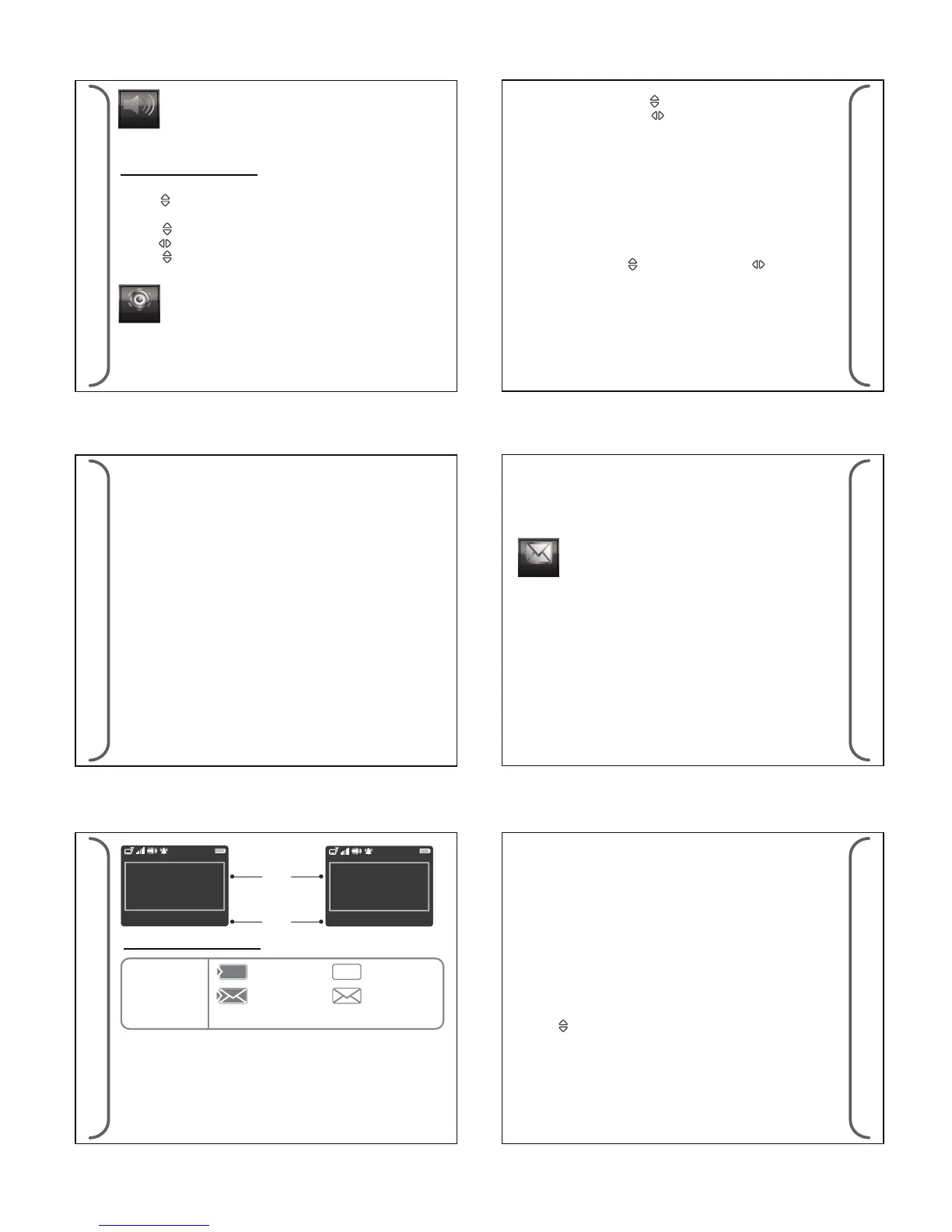
1 Unread 1 Unread
Main
EAM !
(Emergencncy Action Message)!
Defcon 2
To report back to camp
Pop out box for
new message
1 Unread 1 Unread
Main
SMS - EAM !
(Emergencncy Action Message)!
Defcon 2
To report back to camp
Message Inbox Icons
Message List
unread
message
read
message
Pe
Pe
Note: Pe indicate which capcode it received.
(a) Set Pager password
(a) SMS & Page Message
The device can receive SMS or Page messages.
- Select MENU>DEVICE SETTING>Keypad Program> Set pager
password (6 digits)
Press the Up/Down Key < > to adjust the numbers for password.
Press the Left/Right Key < > to go for another digit. Press <OK>
to set the password.
8.5 Keypad Program
9.1 Additional Device feature
• Canned message reply, up to 10 canned messages.
• Auto response message received/read and canned message reply
by SMS/GPRS.
• Incoming Call (ltering of pre-dened 10 authorized phone
numbers and accept ALL/ None option)
• Outgoing Call (pre-dened 30 phone numbers)
• Silent listen- in Call
• 20 call transactions log
• Airplane Mode
• SIM Card Lock Out (Operator dependent)
• Auto time and date update (GPS coordinate and GSM operator
dependent)
35
BR808P
BR808P
36
Every Capcode can have its own alert and alert length. For News
alert, it only can have short beeps.
8.4 Page Alert Setting
Page & News Alert
- Select MENU>ALERTS>PAGE ALERTS> Set page type
- Press < > Set page type
Choose <Select> to set.
- Press < > Select alert type
- Press < > Move to next box
- Press < > Select alert length value (not available for news alert)
Choose <Back> to set.
(b) Program Pager Capcode, Pager Source Type and Signal rate.
- Select <CAPCODE> or <SOURCE> or <SIGNAL RATE> to
program.
- The device can program up to eight capcode.
- Choose the source for each capcode. . (T for tone only pager, A
for Alphanumeric pager and N for Num).
- Select signal rate ( 512 bps or 1200bps or 2400bps) and Choose
<BACK> to set.
- Use Up/Down Key < > and Left/Right Key < > to program
the required eld.
8.6 AES Data Decryption
The device can provide symmetric key decryption function for
encrypted new page message coming from congured sub
addresses with Advanced Encryption Standard (AES).AES key and
sub address for decryption can be programmed via congurator.
37
BR808G
BR808G
38
The device can be congured to make outgoing calls to predened
numbers. Up to 10 predened numbers can be stored in the device.
These numbers are separate from the incoming numbers.
9 Br808G - POCSAG Alphanumeric Pager with GSM
Message Acknowledgement
• Cell Locate if GPS positioning is not available.
• Congurable events for one digital input and one digital output
• Manual / Auto SOS
It will have 4 folders for the messages
• SMS message folder - all SMS message will go into this folder
• Page Message folder - all page message will go into this folder
• News Message folder - all news message will go into this folder
• Archive Message folder - any message from Page & News message
can be (manually) archive into this folder.
39
BR808G
BR808G
40
1 Unread
message
(b) Reply, Archive & Delete a Message
- Select <OPTION> in the Message Screen to choose <REPLY>,
<ARCHIVE> or <DELETE>
Note: • A reminder alert (interval which is setup by user) for
unread messages when mode is set to audio or vibrate.
• Archive is for Page message only.
Manual Response Message (Canned Reply)
A SMS reply can be sent in response to a page or SMS message.
A list of canned reply message can be choose from message
option. The reply is in the form:
Page [<Device ID>:Page Reply]
<canned reply message>
[<1st 50 characters of original page message>]
SMS [<Device ID>:SMS Reply]
<canned reply message>
[<1st 50 characters of original SMS message>]
(c) Auto Response Message (Congurable)
1. Message Received/ Read
The device can be congured to auto-acknowledge page messages.
The acknowledgement will be sent via SMS to a prexed number
(congurable). There are two level of acknowledgement that can
be turned on.
Press < Reply > in the Message Option to select canned reply.
• Press < > to choose and press <Select> to conrm.


 To Next Page
 Loading...
