English
23
OPERA REEVO Cod. 420120426 REV. 1.0
INPUT AND OUTPUT SECTION
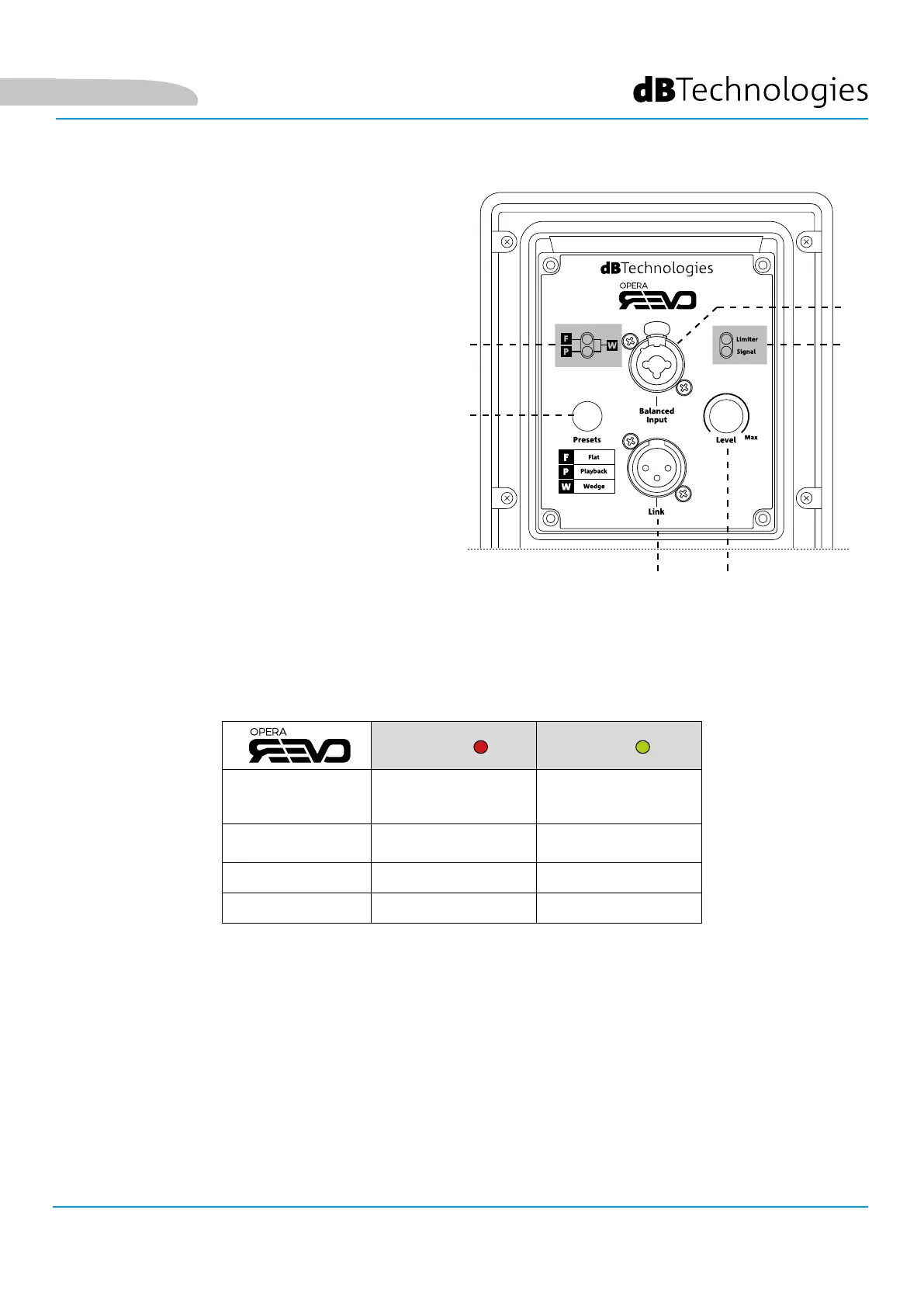
1. PRESETS
This button selects from three speaker equaliser
settings:
Flat - default setting, no equalisation active.
Playback - the response is optimised for playing
music.
Wedge - choose this setting when the speaker is
used as a stage monitor.
2. PRESET LED
The combination of the two LEDs indicates which
preset is active. If both are on, the Wedge preset
is selected.
3. INGRESSO AUDIO (“Balanced input”)
Input compatible with a balanced XLR/jack cable
to connect the audio signal from a mixer or
another speaker.
4. USCITA AUDIO (“Link“)
Output compatible with a balanced XLR/jack
cable to link the signal to other speakers in a daisy-chain configuration.
5. STATUS LED Main
The LEDs provide an immediate indication of the speaker status, in accordance with the logic summarised in the
table below:
Limiter Signal
Power up OFF OFF
Use
COMPRESSION
LIMITER STATUS
SIGNAL OUTPUT
STATUS
Partial malfunction ACTIVE ACTIVE
Partial malfunction CYCLIC FLASHING OFF
6. LEVEL
Knob to adjust the speaker level.
5
3
1
2
4 6



 To Next Page