English
25
OPERA REEVO Cod. 420120426 REV. 1.0
USE
CONNECTING AND LINKING THE AUDIO SIGNAL
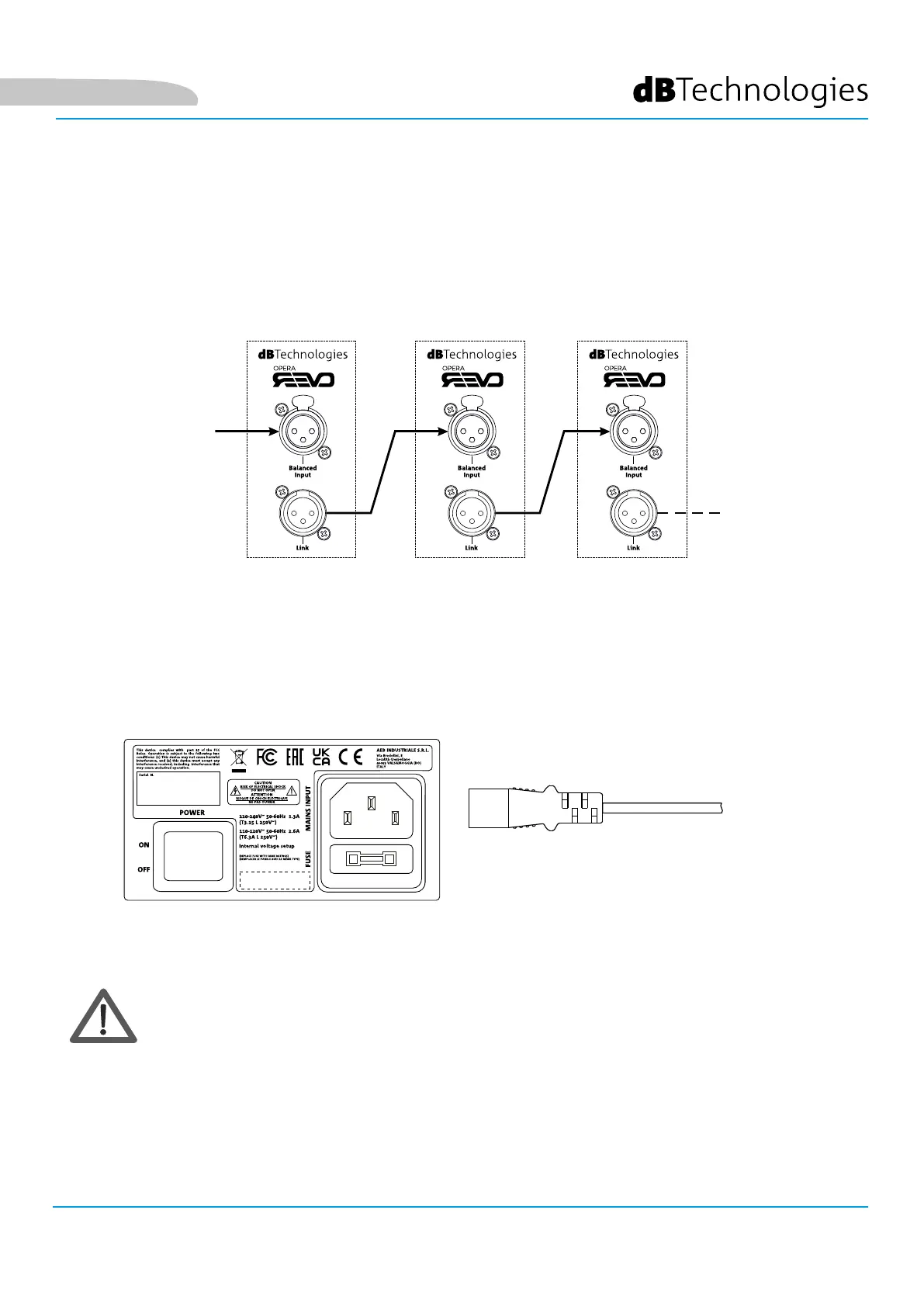
When linking the audio signal, connect the sound source to the “INPUT” of the first speaker first of all. Then
connect a balanced XLR cable from the “LINK” output of the first speaker to the “INPUT” of the second, and so on.
Repeat this step for all the speakers in the chain.
CONNECTING THE POWER SUPPLY
Connect the power cable provided to the MAINS INPUT socket, and then to the mains supply and turn the power
switch ON. The Limiter LED will flash briefly. Switch the speaker OFF before disconnecting the power cable.
CAUTION!
AUDIO
SOURCE
POWER
SUPPLY
• Check that the power supply voltage indicated corresponds to that in the country of use



 To Next Page