EasyManua.ls Logo

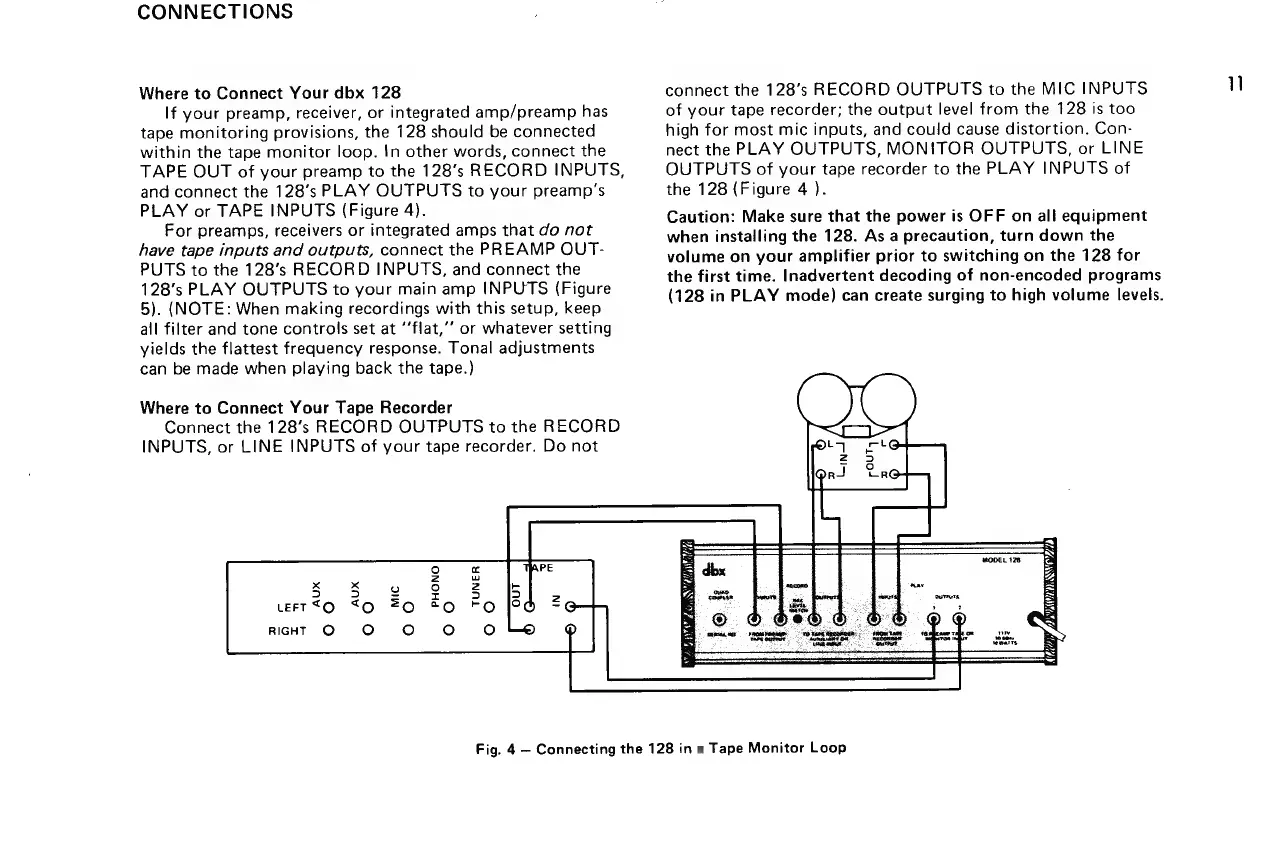
dbx 128 - CONNECTIONS; Connecting to Preamps;Receivers; Connecting to Tape Recorders

dbx 128
42 pages
Print Icon
To Next Page IconTo Next Page
To Previous Page IconTo Previous Page
Loading...
CONNECTIONS
Where
to
Connect
Your
dbx
128
If
your
preamp,
receiver,
or
integrated
amp/preamp
has
tape
monitoring
provisions,
the
128
should
be
connected
within
the
tape
monitor
loop.
{n
other
words,
connect
the
TAPE
OUT
of
your
preamp
to
the
128’s
RECORD
INPUTS,
and
connect
the
128’s
PLAY
OUTPUTS
to
your
preamp’s
PLAY
or
TAPE
INPUTS
(Figure
4).
For
preamps,
receivers
or
integrated
amps
that
do
not
have
tape
inputs
and
outputs,
connect
the
PREAMP
OUT-
PUTS
to
the
128’s
RECORD
INPUTS,
and
connect
the
128’s
PLAY
OUTPUTS
to
your
main
amp
INPUTS
(Figure
5).
(NOTE:
When
making
recordings
with
this
setup,
keep
all
filter
and
tone
controls
set
at
‘‘flat,’’
or
whatever
setting
yields
the
flattest
frequency
response.
Tonal
adjustments
can
be
made
when
playing
back
the
tape.)
Where
to
Connect
Your
Tape
Recorder
Connect
the
128’s
RECORD
OUTPUTS
to
the
RECORD
INPUTS,
or
LINE
INPUTS
of
your
tape
recorder.
Do
not
connect
the
128’s
RECORD
OUTPUTS
to
the
MIC
INPUTS
of
your
tape
recorder;
the
output
level
from
the
128
is
too
high
for
most
mic
inputs,
and
could
cause
distortion.
Con-
nect
the
PLAY
OUTPUTS,
MONITOR
OUTPUTS,
or
LINE
OUTPUTS
of
your
tape
recorder
to
the
PLAY
INPUTS
of
the
128
(Figure
4
).
Caution:
Make
sure
that
the
power
is
OFF
on
all
equipment
when
installing
the
128.
As
a
precaution,
turn
down
the
volume
on
your
amplifier
prior
to
switching
on
the
128
for
the
first
time.
Inadvertent
decoding
of
non-encoded
programs
(128
in
PLAY
mode)
can
create
surging
to
high
volume
levels.
y
SEES
GI
ZO
N
(kOe)
Fig.
4
Connecting
the
128
in
a
Tape
Monitor
Loop
11

Related product manuals