o
o
<§ll§>2
o o
CH (=
POWER
ON
OFF
•
!0<B
301
I.M
Mi
<oi
M,l
-IC*JB JOl
1,5.1
205 1
M
OtXB
101
M.I
DO DD
VOLU»* EXPANSION
'
GAIN CHANGE
IMPACT RESTORATION
MULTI-BAND EXPANDER
WITH
LOG (CONTROL SYSTEM
DD
DD
TRANSITION IMPACT
LEVEL RESTORATION
CD nil CD
SOURCE TAPE PRE POST BYPASS DISPLAY
o
o
quality, and we
think that
the 4BX is quite successful
at making compressed,
limited,
and clipped re-
corded music
approximate
live (see About Impact
Restoration), You will
quickly find
the best-sounding
settings for various
kinds of music,
classical, jazz,
and/or popular.
G
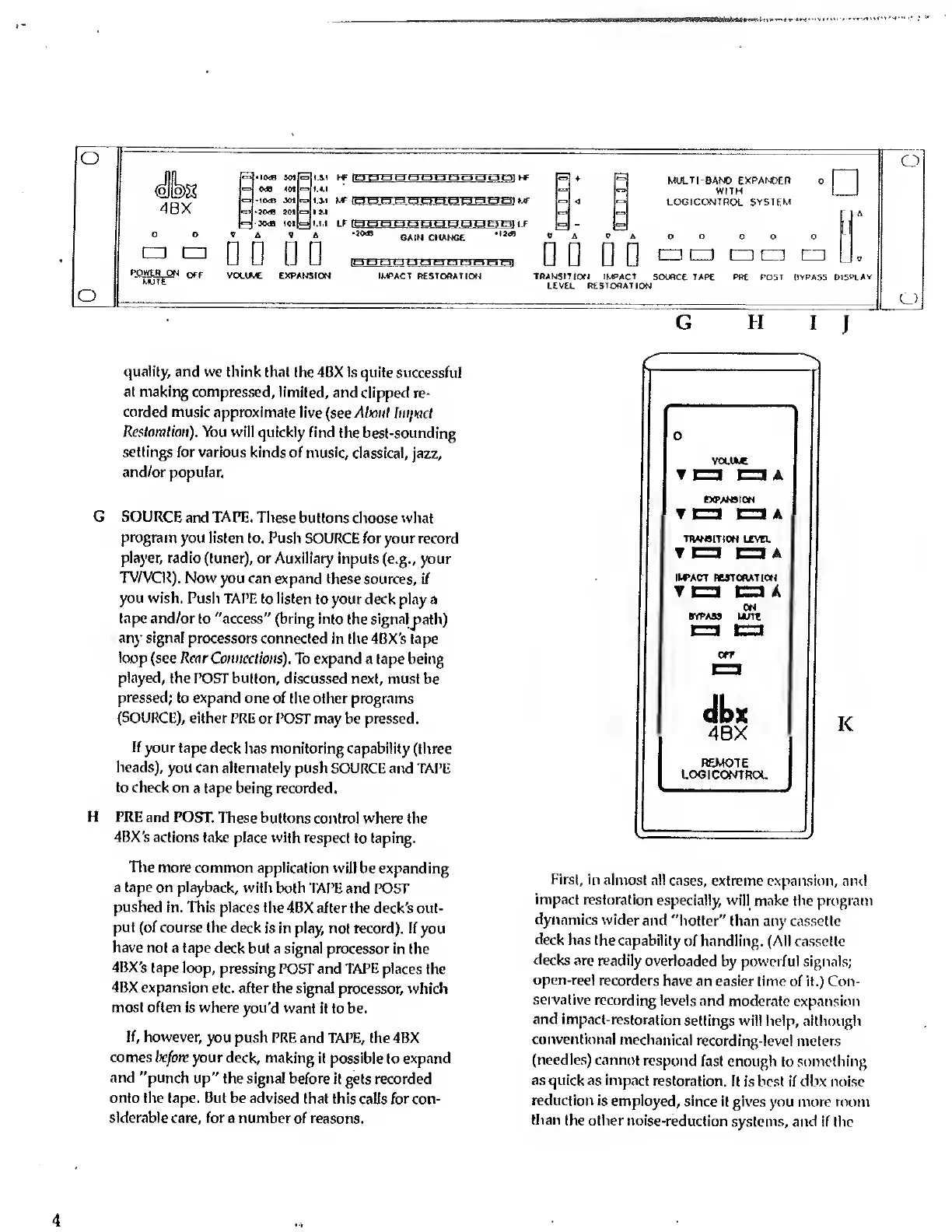
SOURCE
and TAPE.
These buttons
choose what
program
you listen to. Push
SOURCE for your record
player, radio
(tuner), or Auxiliary
inputs (e.g., your
TV/VCR). Now
you can
expand these sources, i/
you wish.
Push TAPE to listen
to your deck play a
tape and/or
to "access" (bring into
the signalpath)
any signal
processors connected in
the 4BX's tape
loop
(see Rear
Connections). To expand
a tape being
played,
the POST button,
discussed next, must
be
pressed;
to expand one
of the other programs
(SOURCE),
either PRE
or POST may be pressed.
If
your tape deck
has monitoring capability
(three
heads),
you can alternately push
SOURCE and TAPE
to
check on
a
tape
being recorded.
H
PRE and POST.
These buttons
control where the
4BX's actions
take place with respect
to taping.
The more
common application
will be expanding
a tape on playback,
with both TAPE
and POST
pushed
in. This places the
4BX after the deck's
out-
put (of
course the deck
is in play, not record). If
you
have not
a tape deck
but a signal processor in
the
4BX's tape loop,
pressing POST and TAPE places
the
4BX expansion
etc. after the signal processor,
which
most often
is where you'd
want it to be.
If, however,
you push
PRE and TAPE, the
4BX
comes
before your deck, making it possible
to expand
and "punch up" the signal
before
it
gets recorded
onto the tape. But be
advised that this
calls for con-
siderable
care, for a number
of reasons.
H
I
J
VOLU*
ttPANSION
TO DA
TRANSITION LCVTL
T
1=1 EZ3
A
IWACT RESTORATION
ON
BYPASS U/Tt
dbx
4BX
REMOTE
LOGICOrJTROL
K
First, in
almost all cases,
extreme expansion,
and
impact
restoration
especially, will make
the
program
dynamics wider
and "hotter"
than any cassette
deck
has the
capability
of handling. (All
cassette
decks
are readily
overloaded
by powerful signals;
open-reel
recorders
have an easier time
of
it.)
Con-
servative recording
levels and
moderate expansion
and
impact-restoration
settings will help, although
conventional
mechanical
recording-level meters
(needles) cannot
respond fast
enough to something
as
quick as impact
restoration.
It is best if dbx noise
reduction
is employed,
since
it gives you more room
than
the other
noise-reduction
systems, and if
the
4


 To Next Page
 Loading...