Hold: (0ms to 500ms) The Hold control sets the amount of delay time the gate is held open after the signal pass-
es below the threshold point.
Release: (From 360dB/sec to 5dB/sec) Release sets the speed at which the gate “closes” after the end of the Hold
time is reached.
TCM™ : (Off/On) Transient Capture Mode™ is the method by which the gate is able to catch the very beginnings
of fast transient signals. Using TCM™ results in a smoother sounding signal, because of the increased ability to use
slightly less aggressive settings and still achieve the desired effects in gating, compression, and limiting.
TCM™ Time: (From 0µs to 3ms) TCM delay time is the length of time the audio signal is delayed, allowing the
detectors to begin to react to the signal. For a complete explanation of TCM™ Transient Capture Mode™, see sec-
tion 6.
EDITING COMPRESSORS
Parameters of the Compressor
The parameters included on the DDP for compression operations are as follows:
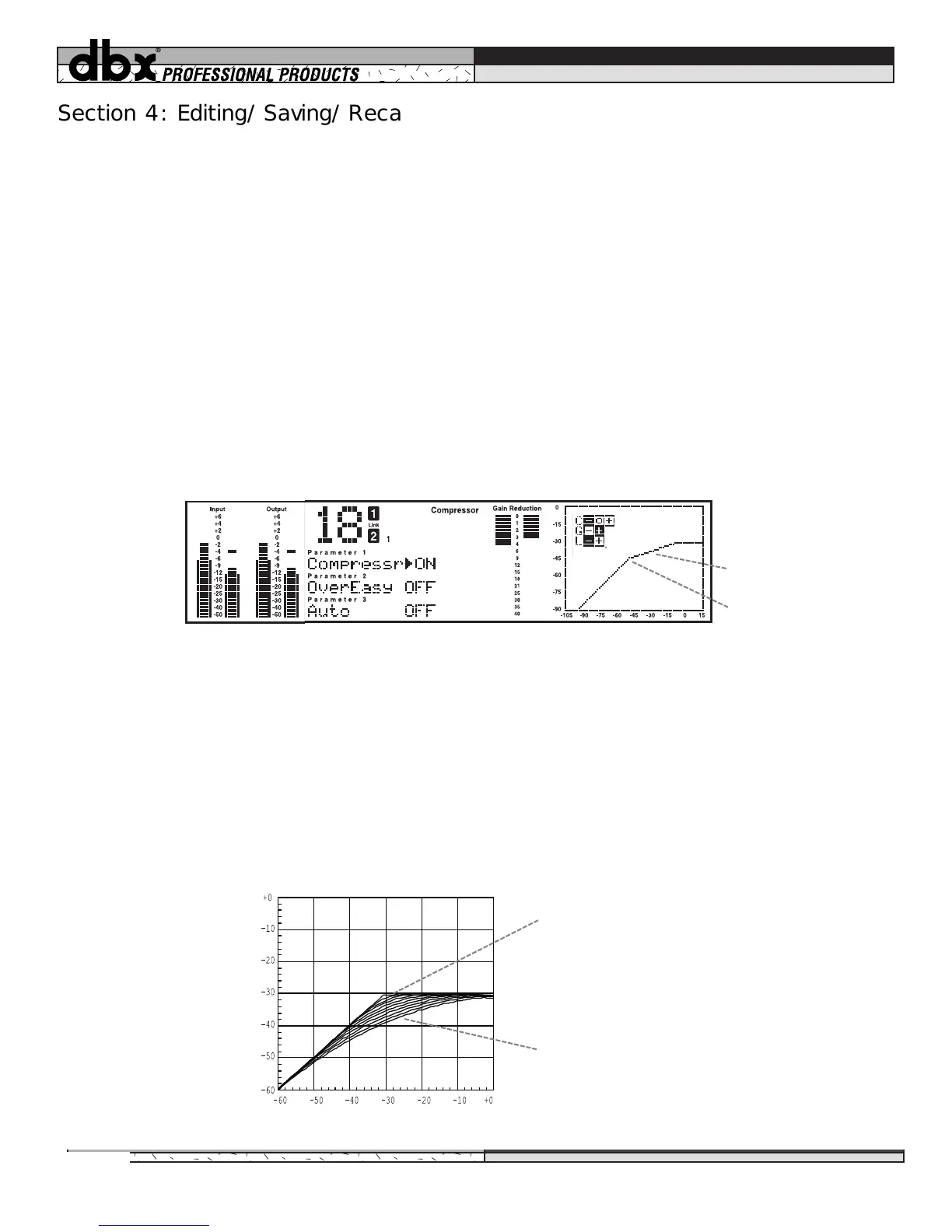
Compressor: (Off/On) As with the gate, the compressor section must be turned on to be active. The curve win-
dow will show the compression threshold, as well as the ratio and gain levels.
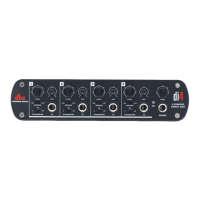
dbx OverEasy®: (Off, Knees 1-10) Activating the OverEasy® threshold characteristic softens the compression
knee, making the transition between uncompressed and compressed signal as seamless as possible. In addition to
having the on/off setting, you may choose varying knee curves with the VariKnee™ variable knee algorithm (see
figure below). Selecting Knee #1 activates the curve next to the hard knee curve, #2 selects the next softer knee,
etc., up to Knee #10, which is the softest knee. Figure 16 below illustrates the varying degrees of OverEasy soft
knee settings that VariKnee™ provides. Although the curve window does not indicate the softness of the knee, be
aware that this kind of flexibility in knee settings is available when you change the VariKnee™ settings.
Section 4: Editing/Saving/Recalling Programs
Figure 15: Compressor parameters and curve
Threshold point
Compressor Ratio
Figure 16: OverEasy® VariKnee™ curves
Knee #1 - Small OverEasy range
Knee #10 - Larger OverEasy range
Input
Output
16


 To Next Page