13
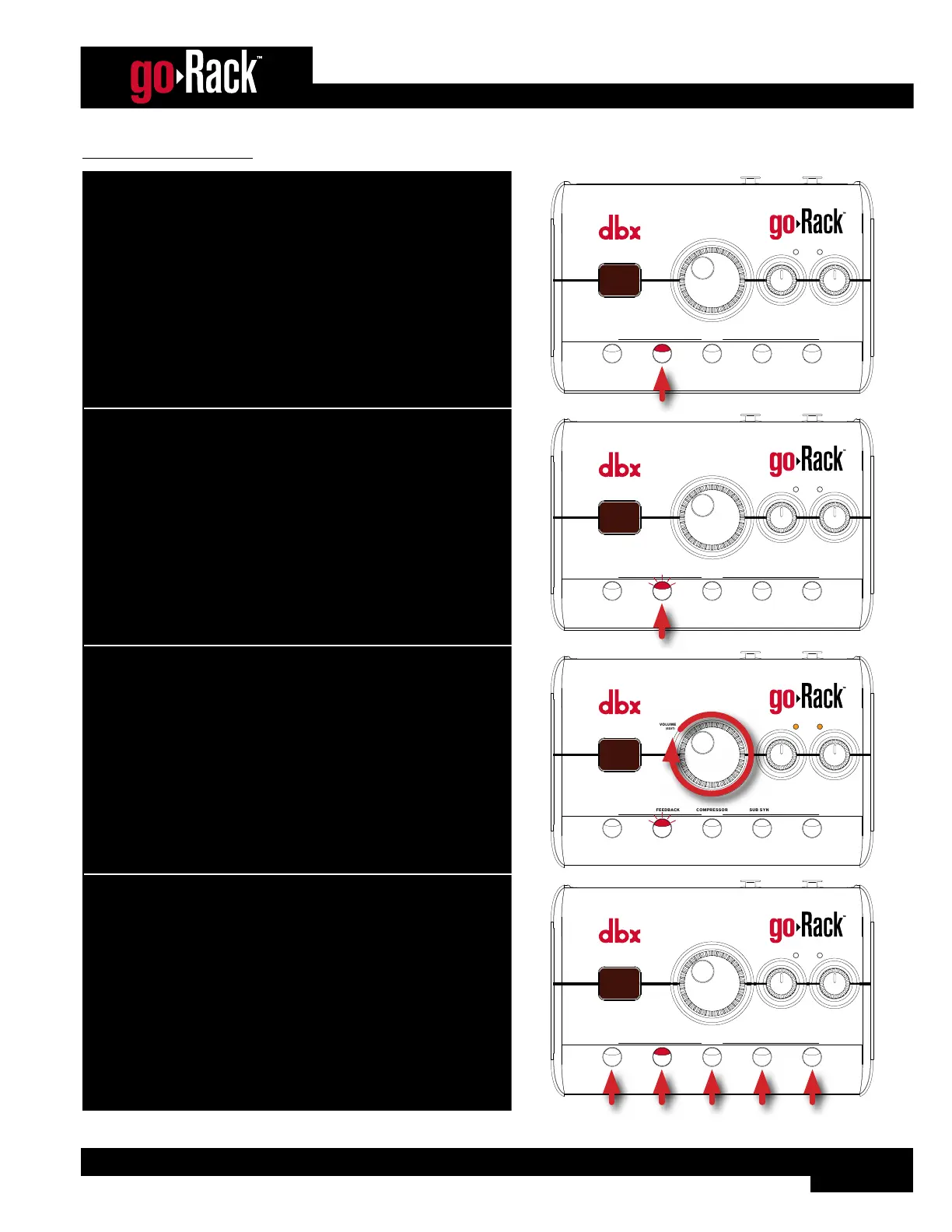
To use Anti-Feedback:
1. Press the ANTI-FEEDBACK button to enable the Anti-Feedback
module (the LED will light, indicating the processing module is
enabled).
ANTI-FEEDBACKMUTE
VOLUME
(EDIT)
MODE
EQCOMPRESSOR
(HOLD) EDIT
SUB SYNTH
INPUT
SIGNAL
LEFT RIGHT
9 9
7
0
2. To adjust the filter width options, press and hold the
ANTI-FEEDBACK button for 2 seconds (the ANTI-FEEDBACK LED
will flash, indicating Anti-Feedback Edit mode is active).
ANTI-FEEDBACKMUTE
VOLUME
(EDIT)
MODE
EQCOMPRESSOR
(HOLD) EDIT
SUB SYNTH
INPUT
SIGNAL
LEFT RIGHT
9 9
2
3. Turn the VOLUME (EDIT) encoder to select the desired filter width
option (see ‘Available Anti-Feedback Options’ on page
12 for option descriptions).
ANTI-FEEDBACKMUTE
VOLUME
(EDIT)
MODE
EQCOMPRESSOR
(HOLD) EDIT
SUB SYNTH
INPUT
SIGNAL
LEFT RIGHT
9 9
3
4. When done, press any button to exit Edit mode.
Note that any set AFS filters will be automatically cleared whenever
the AFS button is disabled or the goRack is power cycled.
ANTI-FEEDBACKMUTE
VOLUME
(EDIT)
MODE
EQCOMPRESSOR
(HOLD) EDIT
SUB SYNTH
INPUT
SIGNAL
LEFT RIGHT
9 9
7
0


 To Next Page