23
Application 2: Solo Artist/Duo Performance
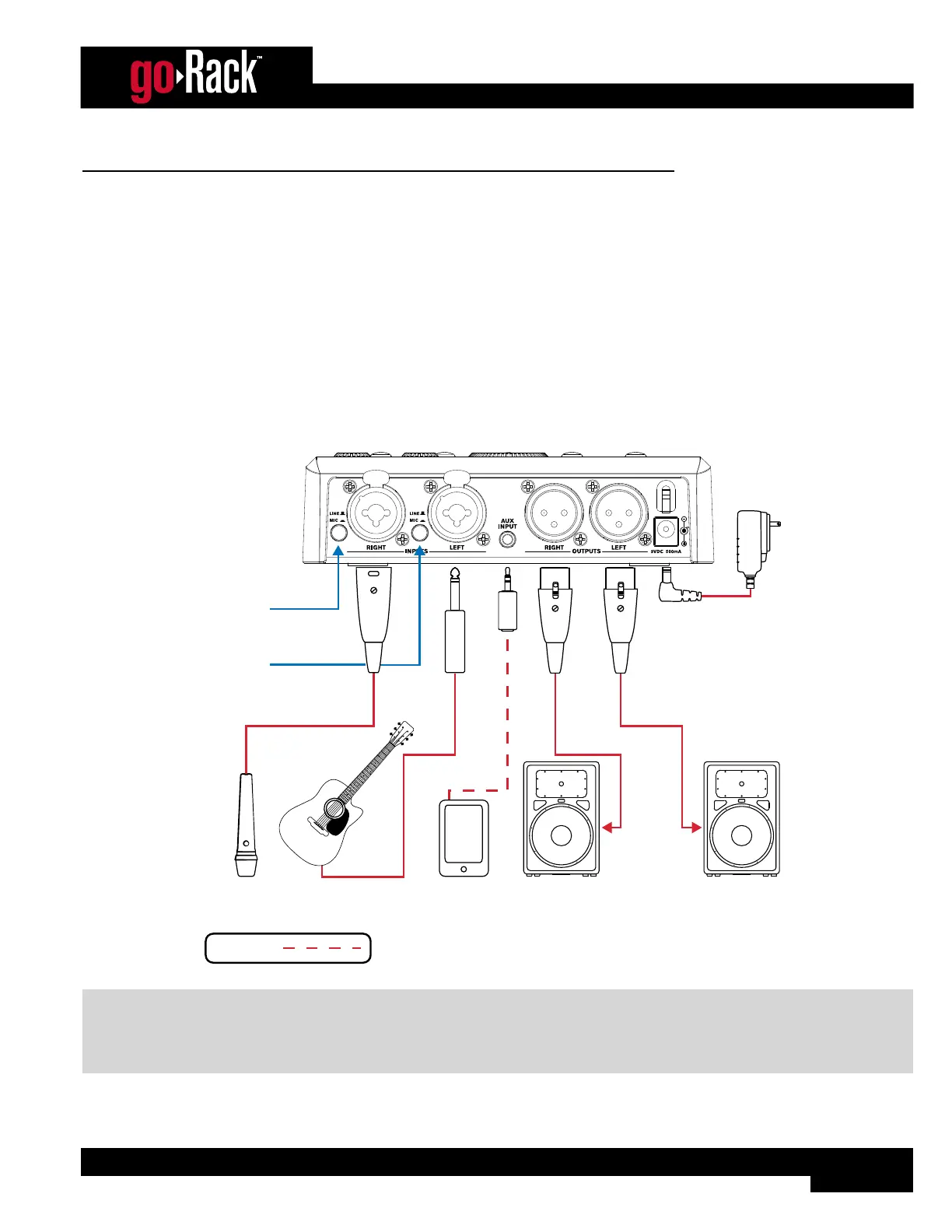
This application is suited for solo artist/duo performance applications and provides a 2-channel mixer with system processing.
The goRack’s two combination MIC/LINE inputs can be used for connecting microphones or direct instruments. The AUX
INPUT can be used for connecting a mobile device or music player for backing tracks or music playback between sets.
Application Notes:
• Make sure your powered speakers (or amplifiers) are turned off before making connections.
• Make connections as described in ‘Making Connections’ on page 5 then apply power to the system according
to the instructions described in ‘Applying Power’ on page 5.
• The routing 3 option will work best for this application. See ‘Configuring The goRack’s Routing’ on page 6 for
information on goRack routing options.
Powered
Speaker
Powered
Speaker
Acoustic Guitar
w/ Pickup
Microphone
Set to
MIC
Set to
LINE
Portable
Music Player
Line Inputs
Stereo Cable
Included Harman
Power Adapter
Microphone/Instrument Connections
Optional
NOTE: A stereo (Tip-Ring-Sleeve) Mini cable should be used for the connection between the portable music player and
AUX INPUT. If connecting instruments to the goRack’s LEFT/RIGHT inputs using 1/4” plugs, unbalanced TS (Tip-Sleeve)
instrument cables should be used. See ‘Audio Cable Diagrams’ on page 26 for more information on these cable
types.


 To Next Page