22
Application Diagrams
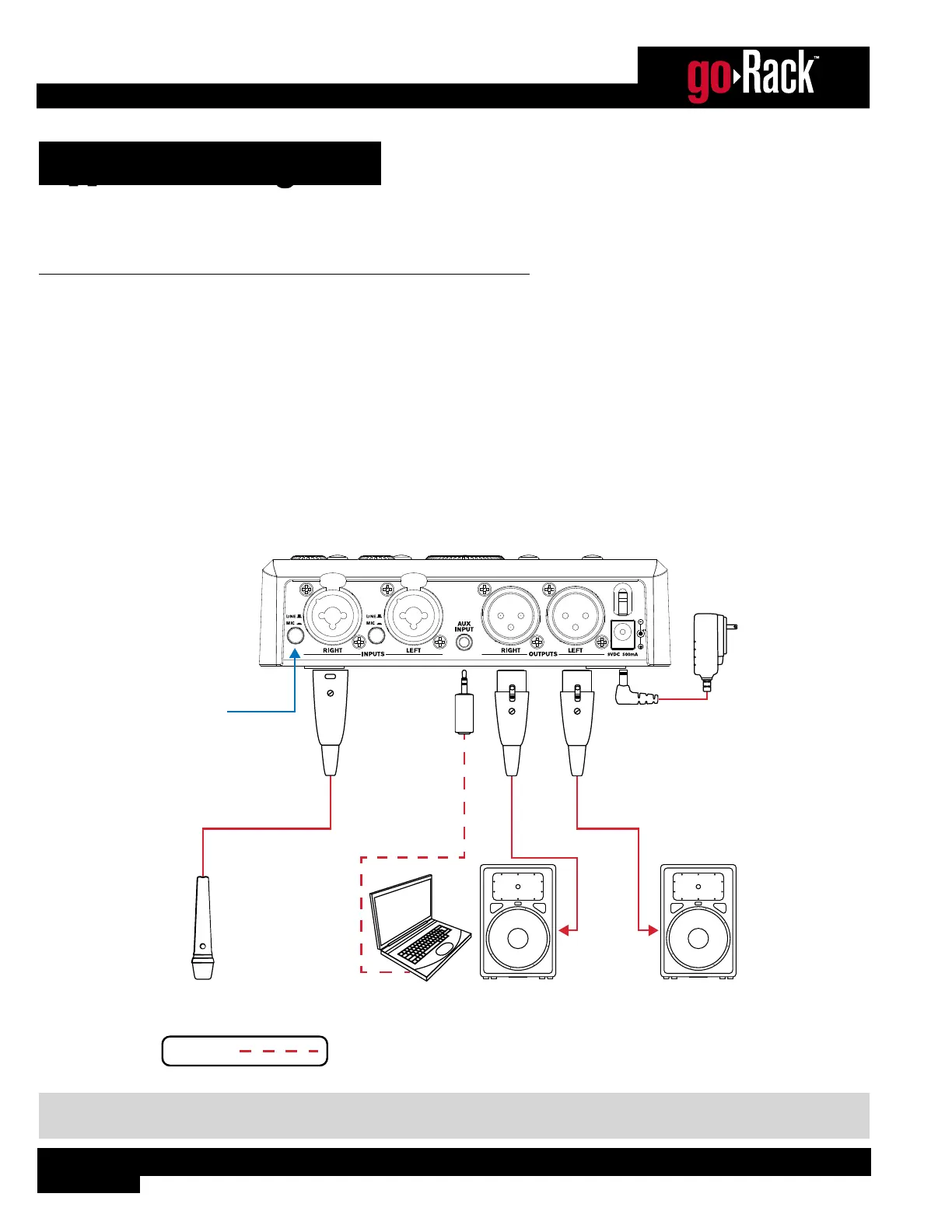
Use these diagrams and notes for reference when initially connecting and configuring the goRack for your application.
Application 1: Speech/Presentation
This application is suited for speech/presentation applications and provides a 2-channel mixer, aux input, and system
processing. The microphone can be connected to the goRack’s MIC/LINE 1 input. If a second microphone is required, the
MIC/LINE 2 input can be used. The AUX INPUT can be used for connecting a portable device for audio playback.
Application Notes:
• Make sure your powered speakers (or amplifiers) are turned off before making connections.
• Make connections as described in ‘Making Connections’ on page 5 then apply power to the system according
to the instructions described in ‘Applying Power’ on page 5.
• The routing 3 option will work best for this application. See ‘Configuring The goRack’s Routing’ on page 6 for
information on goRack routing options.
Powered
Speaker
Powered
Speaker
Microphone
Set to
MIC
Portable
Device
Line Inputs
Speech/Presentation Connections
Stereo Cable
Included Harman
Power Adapter
Optional
NOTE: A stereo (Tip-Ring-Sleeve) Mini cable should be used for the connection between the portable device and AUX
INPUT. See ‘Audio Cable Diagrams’ on page 26 for more information on these cable types.


 To Next Page