15
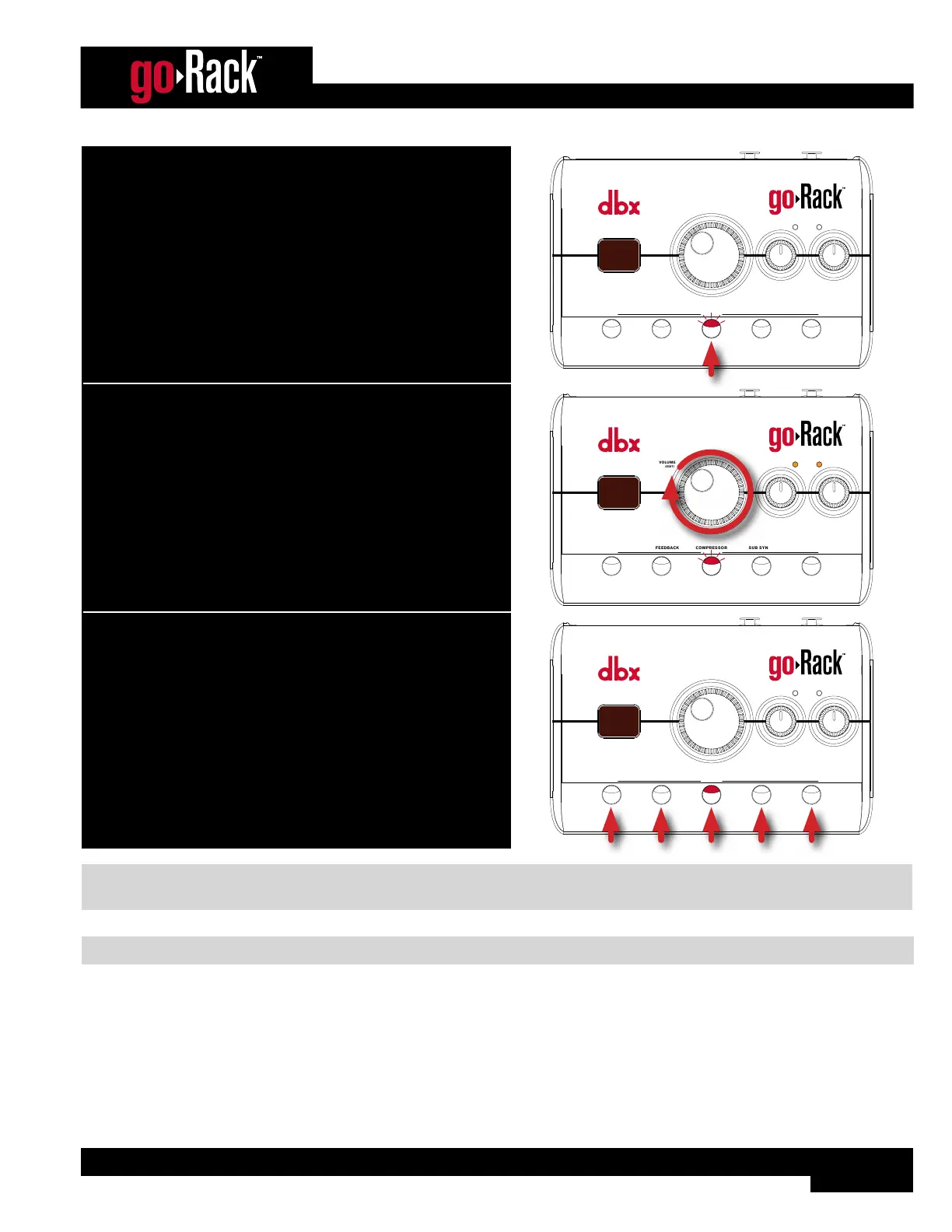
2. To edit the compressor, press and hold the COMPRESSOR button
for 2 seconds (the COMPRESSOR LED will flash, indicating
Compressor Edit mode is active).
ANTI-FEEDBACKMUTE
VOLUME
(EDIT)
MODE
EQCOMPRESSOR
(HOLD) EDIT
SUB SYNTH
INPUT
SIGNAL
LEFT RIGHT
9 9
4
5
3. While auditioning the sound source(s), turn the VOLUME (EDIT)
encoder until the desired amount of compression is achieved.
ANTI-FEEDBACKMUTE
VOLUME
(EDIT)
MODE
EQCOMPRESSOR
(HOLD) EDIT
SUB SYNTH
INPUT
SIGNAL
LEFT RIGHT
9 9
5
0
4. When done, press any button to exit Edit mode.
ANTI-FEEDBACKMUTE
VOLUME
(EDIT)
MODE
EQCOMPRESSOR
(HOLD) EDIT
SUB SYNTH
INPUT
SIGNAL
LEFT RIGHT
9 9
7
0
NOTE: Applying too much compression can have adverse side effects, such as level “pumping” or potential increased risk
of system feedback. If these conditions occur, it is recommended that the compression amount be reduced.
NOTE: When applying compression, make sure the “Clip” or “Limit” LEDs on your amp or powered speakers do not light.


 To Next Page