36
US
CA
Care and cleaning
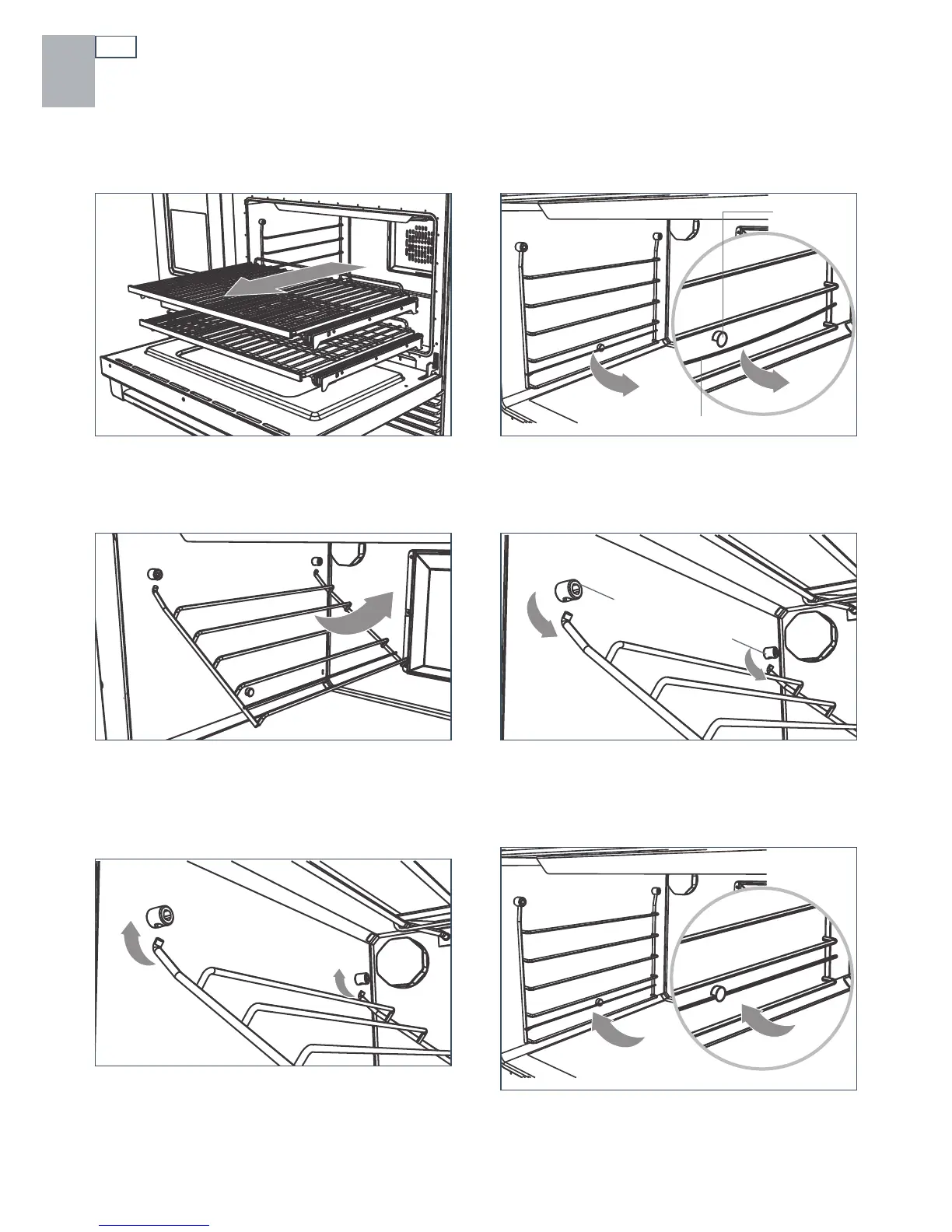
Removing and replacing the side racks
To remove side racks
To replace side racks
1
Remove any shelves first. See section
‘Positioning the shelves’ for instructions.
1
Supporting the side rack with your hand
from underneath, hold it almost horizontally
and locate the prongs into the mounting
slots.
2
Ensure the prongs are fully inserted into the
slots, then lower the side rack carefully and
gently push the retaining wire underneath
the lock stud.
3
Swing the bottom of the side rack up
towards the center of the oven until it is
almost horizontal.
4
Slide the prongs at the top out of the
mounting slots.
2
Gently pull down on the retaining wire from
underneath the lock stud. The retaining wire
will pop out.
Retaining wire
Mounting slots
Lock stud



 To Next Page