EasyManua.ls Logo

DECKEL FP1 - Active digital position readout unit; Moving past reference points; Setting the reference points; Refinding reference points

DECKEL FP1
5 pages
Print Icon
To Next Page IconTo Next Page
To Previous Page IconTo Previous Page
Loading...
Active
digital
position readout
unit,
cont'd
Moving
past
reference
Points
The
reference
points
are
located
near
the
zero
position
of
the
coarse
scale
in all
three
axes.
-
Operate
M
t.t
(unless
LED is
already
illuminated).
-
Operate
@
t.y'
LEDs
(6)
and
(9)
will
light up; actual'
value
readout
blocked.
-
Operate
@t.t
and
the two
feed buttons
on
operator
control
panel
if
reference marks
are to be
approched at
feed
rate.
-
Move machine
axes
(slides)
beyond
reference
marks
consecutively
by operating
feed
control
lever and
rapid
traverse
button:
actual-value
readouts
will
start counting
from
reference
mark;
LEDs
(9)
will be
extinguished.
Setting
the
reference
Points
(only
in
'manual'mode)
After
aligning
the machine
with
the workpiece
datum, set
actual-value
counters
to
a
reference
value,
usually zero
lref'
erence
point
=
zero
point
of
actual-value
readout).
Align
in
spindle
longitudinal
direction,
for
example with a
bore or
workpiece
edge, by
moving
end
face of
tool into
contact
with
workPiece.
-
Align
with
reference
point
(in
at
least one axis)'
-
Operate one
of the
reference
point
keys
(8).
-
Operate
El
t.t
(to
zero setpoint
readout),
key
refer-
ence
value
into
setpoint
readout
(5)
on
keyboard
(l)
and
use
[l
key to
determine
sign.
-
Operate
transfer
key
(2)
of axis
just
aligned:
keyed-in
value will appear
in actual-value
readout.
Reference
point
in this axis
is now
stored.
-
Repeat
this
procedure
in the
other axes.
lf
several
reference
points
have been
set, the
actual-value
readout will
show
the distance
from each
reference
point
upon
operating
the associated
reference
point
key.
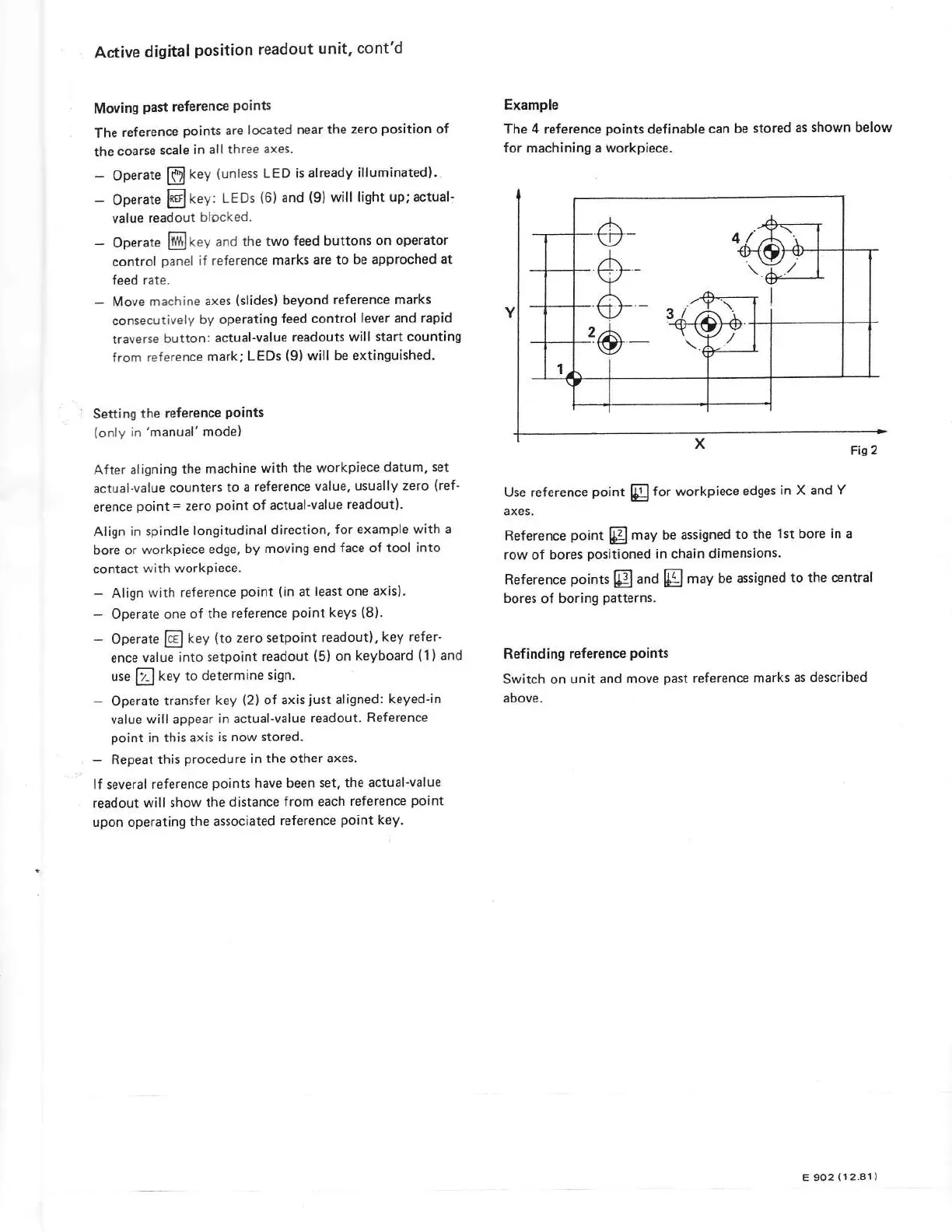
Example
The 4
reference
points
definable can
be
stored
as
shown below
for
machining a
workpiece.
Fig2
Use reference
point
@
for workpiece
edges
in X and
Y
axes.
Reference
point
@l
may be
assigned
to the
lst bore in
a
row of bores
positioned
in chain dimensions.
Reference
points
@
and
@
may
be assigned
to
the central
bores of boring
patterns.
Refinding
reference
points
Switch on
unit and
move
past
reference
marks
as described
above.
o-
d
#
E 9O2
(12.81)