EasyManua.ls Logo

DECKEL FP1 - Active digital position readout unit; Positioning; Preparing the positioning operation

DECKEL FP1
5 pages
Print Icon
To Next Page IconTo Next Page
To Previous Page IconTo Previous Page
Loading...
'rctive
digital
position
readout unit, c-ont'd
Positioning
First
set
at least
one
reference
point
with or
without refer'
ence
mark
evaluation.
The
position
readout
will
count from
the
momentary
reference
Point.
ln'manual'mode
Sl
Use
handwheel
or
pow.er
feed to
move
machine slide(s).
Feed motions
-
Operate
'Feed'keY
@.
-
Operate
both
feed buttons on operator
panel
and
rapid
traverse
but
in addition,
if required.
Automatic
positioning
,odes:'absolute
dimensions';
'incremental
(chain)
dimensions'.
Absolute
d imensions:
all dimensions,
including
setpoints,
refer to
the
reference
point
in the axis concerned.
lncremental
(chain)
dimensions:
each dimension
refers to
the last
previous
actual
position.
Setpoint
values will be
keyed
in
as chain
dimensions,
but actual-value
readouts
show
absolute
dimensions.
Starting
situation:
'manual'
mode,
necessary
reference
points
already
set.
Preparing the
positioning
operation
-
lf
'REF'
lamp
(6)
is
still
illuminated,
operate
'REF'
key
to extinguish
LED.
-
Operate
mode
key
E
otE.
-
Set
feed rate
o,n
operator control
panel
and operate
feed
buttons.
rosltlOnlng
-
Operate
CE
key
(1)
{not
required
if
previous preset
value has already been
transfered
to
an actual-value counter).
-
Key
in
setpoint
value
on
keyboard
(1
)
in either absolute
or
chain dimensions.
depending
on
mode
selected.
-
Operate transfer
key X,
Y
or Z
(21
.
-
Engage
feed control
lever in accordance with
external
axis and
direction
indicator
(Fig
3): axis will
start
mov-
ing and
stop
in setpoint
position.
-
Disengage
feed control
lever
(move
lever
to
middle
posi-
tion).
Any
positioning
operation can
be interrupted
by
means of
El
n.t
(131.
To resume the
positioning
operation, again
operate transfer
key in the axis concerned.
To
change
the
direction of a motion, disengage
feed control
t.ver,
key in
new
position
and then operate
transfer key
in
,e
axis
concerned.
E
9O2a
(
12.81)
lmportant
lf a
'chain
dimension'
positioning
operation
is interrupted
by means
of
'stop'
button
(13),
the actual
position
at that
point
will be the
reference
point
for the
next
positioning
operation
in chain
dimension.
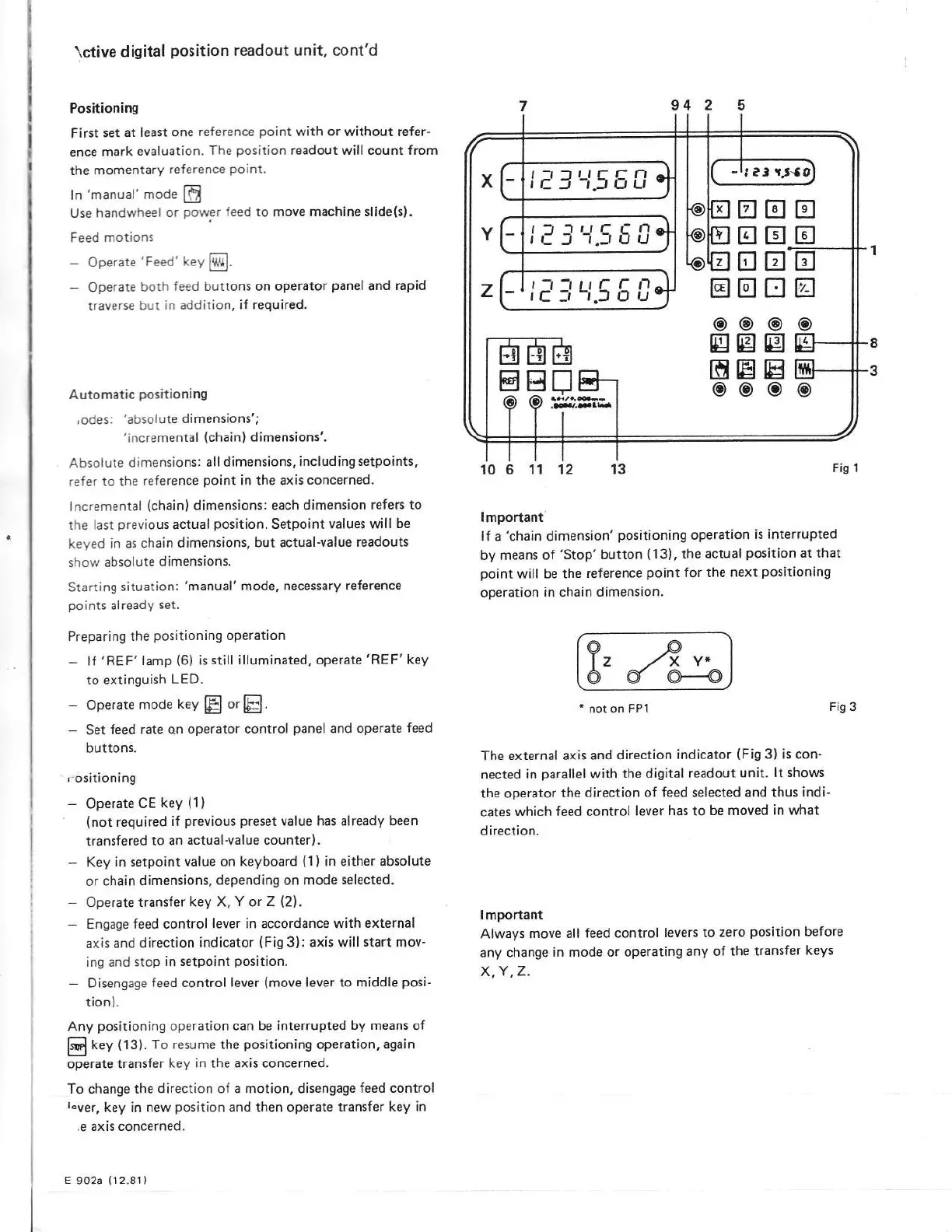
Fig 1
g,
4,.
6 6
re
*
not on FP1
Fis
3
The external
axis
and direction
indicator
(Fig
3) is con-
nected in
parallel
with
the digital
readout
unit.
lt
shows
the operator
the
direction of
feed selected and thus
indi-
cates
which
feed control
lever
has to
be moved
in
what
direction.
lmportant
Always move
all
feed control
levers to
zero
position
before
any
change
in
mode
or operating
any of the
transfer
keys
X,Y,Z.
trtr
trtr
trtr
trtr
@@
Bg
Etr
oo
tr
tr
tr-
a
o
E}
E[
@
tr
o
E
E
o
-riaSrJ-50
t73r!5EA