EasyManua.ls Logo

DECKEL FP1 - Active digital position readout unit; Technical data; Identification of controls; Switching on

DECKEL FP1
5 pages
Print Icon
To Previous Page IconTo Previous Page
Loading...
\ctive
digital
position
readout
unit
Electronic
linear
measuring
and
positioning
system
for
automatic
slide
motions
to
preselected
positions
in absolute
and
incremental
(chain)
dimensions.
Def
inition
of
4 reference
points;
storage
of
tool
compensa-
tions;
meiric
inch
conversion.
Technical
data
Numberof
digits
........7
Resolution
(selectable)
. . 0.01/0.005
mm
swirchableto...
0.0005/0.0002inch
,denti{ication
of controls
1 lnput
k
E,o
val ues
Decimal
point
key
Sign
input key
(plus
sign will not appear
in
readout)
Cancelling
key for setpoint
values or
error indications
eyboard
E
Numerical
keys for
preset
or
setpoint
.2
x
.E
o
C
o-
tL
Fig
1
Switching
on
Switch on
machine
(main
disconnect
switch)
and
digital
readout
unit
(switch
on
rear
side of
housing).
At
f
irst all
LEDs and
readouts
will
light
up
(lamp
test).
Setpoint
readout:
88888888
Actual-value
readout
+
18888888
After approx
1.5 sec the actual-value
readouts
(counters)
will
show the
position
values
assigned
to
the
reference
marks
by
def ining the
reference
point
[]
before
the unit
was
switched
off.
(All
scales
are
provided
with a
reference
mark
in addition
to the
scale
divisions.l
-
The readouts
will
count
in
the
measuring
system
(mm
or
inch)
last
used.
lf required, operate
'inch'
key
(1
1
)-
-
Check
resolution
(smallest
increment
shown)
in
active-
value
readouts
(71.
operatinS
key
(12)
if
required.
Move
past
reference
marks if
reference
points
are
to
be
set
reproducibly
or
previously
set reference
points
are
to
be
reproduced
after
switching
the
readout
unit off
and later
on
again
(for
details
see below).
trtr
El tr
Etr
trtr
@@
Bg
trtr
@o
tr
tr
E
a
@
trl
Mil
@
tr
@
EI
ffi
o
-rtat
rJ{o
l;:3,L!.58fr
te
lL.584
tr
a
@
2
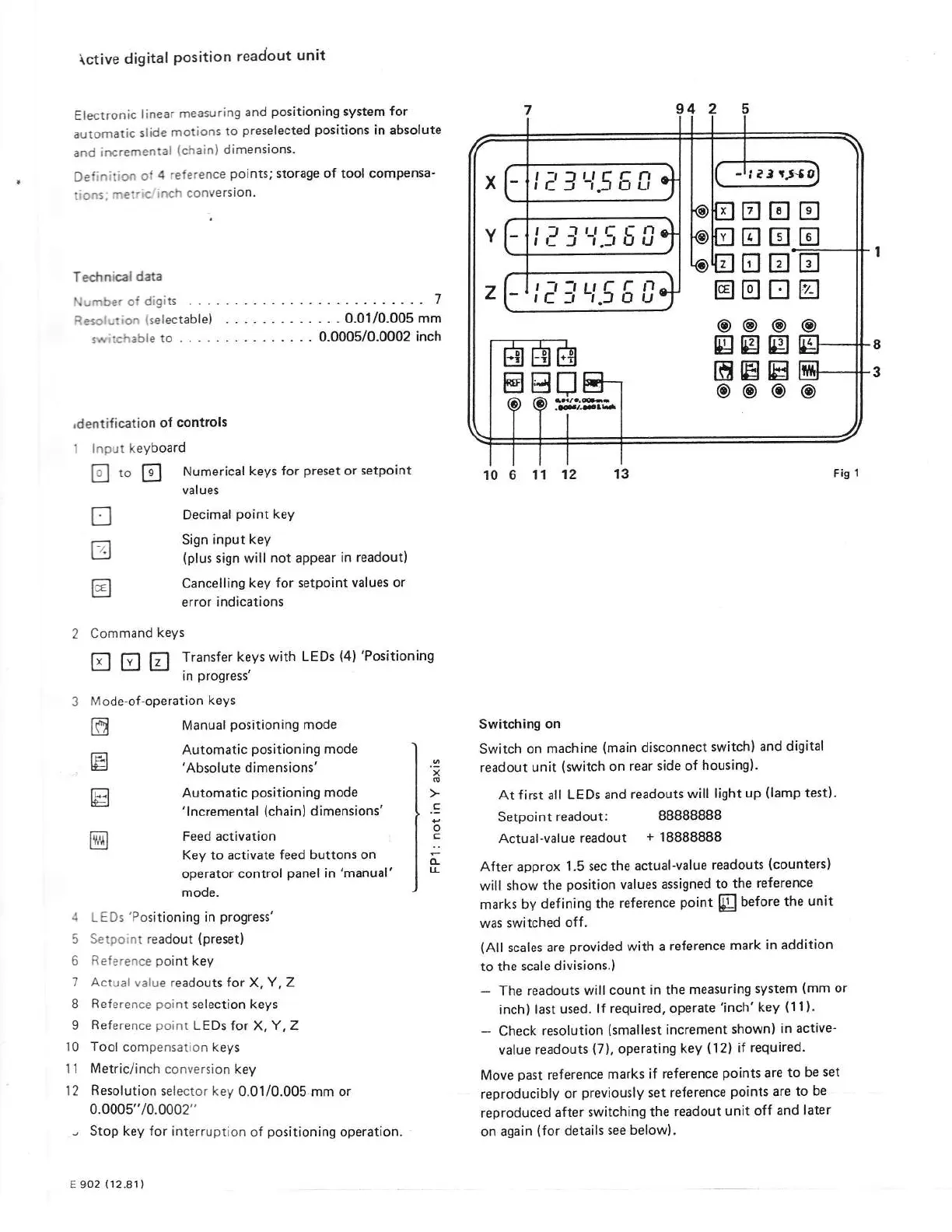
Command
keYs
tr tr tr
Transfer
keys with
LEDs
(4)
'Positionins
in
progress'
3
Mode-of-operation
keys
m
Manual
positioning
mode
r'.'
Automatic
positioning
mode
E=J
'Absolute
dimensions'
trl
Automatic
positioning
mode
'
I
ncremental
(chain)
dimensions'
@}
Feed activation
Key to activate
feed
buttons on
operator control
panel
in
'manual'
mode.
4
LEDs
'Positioning
in
progress'
5 Setpoint readout
(preset)
6
Reference
point
key
7 Actual
value readouts for
X,
Y, Z
8
Reference
point
selection keys
9
Reference point
LEDs
lor
X,
Y
,
Z
10 Tool
compensation keys
1 1
Metric/inch
conversion key
l2
Resolution
selector key
0.01/0.005 mm or
0.0005"/0.0002"
-
Stop
key
for
interruption
of
positioning
operation.
E 902
(12.81)