EasyManua.ls Logo

Dedenbear LIGHTNING - User Manual

Dedenbear LIGHTNING
12 pages
Print Icon
To Next Page IconTo Next Page
Loading...
INSTALLATION
INSTRUCTIONS
Installation Instructions ............................................................. pg 1
Pro/Full Feature ........................................................................ pg 2
Button Use & Programming ...................................................... pg 2
Types of Delay Boxes ............................................................... pg 3
Setting Transbrake Delay ....................................................... pg 3-4
Setting Throttle Stop Types & Timers.....................................pg 4-5
Throttle Stop Control ................................................................ pg 5
Starting Line Control / Super Start ........................................... pg 6
General Info / Definitions .......................................................... pg 7
Transbrake Wiring ..................................................................... pg 8
Throttle Stop & Nitrous Wiring .................................................. pg 9
Linkage Stop & Remote Display ............................................. pg 10
Timed Shifter Wiring ............................................................... pg 11
Setting Parameters ................................................................. pg 12
MODEL NUMBERS
L1 and L2
LIGHTNING and LIGHTNING PLUS
INSTALLATION & OPERATION MANUAL
INSTALLATION
BUTTON QUICK REFERENCE
INDEX
2650-1303-00 Rev. A
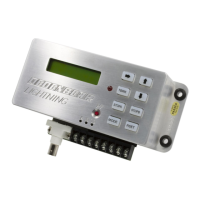
Using #8 screws through the rubber grommets in the base, mount the LIGHTNING away from heat, vibration and
the ignition system.
Make sure the driver can reach the buttons when strapped in and angle the unit, if needed, so the display can be
read straight on.
Wire the LIGHTNING as shown on pages 8-11. Make sure the power lead comes straight from the master switch
and the ground goes to a solid chassis ground, not sheet metal panels.
Question and Answer IconNeed help?

Do you have a question about the Dedenbear LIGHTNING and is the answer not in the manual?

Dedenbear LIGHTNING Specifications

General IconGeneral
BrandDedenbear
ModelLIGHTNING
CategoryControl Unit
LanguageEnglish

Summary

INSTALLATION INSTRUCTIONS

INSTALLATION

Mount the unit away from heat/vibration, ensure driver reach, and proper wiring.

BUTTON USE AND SETTINGS

PRO;FULL BUTTON

Feature to switch between two setting groups (PRO/FULL) for different race classes.

PROGRAMMING BUTTONS

Explains the function of arrow, cursor, TBRK, STOPA, STOPB, MODE, and RSET buttons.

SETTING TRANSBRAKE DELAY

DELAY

Sets the transbrake delay time, typically around 1.000 second for full tree.

SETTING TRANSBRAKE DELAY (continued)

THROTTLE STOP TIMERS

STOP A; STOP B

How to access and set timers for STOP A (4-stage or SLC) and STOP B (2 or 4-stage).

THROTTLE STOP TIMERS (continued)

T-STOP A TYPE

Selects throttle stop type (Base Plate Style or Linkage/Disc) to set output polarity.

T-STOP A CONTROL

Sets the throttle stop control mode to 2-Stage, 4-Stage, or Off.

STARTING LINE CONTROL & SUPER START SYSTEM

SLC Transbrake Release

Linkage stop closes throttle at transbrake application, opens at release.

WIRING THE POWER FEED, TRANSBRAKE BUTTON AND SKIP BUTTON

Power Feed Wiring

Details wiring the 12v power supply, fuse, and ground for the unit.

Transbrake Button Wiring

Instructions for wiring the transbrake button to the LIGHTNING unit and solenoid.

WIRING FOR TIMED SHIFTING

FACTORY SETTINGS AND PARAMETERS

PRO-FULL Setting Parameters

Lists adjustable settings and their ranges for PRO and FULL modes.

TBRK Settings

Parameters for transbrake delay, delay 2, ETs, bottom delay, cross comp, skip, pause, lockout.

STOP A Settings

Parameters for throttle stop A timers, type, and control, plus SLC settings.

STOP B Settings

Parameters for throttle stop B timers, type, and control.